API Integration Explained: Types, Methods, and Practical Examples

Most web applications talk to each other through APIs. If you've ever pulled data from a third-party service, processed a payment, or generated a PDF from HTML, you've used one. But the terminology around APIs can get confusing fast: REST vs. SOAP vs. GraphQL, synchronous vs. asynchronous, public vs. internal. This guide breaks it down with clear definitions, architecture comparisons, and a working Node.js code example at the end.
Understanding API Fundamentals
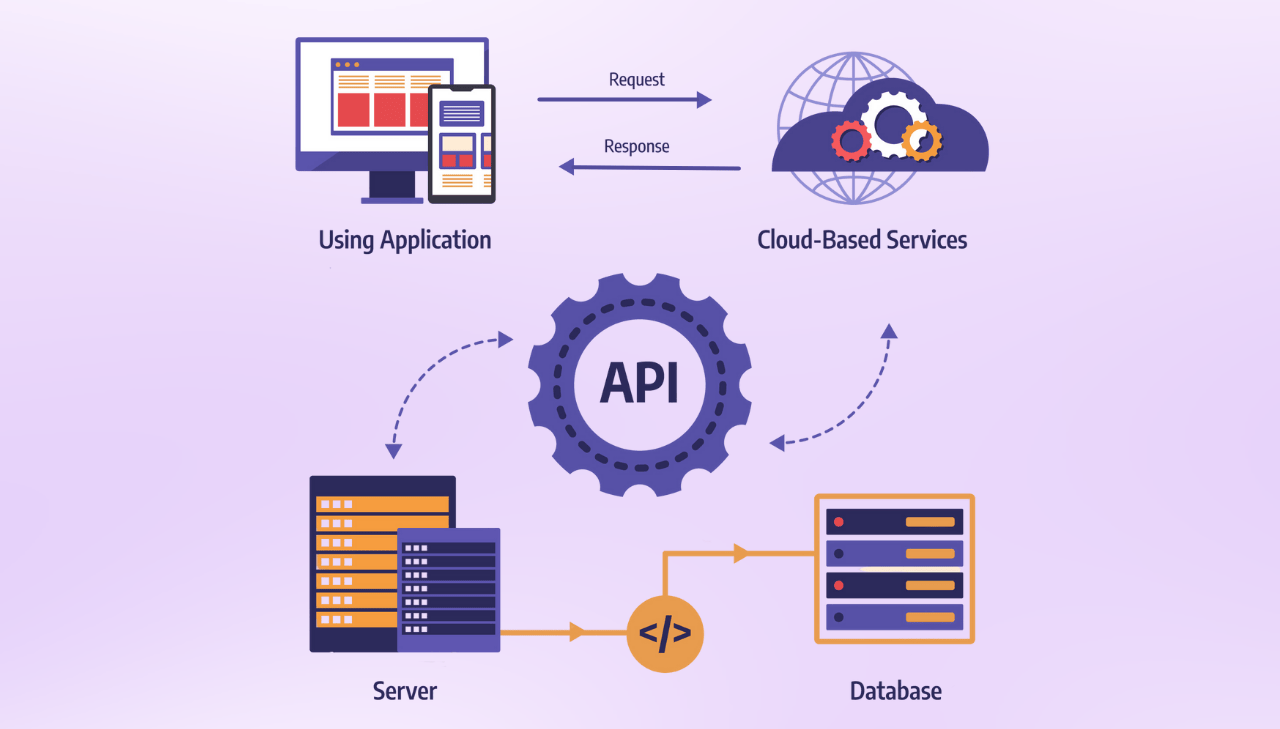
An API (Application Programming Interface) is a set of rules that lets one application talk to another. Your app sends a request, the API processes it, and sends back a response. That's the core loop, whether you're querying a weather service or converting a document. According to AltexSoft, this request-response model is the basis of how APIs work in practice.
The Essential Components
- API Endpoints: Specific URLs where the API can receive requests.
- API Calls: The requests made to an API containing operations, parameters, and authentication details.
- Authentication Mechanisms: Security measures like API keys or OAuth tokens to verify access.
- Data Exchange Formats: Standardized formats (typically JSON or XML) that structure information exchange.
- API Documentation: Technical specifications guiding developers in API usage.
Here's how these pieces fit together:
A Simple API Example
Here's a basic REST API call in practice:
Example request:
// Making a GET request to a weather API endpoint
fetch('https://api.weatherapi.com/v1/current.json?key=<YOUR_API_KEY>&q=London')
  .then(response => response.json())
  .then(data => {
    console.log(`Current temperature in ${data.location.name}: ${data.current.temp_c}°C`);
  })
  .catch(error => console.error('Error:', error));
Example response:
{
  "location": {
    "name": "London",
    "region": "City of London, Greater London",
    "country": "United Kingdom",
    "lat": 51.5171,
    "lon": -0.1062,
    "tz_id": "Europe/London"
  },
  "current": {
    "temp_c": 19.2,
    "temp_f": 66.6,
    "is_day": 1,
    "condition": {
      "text": "Sunny",
      "icon": "//cdn.weatherapi.com/weather/64x64/day/113.png"
    },
    "wind_kph": 13.7,
    "humidity": 46,
    "cloud": 0,
    "feelslike_c": 19.2,
    "feelslike_f": 66.6
  }
}
The pattern is always the same: endpoint URL, authentication (API key, OAuth token, or other method), structured request, and a response back (usually JSON).
Types of APIs
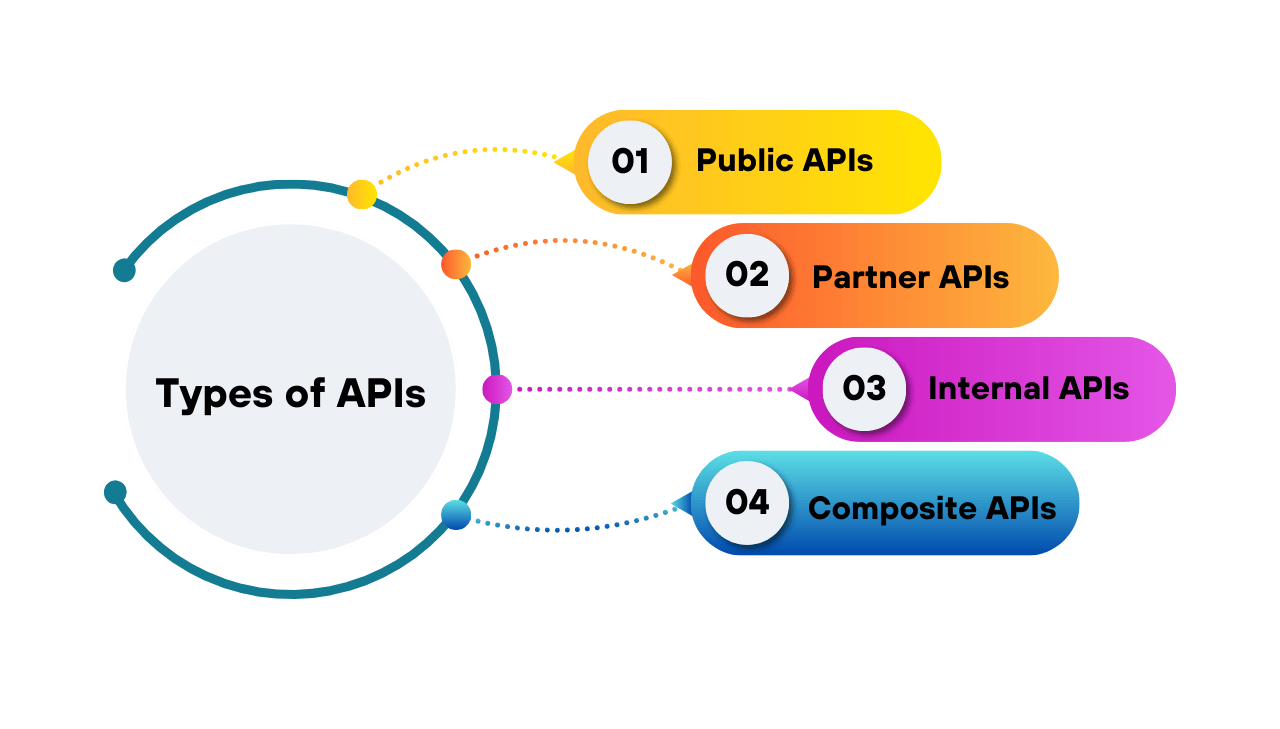
Not all APIs are open to everyone. According to Workato, APIs fall into four categories:
- Public APIs: Open to anyone. The weather API example above is a public API.
- Partner APIs: Restricted to authorized business partners. Require a formal relationship and usually offer deeper integration.
- Internal APIs: Used within an organization to connect internal systems. Not exposed to the outside world.
- Composite APIs: Bundle multiple API calls into a single request, reducing network overhead.
API Integration Architectures
The architecture you pick depends on what you're building. Here are the four main options:
REST
REST (Representational State Transfer) is the most common API architecture. It uses standard HTTP methods (GET, POST, PUT, DELETE), is stateless, and works well for most web applications. The weather example above is a REST API.
SOAP
SOAP (Simple Object Access Protocol) uses XML for message formatting. It's more rigid than REST but has built-in security features (WS-Security) and strong typing. You'll mostly see it in enterprise and banking systems.
GraphQL
A query language that lets clients request exactly the data they need, nothing more. Useful when you have complex data relationships or want to avoid multiple round-trips to the server.
Webhook-Based
Instead of polling for updates, webhooks push data to your endpoint when something happens. If you need real-time notifications (payment confirmed, document ready), webhooks are the way to go.
gRPC is also worth mentioning for high-performance microservices communication, though it's less common in public APIs.
ByteByteGo has a good visual overview of these architectures:

API Integration Methods
APIs also differ in how they handle timing. There are three communication patterns:

Synchronous
You send a request and wait for the response. Good for things that need to happen right now:
- Payment processing.
- User authentication.
- Quick data lookups.
Asynchronous
You send a request and get a job ID back. The server processes it in the background and notifies you when it's done (via webhook or polling). Better for:
- Heavy operations like PDF generation or data processing.
- High-volume batch jobs.
- Anything that takes more than a few seconds.
Hybrid
Start with a synchronous call to validate the input, then hand off to asynchronous processing. You get immediate validation plus non-blocking execution for the heavy work.
Business Benefits of API Integration
Why bother with APIs at all? Because building everything yourself is slow and expensive.
According to Forbytes, companies using API integrations see a 24% improvement in operational efficiency. Instead of writing your own payment system, email sender, or PDF generator, you plug into an existing one and focus on your product.
The practical benefits come down to: faster development (use what already exists), lower costs (no need to maintain infrastructure you didn't build), and better scalability (API providers handle the load).
Future Trends in API Connectivity
According to Capital Numbers, a few trends are shaping where APIs are headed:
- AI-assisted tooling: Auto-generated documentation, performance optimization, and security threat detection.
- Low-code platforms: Tools like n8n and Zapier let non-developers wire up API integrations without writing code.
- Real-time by default: WebSockets and server-sent events replacing polling.
- APIs as products: Companies treating their API as a revenue stream, not just an internal tool.
API in Action: Simplifying Document Generation
To put all this into practice, let's look at PDF generation. Many applications need to turn dynamic data (invoices, reports, contracts) into PDF files. You could set up your own headless browser, manage Chromium updates, and handle the infrastructure yourself. Or you could call an API.
PDFBolt is a REST API for HTML to PDF conversion. You send HTML, URLs, or a template with data, and get a PDF back. It supports both synchronous calls (for real-time generation) and asynchronous processing (for batch jobs), and uses Handlebars templates for reusable layouts. There's a free plan if you want to try it out.
Real-World Example: Template-Based PDF Generation
Here's what a real API integration workflow looks like, using PDF generation as the example.
Step 1: Create Your Template
- Sign up for free and navigate to Templates section.
- Click Create Template and choose from our gallery or start from scratch.
- Design or customize your layout using Handlebars syntax with variables like
{{customerName}}. - Test with sample JSON data in the DATA tab.
- Click Publish to get your template ID.
Step 2: API Integration Example
Node.js Implementation
const fs = require('fs');

async function generatePdf() {
    const response = await fetch('https://api.pdfbolt.com/v1/direct', {
        method: 'POST',
        headers: {
            'API-KEY': 'XXXXXXXX-XXXX-XXXX-XXXX-XXXXXXXXXXXX',
            'Content-Type': 'application/json'
        },
        body: JSON.stringify({
            templateId: 'your-template-id',
            templateData: {
                client_name: 'John Doe',
                invoice_number: 'INV-001',
                total_amount: '$299.99',
                line_items: [
                    { description: 'Web Development', unit_price: '$200.00' },
                    { description: 'Design Services', unit_price: '$99.99' }
                ]
            }
        })
    });

    if (!response.ok) {
        const errorText = await response.text();
        throw new Error(`HTTP ${response.status} - ${errorText}`);
    }

    const pdfBuffer = await response.arrayBuffer();
    fs.writeFileSync('invoice.pdf', Buffer.from(pdfBuffer));
    console.log('PDF generated successfully');
}

generatePdf().catch(console.error);
This example demonstrates several API best practices:
- Clear endpoint structure (
/v1/direct). - Secure authentication (API key in headers).
- Proper error handling (status code checking).
- Separation of concerns (template design vs. data).
If you want to implement PDF generation in your application, explore these resources:
- HTML to PDF API - Convert HTML to PDF with a single API call.
- API Documentation - Complete reference with all endpoints and parameters.
- Quick Start Guide - Implementation examples for multiple programming languages.
- Template Creation Guide - Step-by-step template design tutorial.
Conclusion
APIs are how modern applications share data and delegate work. Pick the right architecture (REST for most things, GraphQL for complex queries, webhooks for real-time events), choose the right timing pattern (sync for quick operations, async for heavy processing), and you're most of the way there.
If you're looking for a practical starting point, the PDF generation example above covers the basics: authentication, error handling, and structured requests. The same patterns apply whether you're integrating a payment API, a notification service, or anything else.
For more API integration examples, check our Quick Start Guide.
May all your responses be 200 OK! ⚡