HTML to PDF in PHP Using DomPDF: Complete Tutorial

DomPDF is one of the most popular PHP libraries for converting HTML to PDF. This tutorial walks through PHP HTML to PDF conversion step by step: from a basic DomPDF setup to a full invoice generator using Twig templates. You will also find troubleshooting tips and a comparison with API-based PHP PDF generation alternatives.
What is DomPDF?
DomPDF is a PHP PDF generation library that converts HTML and CSS to PDF. It parses your HTML content and generates PDF documents based on the structure and CSS styling you provide. Unlike other PHP PDF libraries that require learning proprietary APIs, DomPDF lets you use your existing HTML and CSS knowledge to create documents.
DomPDF features:
- Extensive CSS 2.1 and partial CSS3 support.
- Relatively small footprint with minimal dependencies.
- Support for various image formats (PNG, JPG, GIF).
- UTF-8 character encoding for international text.
- Table, header, and footer support.
- Customizable page size and orientation.
- Support for custom fonts.
- Open-source and free to use.
Getting Started with DomPDF
This section covers the basics of DomPDF with a simple PDF generation script. The full invoice generator comes later.
Prerequisites
Ensure your PHP environment is properly configured for PDF generation.
| Requirement | Recommendation and Details |
|---|---|
| PHP Version | PHP 7.1 or higher with the mbstring and dom extensions. The gd extension is optional (needed for image processing). |
| Composer | PHP dependency manager – Get Composer. |
| IDE | PHP-friendly IDE like PHPStorm, VS Code with PHP extensions, or NetBeans. |
Basic Setup
- First, create a new project directory and navigate into it:
mkdir dompdf-project
cd dompdf-project
- Next initialize a new Composer project:
composer init --no-interaction --name=your-name/dompdf-project
- Install DomPDF via Composer:
composer require dompdf/dompdf
Simple Example
The following PHP script generates a basic PDF with a title, some content, and a footer. It demonstrates the fundamental DomPDF workflow.
View Code
<?php
// Require the Composer autoloader
require 'vendor/autoload.php';

// Import DomPDF classes
use Dompdf\Dompdf;
use Dompdf\Options;

// Configure DomPDF options
$options = new Options();
$options->set('isHtml5ParserEnabled', true);
$options->set('isRemoteEnabled', true);

// Create a new DomPDF instance
$dompdf = new Dompdf($options);

// Simple HTML content
$html = '
<!DOCTYPE html>
<html lang="en">
<head>
    <meta charset="utf-8">
    <title>Simple PDF Example</title>
    <style>
        body {
            margin: 30px;
        }
        h1 {
            color: #7f4184;
            border-bottom: 1px solid #eee;
            padding-bottom: 10px;
        }
        .content {
            margin-top: 20px;
        }
        .footer {
            margin-top: 50px;
            font-size: 16px;
            color: #4f417c;
            text-align: center;
            font-weight: bold;
        }
    </style>
</head>
<body>
    <h1>Hello!</h1>
    <div class="content">
        <h2>This is a simple PDF document generated using DomPDF.</h2>
        <p>Current date and time: ' . date('Y-m-d H:i:s') . '</p>
    </div>
    <div class="footer">
        Generated with DomPDF
    </div>
</body>
</html>
';

// Load HTML content
$dompdf->loadHtml($html);

// Set paper size and orientation
$dompdf->setPaper('A4', 'portrait');

// Render the HTML as PDF
$dompdf->render();

// Output the generated PDF to browser (inline viewing)
$dompdf->stream("document.pdf", [
    "Attachment" => false // Set to true for forced download
]);
To run this example and see DomPDF in action:
1. Save the code above as simple-pdf.php in your project directory.
2. Start a local PHP development server:
php -S localhost:8000
3. Open your browser and navigate to:
http://localhost:8000/simple-pdf.php
If you use a different port for local development, replace it with your preferred port.
4. You should see the generated PDF displayed directly in your browser.
➡️ Click here to see how the generated PDF document looks
Step-by-Step Guide: Creating Invoices with DomPDF and Twig
With the basics covered, the next step is a professional invoice PDF generator using DomPDF and the Twig templating engine. Twig separates HTML templates from PHP logic, which keeps the code cleaner as templates grow more complex.
Step 1: Project Structure
Recommended project layout for a DomPDF project with Twig:
dompdf-project/
├── fonts/                      # Custom fonts (if needed)
├── public/                     # Public-facing files
│   ├── generated_pdfs/         # Directory to store generated PDFs
│   ├── images/                 # Image assets (if needed)
│   └── index.php               # Entry point
├── src/                        # Application code
│   └── InvoiceGenerator.php    # Main generator class
├── templates/                  # Twig templates
│   ├── css/                    # CSS for templates
│   │   └── invoice.css         # Invoice styling
│   └── invoice.twig            # Invoice template
├── vendor/                     # Composer dependencies
└── composer.json               # Composer configuration
If you're starting from scratch, create these directories with the appropriate command for your operating system:
For Unix/Linux/Mac:
mkdir -p fonts public/generated_pdfs public/images src templates/css
For Windows (PowerShell):
New-Item -Path "fonts", "public\generated_pdfs", "public\images", "src", "templates\css" -ItemType Directory -Force
For Windows (Command Prompt):
mkdir fonts
mkdir public
mkdir public\generated_pdfs
mkdir public\images
mkdir src
mkdir templates
mkdir templates\css
Step 2: Install Dependencies
If you're starting from this section directly, initialize a Composer project and install DomPDF and Twig.
Initialize Composer:
composer init --no-interaction --name=your-name/dompdf-project
Install dependencies:
composer require dompdf/dompdf twig/twig
If you've already set up DomPDF following the previous section, you only need to install Twig:
composer require twig/twig
Step 3: Create the Invoice Twig Template
This code creates an HTML template using Twig syntax that defines the structure and design of the invoice. If you want to learn more other template engines, see Top HTML Template Engines for PDF Generation.
Save the file at templates/invoice.twig.
View Code – Invoice Twig Template
<!DOCTYPE html>
<html lang="en">
<head>
    <meta charset="utf-8">
    <meta name="viewport" content="width=device-width, initial-scale=1.0">
    <title>Invoice</title>
    <style>
        {% include 'css/invoice.css' %}
    </style>
</head>
<body>
<div class="invoice-container">
    <div class="invoice-header">
        <table width="100%">
            <tr>
                <td width="60%">
                    <h1 class="invoice-title">Invoice</h1>
                    <div class="invoice-meta">
                        <p>Invoice: #{{ invoice.number }}</p>
                        <p>Date: {{ invoice.date }}</p>
                        <p>Due Date: {{ invoice.due_date }}</p>
                    </div>
                </td>
                <td width="40%" class="logo-cell">
                    <img src="{{ company.logo_path }}" alt="{{ company.name }} Logo" class="logo">
                </td>
            </tr>
        </table>
    </div>

    <div class="divider"></div>

    <table class="client-table">
        <tr>
            <td>
                <h2 class="section-title">Billed From:</h2>
                <div class="client-info">
                    <p>{{ company.name }}</p>
                    <p>{{ company.address }}</p>
                    <p>{{ company.city }}, {{ company.zip }} {{ company.country }}</p>
                </div>
            </td>
            <td>
                <h2 class="section-title">Billed To:</h2>
                <div class="client-info">
                    <p>{{ client.name }}</p>
                    <p>{{ client.address }}</p>
                    <p>{{ client.city }}, {{ client.zip }} {{ client.country }}</p>
                </div>
            </td>
        </tr>
    </table>

    <div class="divider"></div>

    <h2 class="section-title">Order Summary:</h2>
    <table class="invoice-table">
        <thead>
        <tr>
            <th>Description</th>
            <th>Quantity</th>
            <th>Unit Price</th>
            <th>Total</th>
        </tr>
        </thead>
        <tbody>
        {% for item in items %}
            <tr>
                <td>{{ item.name }}</td>
                <td>{{ item.quantity }}</td>
                <td>{{ currency }}{{ item.unit_price }}</td>
                <td>{{ currency }}{{ item.quantity * item.unit_price }}</td>
            </tr>
        {% endfor %}
        </tbody>
        <tfoot>
        <tr>
            <td colspan="3" class="text-right">Subtotal</td>
            <td>{{ currency }}{{ subtotal }}</td>
        </tr>
        <tr>
            <td colspan="3" class="text-right">Tax ({{ tax_rate }}%)</td>
            <td>{{ currency }}{{ tax_amount }}</td>
        </tr>
        <tr class="total-row">
            <td colspan="3" class="text-right">Total</td>
            <td>{{ currency }}{{ total }}</td>
        </tr>
        </tfoot>
    </table>

    <div class="invoice-footer">
        <p>Thank you for your business!</p>
        <p>If you have any questions, please contact us at {{ company.email }}</p>
    </div>
</div>
</body>
</html>
Step 4: Create the Invoice CSS
This code defines the styling for the invoice template, including layout, colors, etc.
Save the file at templates/css/invoice.css.
View Code – Invoice CSS
* {
    margin: 0;
    padding: 0;
}

body {
    font-family: DejaVu Sans, sans-serif;
    font-size: 14px;
    line-height: 1.5;
    color: #333;
    margin: 20px;
}

.invoice-container {
    padding: 30px;
}

.invoice-header {
    margin-bottom: 30px;
}

.invoice-title {
    color: #6a0dad;
    font-size: 28px;
    font-weight: bold;
    margin-bottom: 15px;
}

.invoice-meta p {
    margin: 5px 0;
}

.logo {
    width: auto;
    max-height: 150px;
    float: right;
}

.divider {
    border-top: 1px solid #ddd;
    margin: 20px 0;
}

.client-table {
    width: 100%;
}

.client-table td {
    vertical-align: top;
    width: 50%;
    padding: 0 10px;
}

.client-table td:first-child {
    padding-left: 0;
}

.client-table td:last-child {
    padding-right: 0;
}

.section-title {
    color: #6a0dad;
    font-size: 18px;
    font-weight: bold;
    margin-bottom: 15px;
}

.client-info p {
    margin: 3px 0;
}

.invoice-table {
    width: 100%;
    border-collapse: collapse;
    margin-bottom: 20px;
}

.invoice-table th,
    .invoice-table td {
    border: 1px solid #cacaca;
    padding: 8px;
    text-align: left;
}

.invoice-table th {
    background-color: #6a0dad;
    font-weight: bold;
    color: #fff;
}

.invoice-table td.text-right,
    .invoice-table th.text-right {
    text-align: right;
    font-weight: bold;
}

.total-row {
    background-color: #ecedfd;
}

.invoice-footer {
    margin-top: 30px;
    text-align: center;
    color: #777;
    font-size: 14px;
}
Step 5: Create the Invoice Generator Class
This class processes Twig templates into PDF invoices using DomPDF, with options to view, download, or save the generated documents.
Save the file at src/InvoiceGenerator.php
View Code – Invoice Generator Class
<?php

namespace App;

use Dompdf\Dompdf;
use Dompdf\Options;
use Twig\Environment;
use Twig\Loader\FilesystemLoader;

class InvoiceGenerator
{
    private Dompdf $dompdf;
    private Environment $twig;

    // Initialize the PDF generator with configuration options
    public function __construct()
    {
        // Configure DomPDF options
        $options = new Options();
        $options->set('isHtml5ParserEnabled', true);
        $options->set('isRemoteEnabled', true);
        $options->set('defaultFont', 'DejaVu Sans');

        // Initialize DomPDF with options
        $this->dompdf = new Dompdf($options);

        // Set up Twig
        $loader = new FilesystemLoader(__DIR__ . '/../templates');
        $this->twig = new Environment($loader);
    }

    // Generate the invoice
    public function generate(string $template, array $data, string $outputMode = 'stream'): ?string
    {
        // Render the template with Twig
        $html = $this->twig->render($template, $data);

        // Load the HTML into DomPDF
        $this->dompdf->loadHtml($html);

        // Set paper size and orientation
        $this->dompdf->setPaper('A4', 'portrait');

        // Render the PDF
        $this->dompdf->render();

        // Output the PDF based on the requested mode
        switch ($outputMode) {
            case 'download':
                // Force download
                $this->dompdf->stream("invoice-" . $data['invoice']['number'] . ".pdf", [
                    "Attachment" => true
                ]);
                break;

            case 'save':
                // Save to file
                $output = $this->dompdf->output();
                $filePath = __DIR__ . '/../public/generated_pdfs/invoice-' . $data['invoice']['number'] . '.pdf';

                // Ensure directory exists
                $dir = dirname($filePath);
                if (!is_dir($dir)) {
                    mkdir($dir, 0755, true);
                }

                file_put_contents($filePath, $output);
                return $filePath;

            case 'stream':
            default:
                // Stream to browser (default)
                $this->dompdf->stream("invoice-" . $data['invoice']['number'] . ".pdf", [
                    "Attachment" => false
                ]);
                break;
        }

        return null;
    }
}
Step 6: Create the Entry Point File
This code creates the main PHP file that serves as the entry point to the application, setting up sample invoice data and using the InvoiceGenerator class to create the PDF.
Create the file at public/index.php.
View Code – index.php
<?php
// Enable error reporting
ini_set('display_errors', 1);
error_reporting(E_ALL);

// Require composer autoloader
require_once __DIR__ . '/../vendor/autoload.php';

// Register custom namespace autoloader
spl_autoload_register(function ($class) {
    $prefix = 'App\\';
    $base_dir = __DIR__ . '/../src/';

    $len = strlen($prefix);
    if (strncmp($prefix, $class, $len) !== 0) {
        return;
    }

    $relative_class = substr($class, $len);
    $file = $base_dir . str_replace('\\', '/', $relative_class) . '.php';

    if (file_exists($file)) {
        require $file;
    }
});

use App\InvoiceGenerator;

// Get output mode from query string
$outputMode = $_GET['output'] ?? 'stream';

// Display the UI when no action is specified
if (isset($_GET['ui']) || empty($_GET)) {
    echo '<!DOCTYPE html>
    <html lang="en">
    <head>
        <title>Invoice Generator</title>
        <style>
            .container { max-width: 600px; margin: 0 auto; }
            .btn { display: inline-block; padding: 10px 15px; margin-right: 5px; background: #6a0dad; color: white; text-decoration: none; border-radius: 5px; }
        </style>
    </head>
    <body>
        <div class="container">
            <h1>Invoice PDF Generator</h1>
            <div class="actions">
                <a href="?output=stream" class="btn">View Invoice</a>
                <a href="?output=download" class="btn">Download Invoice</a>
                <a href="?output=save" class="btn">Save to generated_pdfs</a>
            </div>
        </div>
    </body>
    </html>';
    exit;
}

// Calculate invoice totals
function calculateTotals(array $items, float $taxRate): array
{
    $subtotal = 0;
    foreach ($items as $item) {
        $subtotal += $item['quantity'] * $item['unit_price'];
    }

    $taxAmount = $subtotal * ($taxRate / 100);
    $total = $subtotal + $taxAmount;

    return [
        'subtotal' => $subtotal,
        'tax_amount' => $taxAmount,
        'total' => $total
    ];
}

// Generate invoice number
$invoiceNumber = 'INV' . date('Ymd_His');

// Example invoice data
$invoiceItems = [
    ['name' => 'Website Design & Development', 'quantity' => 1, 'unit_price' => 1200.00],
    ['name' => 'Logo Design Package', 'quantity' => 2, 'unit_price' => 250.00],
    ['name' => 'SEO Optimization', 'quantity' => 1, 'unit_price' => 350.00],
    ['name' => 'Content Writing (per page)', 'quantity' => 5, 'unit_price' => 75.00],
    ['name' => 'Social Media Setup', 'quantity' => 3, 'unit_price' => 150.00],
    ['name' => 'Maintenance Package', 'quantity' => 1, 'unit_price' => 99.00]
];

// Calculate totals with 10% tax rate
$taxRate = 10;
$totals = calculateTotals($invoiceItems, $taxRate);

// Prepare invoice data
$invoiceData = [
    'company' => [
        'name' => 'Digital Solutions Group',
        'address' => '275 Tech Boulevard',
        'city' => 'San Francisco',
        'zip' => '94105',
        'country' => 'United States',
        'email' => 'contact@example.com',
        'logo_path' => 'https://img.pdfbolt.com/logo-company.png'
    ],
    'invoice' => [
        'number' => $invoiceNumber,
        'date' => date('d.m.Y'),
        'due_date' => date('d.m.Y', strtotime('+30 days'))
    ],
    'client' => [
        'name' => 'Robert Anderson',
        'company' => 'Modern Solutions',
        'address' => '123 Commerce Street',
        'city' => 'Chicago',
        'zip' => '60601',
        'country' => 'United States'
    ],
    'items' => $invoiceItems,
    'currency' => '$',
    'subtotal' => $totals['subtotal'],
    'tax_rate' => $taxRate,
    'tax_amount' => $totals['tax_amount'],
    'total' => $totals['total'],
];

// Create output directory if needed
if ($outputMode === 'save') {
    $outputDir = __DIR__ . '/../public/generated_pdfs';
    if (!is_dir($outputDir)) {
        mkdir($outputDir, 0755, true);
    }
}

// Generate the invoice
try {
    $generator = new InvoiceGenerator();
    $result = $generator->generate('invoice.twig', $invoiceData, $outputMode);

    // Show success message if file was saved
    if ($outputMode === 'save' && !empty($result)) {
        echo '<!DOCTYPE html>
        <html lang="en">
        <head>
            <title>Invoice Saved</title>
            <style>
                .container { max-width: 600px; margin: 40px auto; }
                .success { color: green; font-weight: bold; margin-bottom: 15px; }
                .btn { display: inline-block; padding: 10px 15px; background: #6a0dad; color: white; text-decoration: none; border-radius: 5px; }
            </style>
        </head>
        <body>
            <div class="container">
                <div class="success">Invoice successfully saved!</div>
                <p>File: <strong>' . htmlspecialchars(basename($result)) . '</strong></p>
                <a href="?ui=1" class="btn">Back to Generator</a>
            </div>
        </body>
        </html>';
    }
} catch (Exception $e) {
// Show error message
echo '<!DOCTYPE html>
<html lang="en">
<head>
    <title>Error</title>
    <style>
        .container { max-width: 600px; margin: 40px auto; }
        .error { color: #721c24; font-weight: bold; margin-bottom: 15px;}
        .btn { display: inline-block; padding: 10px 15px; background: #6a0dad; color: white; text-decoration: none; border-radius: 5px; }
    </style>
</head>
<body>
    <div class="container">
        <div class="error">Error generating invoice</div>
        <p>' . htmlspecialchars($e->getMessage()) . '</p>
        <a href="?ui=1" class="btn">Back to Generator</a>
    </div>
</body>
</html>';
}
Step 7: Run and Test Your Invoice Generator
Now you're ready to run your invoice generator! Start a PHP development server:
php -S localhost:8000 -t public
Navigate to http://localhost:8000/ in your browser to see a simple interface with three buttons:
- View Invoice: Opens the PDF directly in the browser.
- Download Invoice: Prompts a file download of the PDF.
- Save to generated_pdfs: Saves the PDF to the
public/generated_pdfsdirectory.
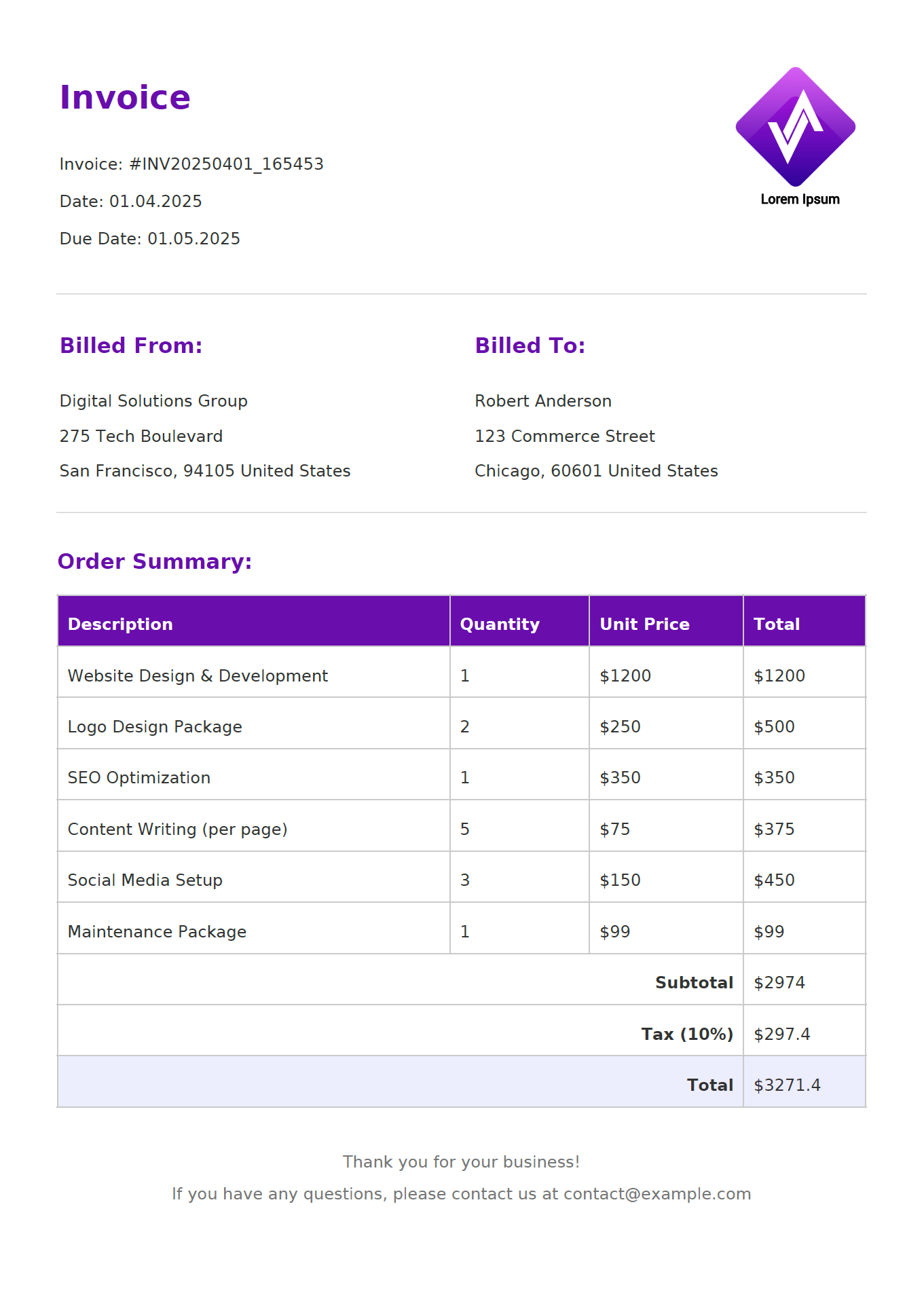
Preview of Generated Invoice
Troubleshooting Common DomPDF Issues
1. Composer Errors:
- Run
composer initin your project directory. - Confirm
vendor/autoload.phpexists. - Ensure all dependencies are installed.
- Resolve any dependency conflicts.
- Check PHP version compatibility.
2. Font Rendering Problems:
- Native PDF fonts (Helvetica, Times-Roman, Courier, Zapf-Dingbats, Symbol) support only Windows ANSI encoding.
- Use pre-installed DejaVu fonts for full Unicode support.
- Specify in CSS:
font-family: 'DejaVu Sans'; - For custom fonts, use TrueType (.ttf) or OpenType (.otf) files.
- Verify PHP extensions
mbstringandgdare enabled.
3. PDF Generation Fails:
- Enable detailed PHP error reporting.
- Review server logs for specific error messages.
- Check file permissions for
public/generated_pdfsdirectory. - Verify PHP version compatibility with DomPDF.
4. Empty or Incomplete PDFs:
- Inspect PHP error logs.
- Validate HTML structure and syntax.
- Ensure all referenced assets (images, CSS) are accessible.
- Check DomPDF configuration settings.
5. Image Rendering Issues:
- Verify image file paths are correct.
- Enable remote image loading:
$options->set('isRemoteEnabled', true); - Confirm server has proper network and file access permissions.
- Check image file formats (PNG, JPG, GIF are supported).
- For production environments, consider using local image assets instead of remote URLs for reliability.
6. CSS Support Limitations:
- DomPDF supports CSS 2.1 and only partial CSS3.
- Flexbox and Grid layouts are not supported.
- Complex positioning may not render as expected.
- Test complex CSS thoroughly and simplify when needed.
Next Steps
Once the basic invoice generator is working, here are a few practical improvements worth considering:
- Add custom headers and footers with page numbers using DomPDF's inline PHP support (
$pdf->page_text()). - Store client and invoice data in a database (MySQL, PostgreSQL) instead of hardcoded arrays.
- Generate QR codes for payment links using a library like
chillerlan/php-qrcode. - Add multi-language support with Symfony's
TranslationExtension(symfony/twig-bridge) or separate translation files. - Use conditional CSS classes to highlight overdue invoices.
Simplified Approach: PDF Generation API
If DomPDF's CSS limitations, font management, or memory usage become a problem, a PDF generation API like PDFBolt can handle rendering externally. The same invoice from this tutorial can be generated with a single HTTP request instead of managing DomPDF, Twig, and CSS locally.
Step 1: Template Creation:
- Sign up at PDFBolt and navigate to Templates.
- Choose an invoice template from the gallery or create from scratch using HTML and CSS.
- Customize the design using the visual editor (uses Handlebars syntax, similar to Twig's templating approach).
- Test with sample data, publish, and get your template ID.
Step 2: PHP Integration:
For a complete implementation guide with ready-to-copy code examples, visit PHP Quick Start Guide or use code snippets by clicking Get API Code in the app.
Complete PHP Implementation
<?php

require_once 'vendor/autoload.php';
use GuzzleHttp\Client;

$jsonHeaders = '{"API-KEY":"XXXXXXXX-XXXX-XXXX-XXXX-XXXXXXXXXXXX"}';
$phpHeaders = json_decode($jsonHeaders, true);

$jsonBody = '{
    "templateId": "your-template-id",
    "templateData": {
        "invoice_number": "INV20250401",
        "issue_date": "01.05.2025",
        "due_date": "01.04.2025",
        "currency_symbol": "$",
        "company_name": "Digital Solutions Group",
        "company_address_street": "275 Tech Boulevard",
        "company_city": "San Francisco",
        "company_postal_code": "94105",
        "company_country": "United States",
        "company_email": "contact@example.com",
        "company_logo_url": "https://img.pdfbolt.com/logo-company.png",
        "client_name": "Robert Anderson",
        "client_address_street": "123 Commerce Street",
        "client_city": "Chicago",
        "client_postal_code": "60601",
        "client_country": "United States",
        "line_items": [
            {
                "description": "Website Design & Development",
                "quantity": "1",
                "unit_price": "1200.00",
                "tax_rate": "10",
                "total_amount": "1200.00"
            },
            {
                "description": "Logo Design Package",
                "quantity": "2",
                "unit_price": "250.00",
                "tax_rate": "10",
                "total_amount": "500.00"
            },
            {
                "description": "SEO Optimization",
                "quantity": "1",
                "unit_price": "350.00",
                "tax_rate": "10",
                "total_amount": "350.00"
            },
            {
                "description": "Content Writing (per page)",
                "quantity": "5",
                "unit_price": "75.00",
                "tax_rate": "10",
                "total_amount": "375.00"
            },
            {
                "description": "Social Media Setup",
                "quantity": "3",
                "unit_price": "150.00",
                "tax_rate": "10",
                "total_amount": "450.00"
            },
            {
                "description": "Maintenance Package",
                "quantity": "1",
                "unit_price": "99.00",
                "tax_rate": "10",
                "total_amount": "99.00"
            }
        ],
        "subtotal_amount": "2974.00",
        "tax_percentage": "10",
        "tax_amount": "297.40",
        "discount_percentage": "0",
        "discount_amount": "0.00",
        "total_amount": "3271.40",
        "notes": "Thank you for your business!"
    }
}';

$phpBody = json_decode($jsonBody, true);

try {
    $client = new Client();
    $response = $client->post('https://api.pdfbolt.com/v1/direct', [
        'headers' => $phpHeaders,
        'json' => $phpBody
    ]);

    file_put_contents('invoice_pdfbolt.pdf', $response->getBody());
    echo "PDF generated successfully\n";

} catch (Exception $e) {
    echo "Error: " . $e->getMessage() . "\n";
}

?>
This API-based approach replaces DomPDF dependencies, Twig templates, and CSS compatibility management with a single HTTP request. For high-volume applications, it also removes server memory constraints since rendering happens externally.
Explore PDFBolt's PDF generation API:
- Full Documentation – Complete reference for all endpoints, parameters, and more.
- Template Guide – Step-by-step instructions for creating and managing templates.
- PDF Templates Gallery – Ready-to-use professional templates.
DomPDF uses its own CSS engine which may not support all modern styles and JavaScript. For full browser rendering, PDFBolt HTML to PDF API uses headless Chrome so pages look exactly as they do in the browser. See the PHP quick start guide for code examples.
Conclusion
This tutorial covered PHP HTML to PDF conversion with DomPDF, from a basic setup to a full invoice generator with Twig templates. DomPDF works well for most PHP PDF generation tasks because it uses standard HTML and CSS instead of a proprietary API. Its main limitation is partial CSS3 support, so layouts that rely on flexbox or grid will not render correctly.
For projects that need full CSS3 support, JavaScript rendering, or high-volume generation without local memory constraints, an API-based approach like PDFBolt is worth considering. Check the PHP quick start guide for integration examples.
They say PHP stands for Pretty Handy for PDFs. Nobody says that, but they should. 🖨️