PHP PDF Libraries Compared: DomPDF, TCPDF, mPDF & More

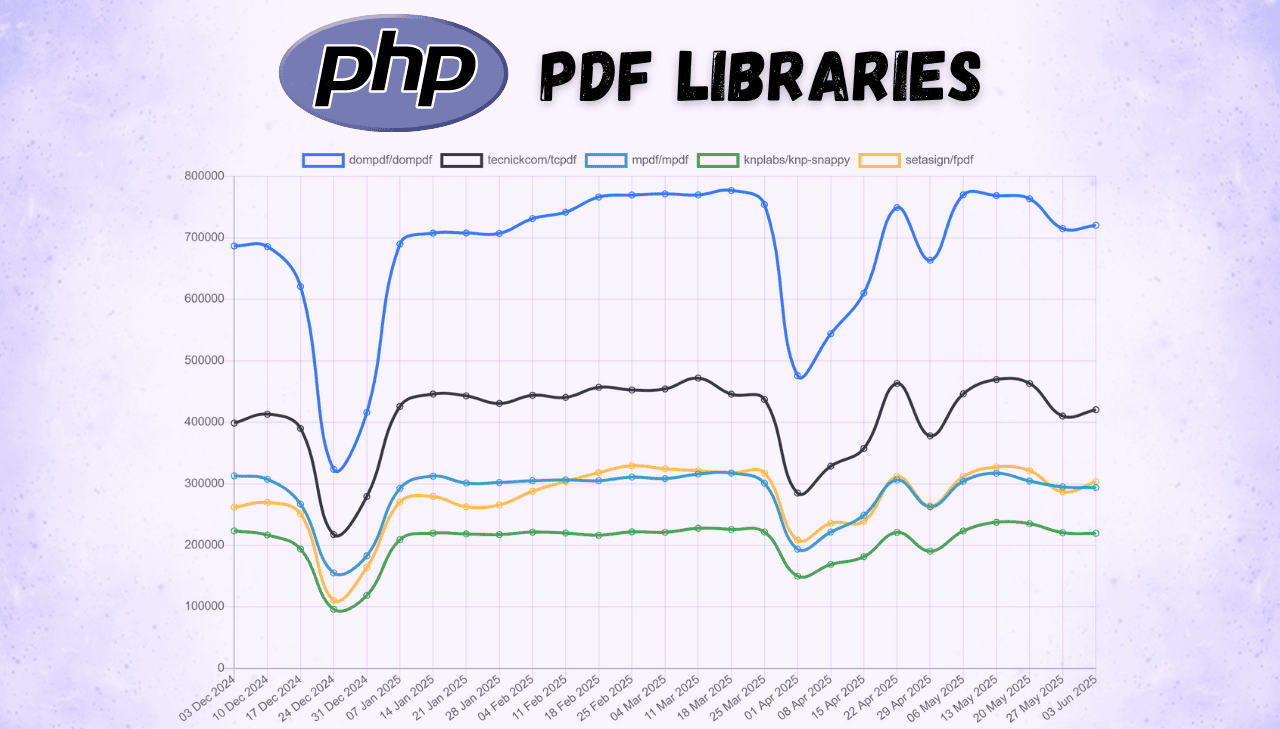
PHP remains the language behind most of the web, and PDF generation is a common task in PHP applications – invoices, reports, certificates, shipping labels. The library you pick affects performance, maintenance cost, and how much CSS/HTML you can reuse. The PHP ecosystem has several approaches: pure PHP HTML to PDF conversion, programmatic document construction, and browser-based rendering. This guide compares the most popular PHP PDF libraries with Packagist download numbers, working code examples, and a side-by-side feature table so you can choose the right fit for your project.
PDFBolt's HTML to PDF API gives you headless Chrome via a REST endpoint – call it with any PHP HTTP client like Guzzle or built-in cURL in a few lines. No Composer dependencies that drift across PHP releases, no fonts to install on your server. 100 free conversions per month.
PHP PDF Libraries: Download Statistics and Popularity Analysis
Packagist download statistics show which PHP PDF libraries developers actually use in production. The installation numbers and GitHub activity below highlight the most trusted options for PHP PDF generation.
PHP PDF Libraries: Total Downloads Comparison
The following table presents download statistics from Packagist.org and GitHub:
| Library | Total Downloads | Dependents | Stars | Forks |
|---|---|---|---|---|
| DomPDF | 134.5M | 637 | 10.8k ⭐ | 1.8k |
| TCPDF | 82.8M | 487 | 4.4k ⭐ | 1.6k |
| mPDF | 62.6M | 536 | 4.5k ⭐ | 1.1k |
| Snappy | 57.8M | 66 | 4.4k ⭐ | 437 |
| FPDF | 48.7M | 240 | 747 ⭐ | 219 |
Statistics and community metrics shown throughout this guide are current as of June 2025.
Visual Representation of Library Popularity
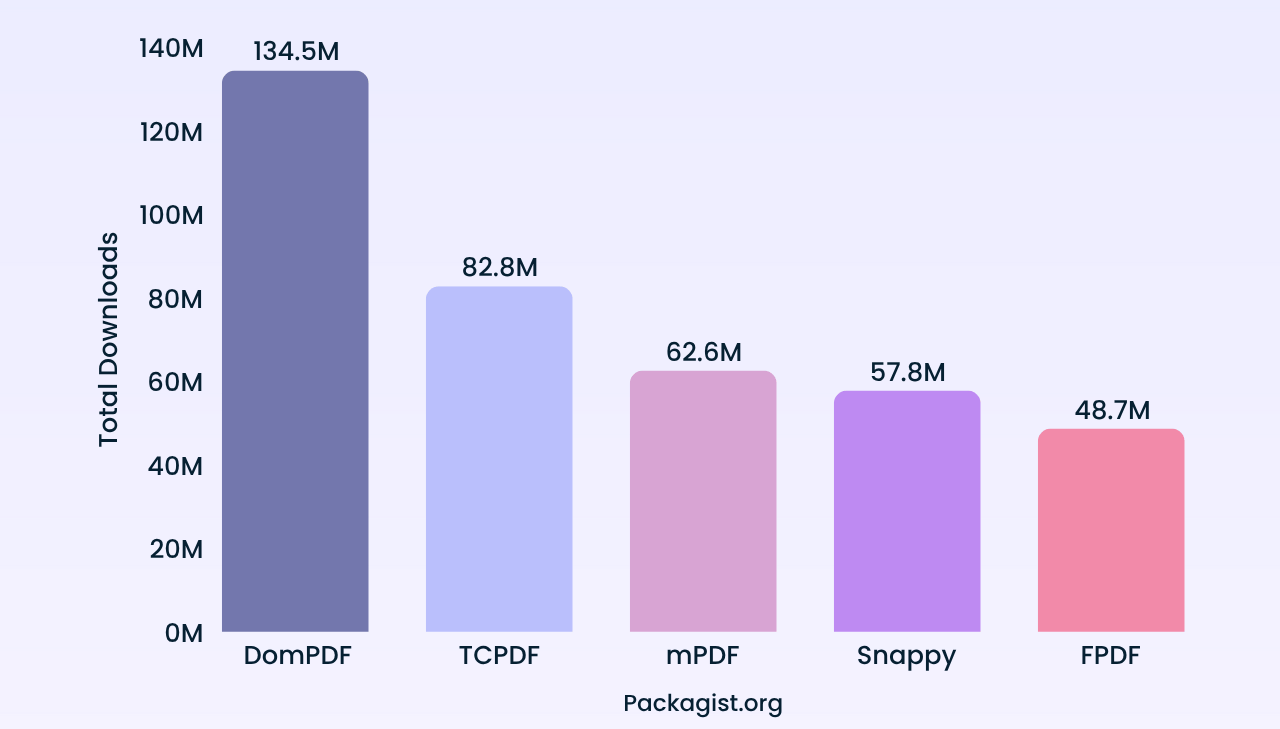
DomPDF leads by a wide margin, followed by TCPDF and mPDF. Snappy and FPDF hold steady user bases, each taking a different approach to PDF generation in PHP.
Long-Term GitHub Popularity Trends for PHP PDF Libraries
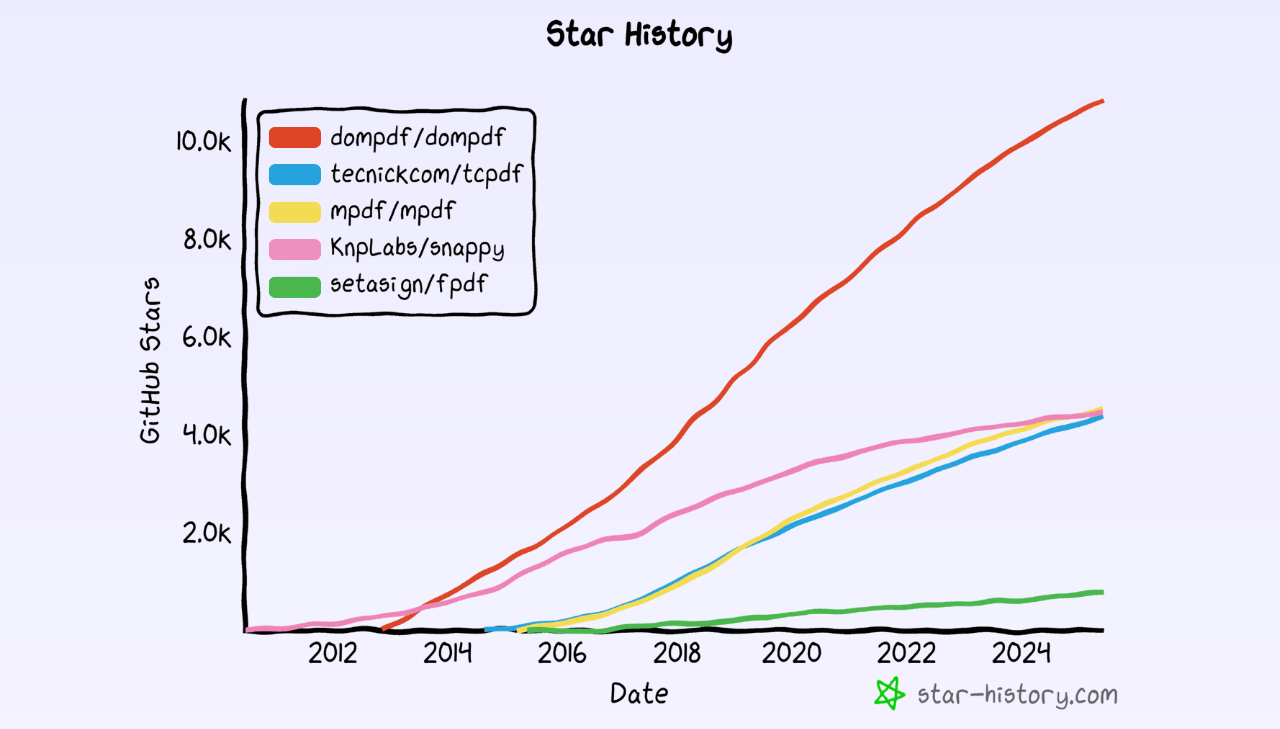
DomPDF grew fastest on GitHub and now has more than double the stars of any competitor. TCPDF, mPDF, and Snappy sit at similar levels, while FPDF tracks lower – consistent with its focus as a lightweight, no-frills library.
Best PHP PDF Generation Libraries: Review with Code Examples
Below you'll find each library with practical examples, feature analysis, and implementation notes.
Download trend charts throughout this section are sourced from pkgtrends.app.
DomPDF
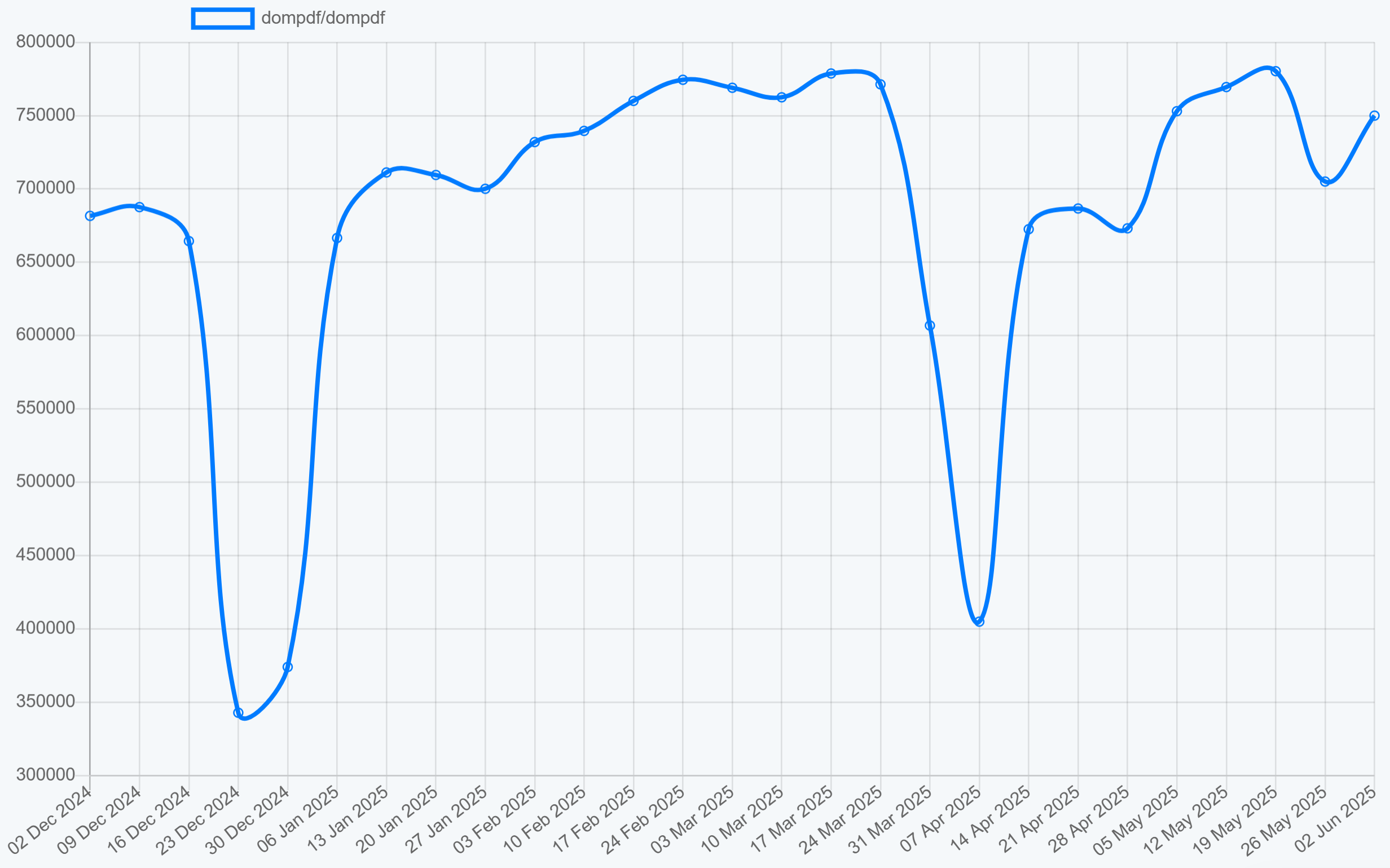
DomPDF is the most downloaded HTML to PDF library in the PHP ecosystem. Written in pure PHP, it renders CSS 2.1–compliant output without external dependencies – a good fit when you want to convert existing HTML templates into PDF documents.
➡️ Key Features:
- Pure PHP implementation with no dependencies on external PDF libraries.
- CSS 2.1 compliance with select CSS3 properties support.
- Complex table support.
- Image support (JPEG, PNG, GIF, BMP) with alpha channel.
- Support for international text and special characters out of the box.
- External stylesheet processing via HTTP/FTP.
➡️ Key Constraints:
- No support for modern CSS features (Flexbox, Grid).
- Table rows cannot be split across pages.
- Limited SVG embedding capabilities.
- No JavaScript execution support.
➡️ Installation:
composer require dompdf/dompdf
➡️ HTML to PDF Conversion Example:
- Code
- PDF Preview
<?php
require_once 'vendor/autoload.php';

use Dompdf\Dompdf;
use Dompdf\Options;

function generatePdf() {
    // Configure DomPDF options
    $options = new Options();
    $options->set('defaultFont', 'Helvetica');
    $options->set('isHtml5ParserEnabled', true);

    // Create new DomPDF instance
    $dompdf = new Dompdf($options);

    // Define HTML content
    $html = <<<HTML
    <!DOCTYPE html>
    <html>
    <head>
        <meta charset="UTF-8">
        <title>DomPDF Example</title>
        <style>
            body { font-family: Helvetica, sans-serif; text-align: center; padding: 40px 0; }
            h1 { color: #dd4526; }
            p { font-size: 26px; margin: 25px 0; }
        </style>
    </head>
    <body>
        <h1>PDF Generated with DomPDF</h1>
        <p>Why are PHP developers paid the most?</p>
        <p><strong>Because they put $ before every variable.</strong></p>
    </body>
    </html>
    HTML;

    // Load HTML content
    $dompdf->loadHtml($html);

    // Set paper size and orientation
    $dompdf->setPaper('A4', 'portrait');

    // Render the PDF
    $dompdf->render();

    // Output the PDF to browser
    $dompdf->stream('dompdf-example.pdf', ['Attachment' => false]);
}

generatePdf();
?>

Explore our detailed guide: HTML to PDF in PHP Using DomPDF.
TCPDF
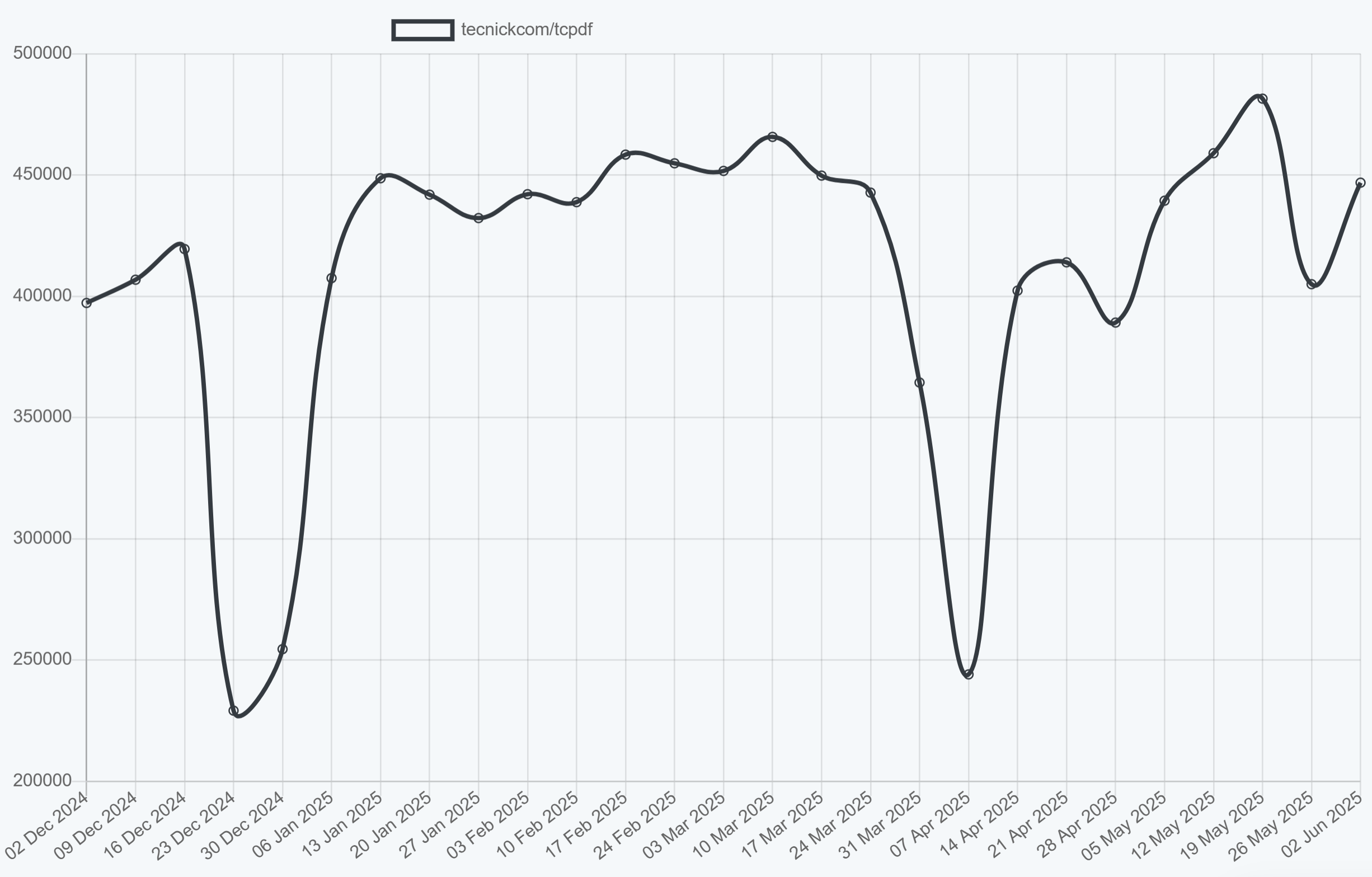
TCPDF is a mature pure PHP PDF library with fine-grained control over document creation. It supports digital signatures, barcodes, fillable forms, and PDF/A archival output – features that make it a common choice for enterprise and compliance-heavy applications.
➡️ Key Features:
- Rich PDF feature set including forms and digital signatures.
- Unicode and Right-To-Left language support.
- Advanced typography with font subsetting.
- 1D and 2D barcode generation capabilities.
- XHTML and CSS processing with JavaScript support.
- PDF/A compliance for archival standards.
➡️ Key Constraints:
- Higher complexity due to its large API surface.
- Larger memory footprint compared to lightweight alternatives.
- In support-only mode; a successor library (tc-lib-pdf) is under development.
- Complex setup for advanced features.
➡️ Installation:
composer require tecnickcom/tcpdf
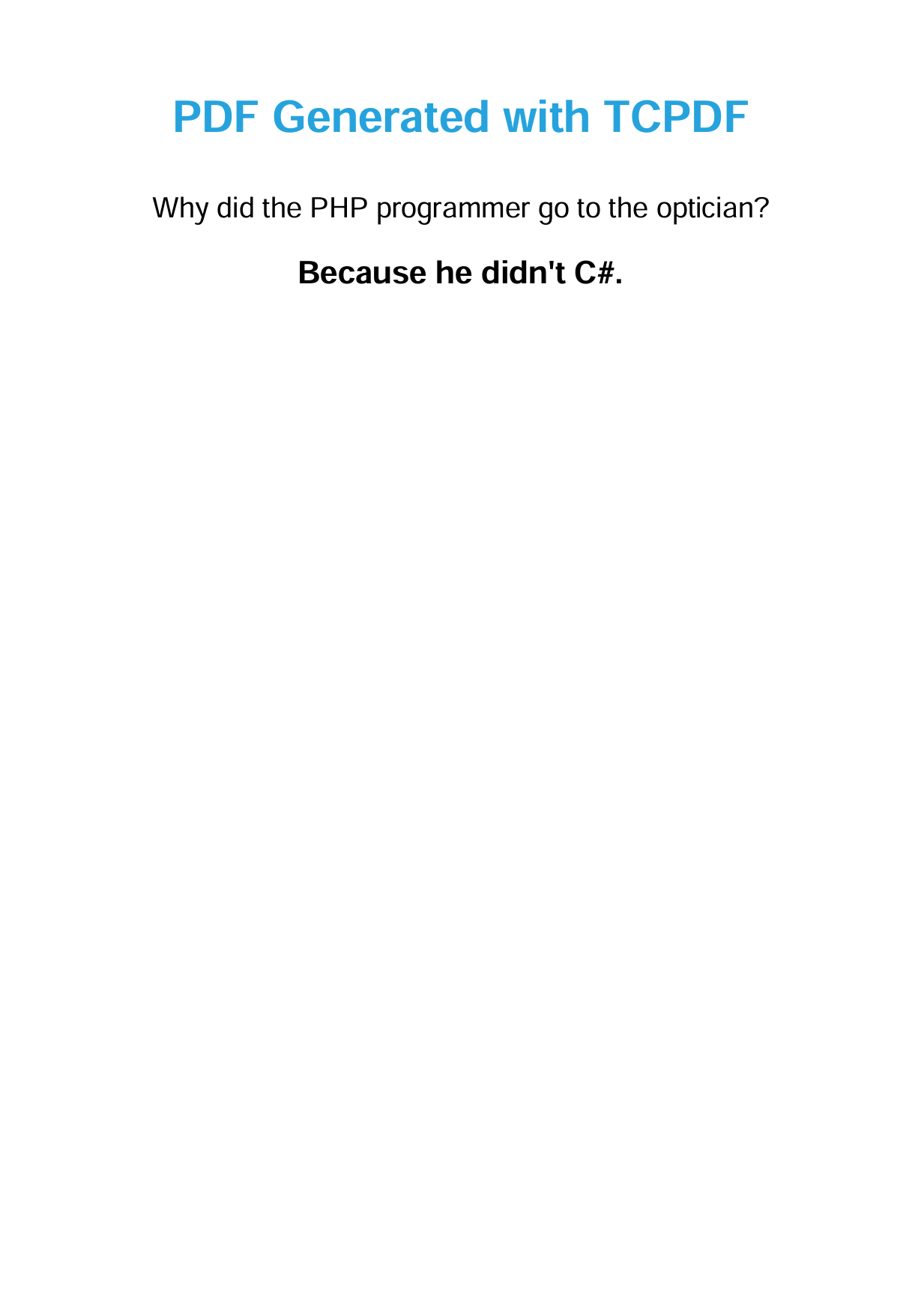
➡️ Document Creation Example:
- Code
- PDF Preview
<?php
require_once 'vendor/autoload.php';

function generatePdf() {
    // Create new TCPDF instance
    $pdf = new TCPDF('P', 'mm', 'A4', true, 'UTF-8', false);

    // Set document information
    $pdf->SetCreator('TCPDF Example');
    $pdf->SetAuthor('PHP Developer');
    $pdf->SetTitle('TCPDF Generated PDF');

    // Remove default header/footer
    $pdf->setPrintHeader(false);
    $pdf->setPrintFooter(false);

    // Set margins
    $pdf->SetMargins(20, 20, 20);

    // Add a page
    $pdf->AddPage();

    // Set font for title
    $pdf->SetFont('helvetica', 'B', 28);
    $pdf->SetTextColor(38, 163, 221);

    // Add title
    $pdf->Cell(0, 15, 'PDF Generated with TCPDF', 0, 1, 'C');
    $pdf->Ln(8);

    // Set font for content
    $pdf->SetFont('helvetica', '', 18);
    $pdf->SetTextColor(0, 0, 0);

    // Add content (programmatically)
    $pdf->Cell(0, 10, 'Why did the PHP programmer go to the optician?', 0, 1, 'C');
    $pdf->Ln(5);

    // Add content using HTML conversion
    $html = <<<'HTML'
        <p style="font-size: 20px; font-weight: bold; text-align: center">
            Because he didn't C#.
        </p>
    HTML;

    // Convert HTML to PDF
    $pdf->writeHTML($html, true, false, true, false, '');

    // Output the PDF
    $pdf->Output('tcpdf-example.pdf', 'I');
}

generatePdf();
?>
Explore TCPDF features and examples: TCPDF GitHub Repository.
mPDF
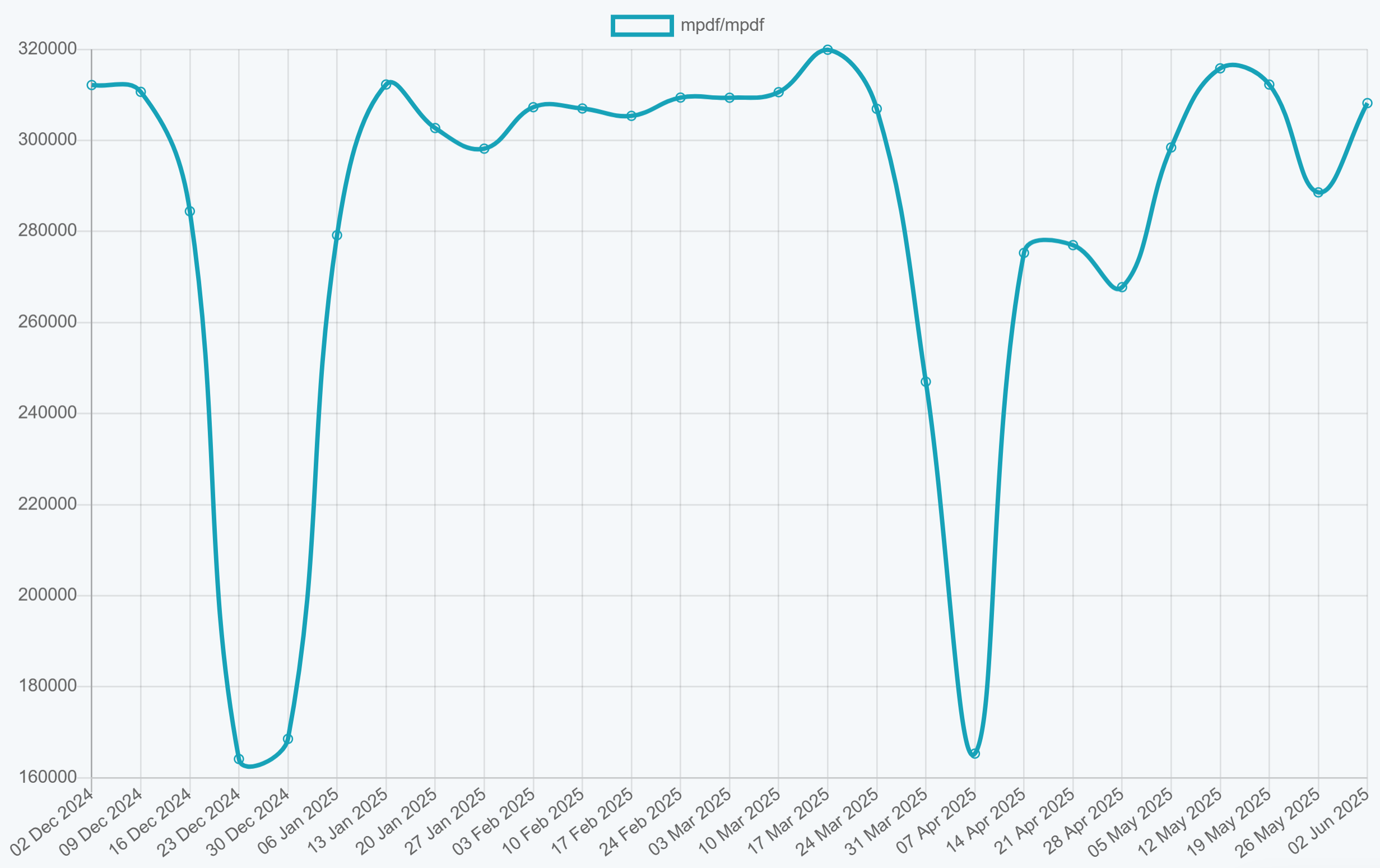
mPDF is a UTF-8 HTML to PDF converter built for multilingual document generation. Based on FPDF and HTML2FPDF, it adds better CSS support and Unicode handling while keeping reasonable performance for most workloads.
➡️ Key Features:
- Strong UTF-8 and multilingual support.
- Good CSS support for many layouts and styling.
- Automatic table of contents generation.
- Watermark and background image support.
- Header and footer customization.
- Barcode generation capabilities.
➡️ Key Constraints:
- Larger file sizes when using Unicode fonts.
- Slower performance compared to lightweight alternatives.
- Limited modern CSS features (no Flexbox/Grid).
➡️ Installation:
composer require mpdf/mpdf
➡️ HTML to PDF Conversion Example:
- Code
- PDF Preview
<?php
require_once 'vendor/autoload.php';

use Mpdf\Mpdf;

function generatePdf() {
    // Create mPDF instance with configuration
    $mpdf = new Mpdf([
        'mode' => 'utf-8',
        'format' => 'A4',
        'margin_left' => 20,
        'margin_right' => 20,
        'margin_top' => 20,
        'margin_bottom' => 20
    ]);

    // Define HTML content
    $html = <<<HTML
    <!DOCTYPE html>
    <html>
    <head>
        <meta charset="UTF-8">
        <style>
            body { font-family: sans-serif; text-align: center; }
            h1 { color:rgb(105, 55, 206); font-size: 32px; }
            p { font-size: 26px; margin:25px 0; }
        </style>
    </head>
    <body>
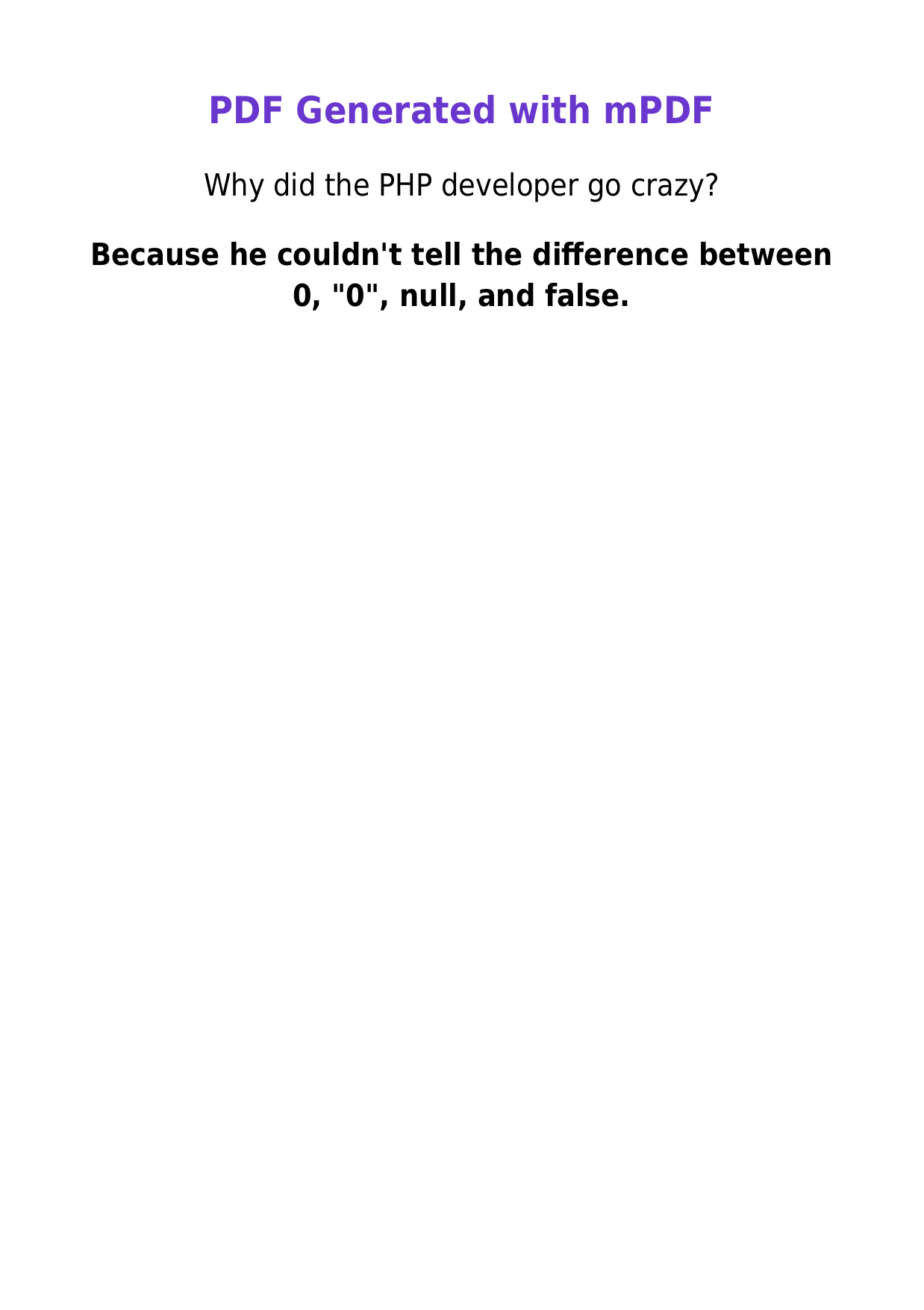
        <h1>PDF Generated with mPDF</h1>
        <p>Why did the PHP developer go crazy?</p>
        <p><strong>Because he couldn't tell the difference between 0, "0", null, and false.</strong></p>
    </body>
    </html>
    HTML;

    // Write HTML content
    $mpdf->WriteHTML($html);

    // Output the PDF
    $mpdf->Output('mpdf-example.pdf', 'I');
}

generatePdf();
?>
Explore mPDF features and documentation: mPDF GitHub Repository.
Snappy
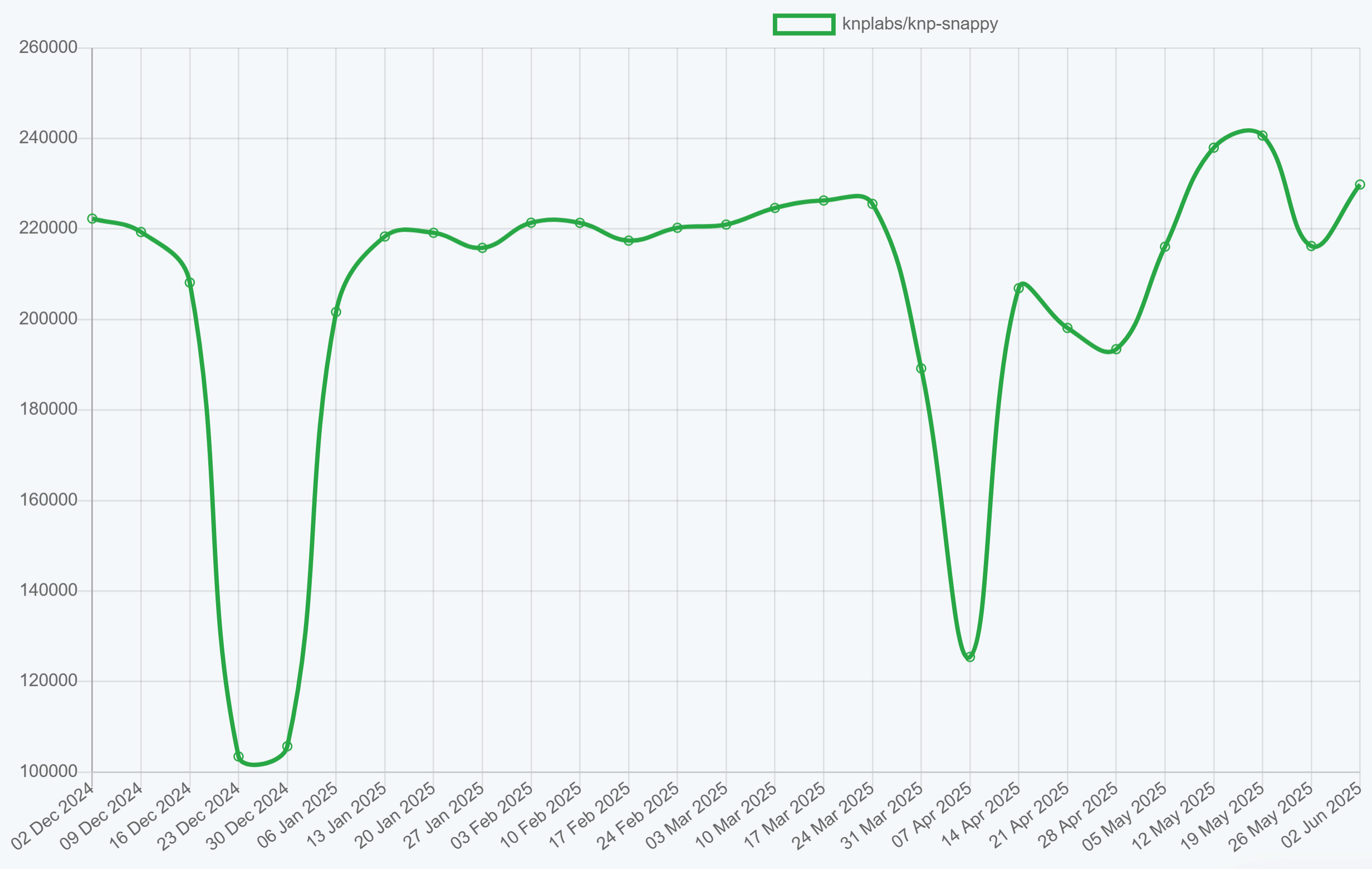
Snappy is a PHP wrapper for wkhtmltopdf that uses the WebKit rendering engine for HTML to PDF conversion. It handles standard web layouts well, though modern CSS features (Flexbox, Grid) are not fully supported.
➡️ Key Features:
- WebKit-based rendering for reliable HTML/CSS output.
- Good CSS support for basic layouts.
- URL-based PDF generation from live websites.
- Custom headers and footers with page numbering.
- Multiple file merging into single PDFs.
- Table of contents generation with custom stylesheets.
➡️ Key Constraints:
- External wkhtmltopdf binary dependency (wkhtmltopdf was archived).
- Cross-platform deployment complexity.
- No support for modern CSS features (Flexbox, Grid).
- Limited JavaScript execution support.
➡️ Installation:
composer require knplabs/knp-snappy
Snappy requires the wkhtmltopdf binary to be installed on your system. Download from wkhtmltopdf.org or use Composer packages.
➡️ HTML to PDF Conversion Example:
- Code
- PDF Preview
<?php
require_once 'vendor/autoload.php';

use Knp\Snappy\Pdf;

function generatePdf() {
    // Configure wkhtmltopdf binary path - adjust for your system:
    // Windows: "C:\Program Files\wkhtmltopdf\bin\wkhtmltopdf.exe"
    // Linux/Mac: /usr/local/bin/wkhtmltopdf
    $binaryPath = '"C:\Program Files\wkhtmltopdf\bin\wkhtmltopdf.exe"';

    // Initialize Snappy with wkhtmltopdf binary path
    $snappy = new Pdf($binaryPath);

    // Configure PDF options
    $snappy->setOption('page-size', 'A4');
    $snappy->setOption('orientation', 'portrait');
    $snappy->setOption('margin-top', '10mm');
    $snappy->setOption('margin-bottom', '10mm');
    $snappy->setOption('margin-left', '10mm');
    $snappy->setOption('margin-right', '10mm');
    $snappy->setOption('encoding', 'UTF-8');

    // Define HTML content
    $html = '<!DOCTYPE html>
<html>
<head>
    <meta charset="UTF-8">
    <title>Snappy PDF Example</title>
    <style>
        body { font-family: Arial, sans-serif; text-align: center; padding: 40px; }
        h1 { color: rgb(210, 133, 11); }
        p { font-size: 26px; margin: 25px 0; }
    </style>
</head>
<body>
    <h1>PDF Generated with Snappy</h1>
    <p>Why is PHP like glitter?</p>
    <p><strong>Once it\'s in your project, you\'ll never get rid of it.</strong></p>
</body>
</html>';

    // Generate PDF and output to browser
    header('Content-Type: application/pdf');
    header('Content-Disposition: inline; filename="snappy-example.pdf"');
    echo $snappy->getOutputFromHtml($html);
}

generatePdf();
?>

Complete Snappy implementation guide: KnpLabs Snappy GitHub Repository.
FPDF
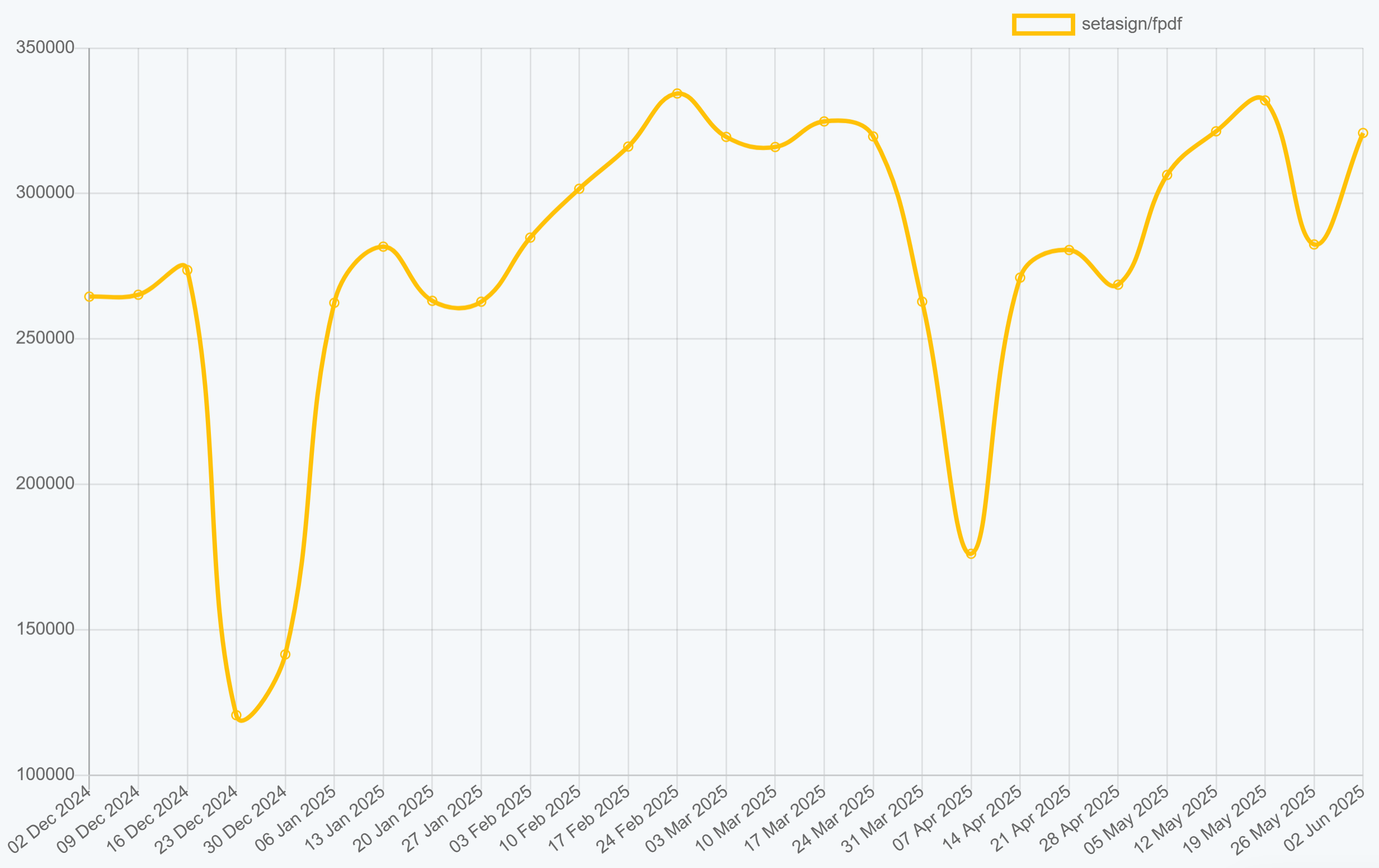
FPDF is the lightweight option for PHP PDF generation. This pure PHP library covers basic PDF creation without external dependencies – a good pick for simple documents or situations where minimal overhead matters.
➡️ Key Features:
- Ultra-lightweight with no external dependencies.
- Simple API for basic document generation.
- TrueType font support with subsetting.
- Image embedding (JPEG, PNG, GIF).
- Custom page formats, orientations, headers, and footers.
- Multi-language support with proper font configuration.
➡️ Key Constraints:
- No HTML to PDF conversion capabilities.
- Manual positioning required for all elements.
- Limited advanced features compared to modern alternatives.
- Basic styling and layout control.
➡️ Installation:
composer require setasign/fpdf
➡️ Basic Document Creation Example:
- Code
- PDF Preview
<?php
require_once 'vendor/autoload.php';

function generatePdf() {
    // Create new FPDF instance
    $pdf = new FPDF('P', 'mm', 'A4');

    // Add a page
    $pdf->AddPage();

    // Set font for title
    $pdf->SetFont('Arial', 'B', 28);
    $pdf->SetTextColor(46, 125, 50);

    // Add title
    $pdf->Cell(0, 35, 'PDF Generated with FPDF', 0, 1, 'C');

    // Set font for content
    $pdf->SetFont('Arial', '', 18);
    $pdf->SetTextColor(0, 0, 0);

    // Add question
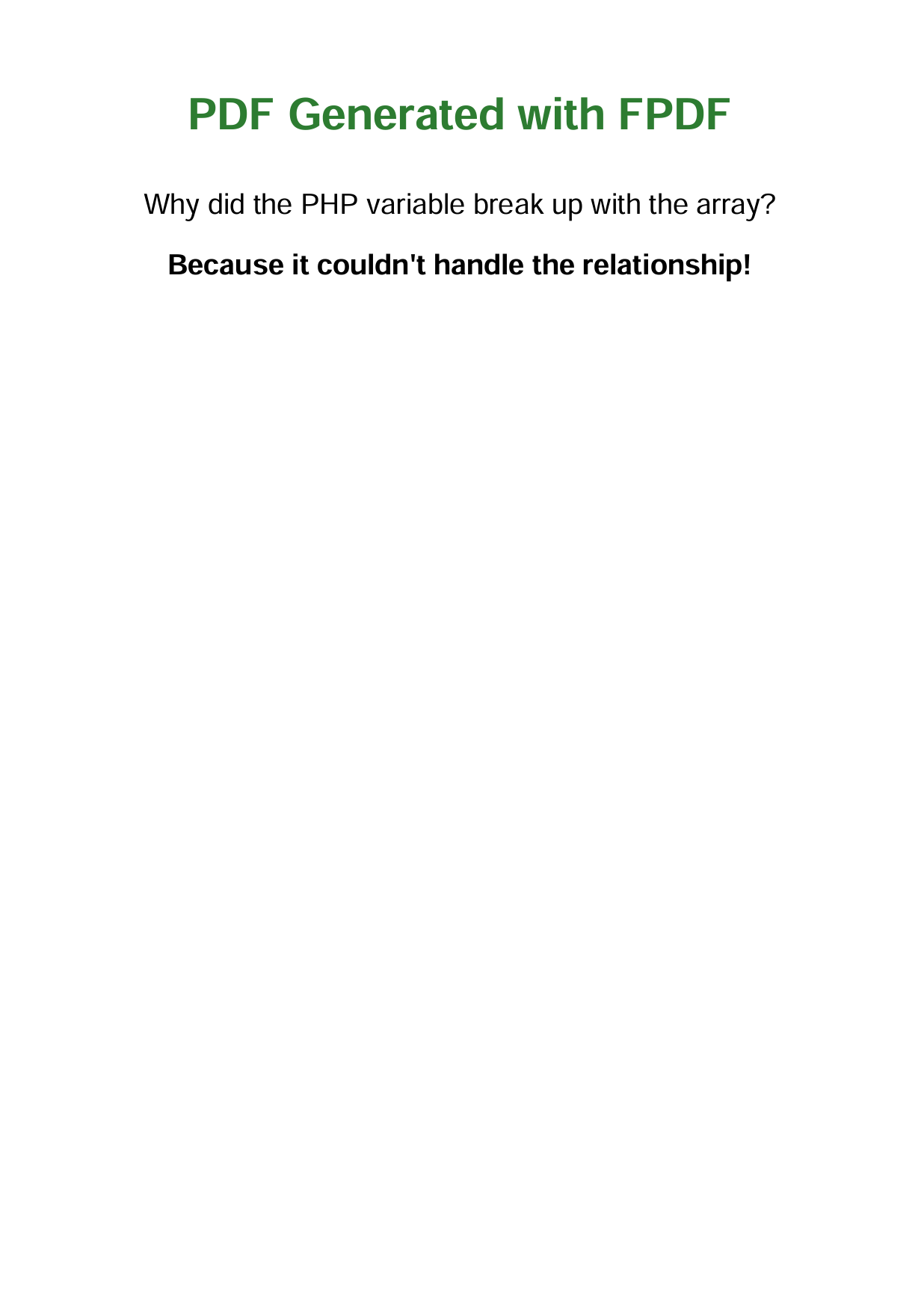
    $pdf->Cell(0, 5, 'Why did the PHP variable break up with the array?', 0, 1, 'C');

    // Add spacing
    $pdf->Ln(5);

    // Add answer
    $pdf->SetFont('Arial', 'B', 18);
    $pdf->Cell(0, 12, 'Because it couldn\'t handle the relationship!', 0, 1, 'C');

    // Output the PDF
    $pdf->Output('I', 'fpdf-example.pdf');
}

generatePdf();
?>
Browse examples and documentation: FPDF GitHub Repository.
PHP PDF Libraries Comparison: Features, Performance, and Use Cases
A side-by-side look at the leading PHP PDF libraries – features, CSS support, dependencies, and licensing.
| Feature | DomPDF | TCPDF | mPDF | Snappy | FPDF |
|---|---|---|---|---|---|
| HTML to PDF | Yes | Limited | Yes | Yes | No |
| CSS Support | CSS 2.1 + select CSS3 | Basic HTML/ CSS | Enhanced CSS 2.1 + select CSS3 | Basic CSS via WebKit | N/A |
| JavaScript | No | Limited | No | Limited | No |
| External Dependencies | None | None | None | wkhtmltopdf binary | None |
| Unicode Support | Good | Excellent | Excellent | Good | Good with proper fonts |
| Performance | Moderate | Moderate | Moderate | Good | High |
| Memory Usage | Moderate | High | Moderate | Low/Moderate | Low |
| License | LGPL-2.1 | LGPLv3 | GPLv2 or later | MIT | MIT |
| Active Development | Active | Support-only | Active | Active | Minimal |
| Advanced PDF Features | Basic | Rich (signatures, encryption, forms, bookmarks) | Some (metadata, watermarks) | Basic | Basic |
DomPDF vs TCPDF vs mPDF: Which PHP PDF Library Should You Pick?
These three libraries handle the majority of PHP PDF generation, but they target different use cases:
-
DomPDF – Best for HTML to PDF conversion. If you already have HTML/CSS templates (invoices, reports, emails), DomPDF can render them directly. It supports CSS 2.1 with some CSS3 properties, requires no external binaries, and has the largest community (134M+ downloads, 10.8k GitHub stars). The main limitation is no Flexbox or Grid support.
-
TCPDF – Best for enterprise and compliance use cases. TCPDF gives you programmatic control over every element on the page: digital signatures, fillable forms, 1D/2D barcodes, and PDF/A archival output. HTML support is basic – you'll mostly use the Cell/MultiCell API. Note that TCPDF is in support-only mode; the successor
tc-lib-pdfis still under development. -
mPDF – Best for multilingual documents. Built on top of FPDF, mPDF handles UTF-8, RTL languages, CJK fonts, and automatic table-of-contents generation better than the other two. CSS support is comparable to DomPDF. The trade-off is larger file sizes when embedding Unicode fonts.
Short version: start with DomPDF if you have HTML templates, pick TCPDF if you need signatures/barcodes/forms, and reach for mPDF when multilingual support is a priority.
How to Choose the Right PHP PDF Library for Your Project
Match your use case to the library's strengths. The table below maps common PHP development scenarios to concrete library recommendations.
| Use Case | Recommended Libraries | Reasoning |
|---|---|---|
| HTML Template Conversion | • DomPDF • mPDF | HTML/CSS support, familiar web development workflow. |
| Simple Documents | • FPDF | Lightweight, minimal dependencies, predictable performance. |
| Complex Documents | • TCPDF | Rich feature set, advanced programmatic control, enterprise capabilities. |
| Multilingual Documents | • mPDF • TCPDF | Superior Unicode and RTL language support. |
| High-Volume Generation | • FPDF | Ultra-lightweight, efficient memory usage, fast performance. |
| Enterprise Features | • TCPDF | Digital signatures, forms, barcode generation, PDF/A compliance. |
| Modify Existing PDFs | • FPDI + TCPDF • FPDI + FPDF | FPDI required for importing pages, overlay content, modify existing documents. |
| Reports with Charts | • TCPDF • FPDF | Generate charts as images, embed via Image() methods. |
| Interactive Forms | • TCPDF | Generate fillable PDF forms with input fields and checkboxes. |
| Barcodes | • TCPDF | Native support for many 1D/2D barcode types (QR, Code128, EAN, PDF417, etc.). |
| Invoices | • DomPDF • mPDF • TCPDF | Template-based generation with dynamic data, professional styling. |
- Optimizing HTML for PDF Conversion – HTML best practices that work with DomPDF, mPDF, and cloud APIs.
- HTML Template Engines Comparison – choosing between Twig, Blade, and others.
- HTML to PDF in PHP Using DomPDF – full implementation tutorial.
- n8n PDF Automation Guide – automated document workflows.
HTML to PDF API vs PHP Libraries: When to Use a Cloud Service
When PHP PDF libraries reach their limits, cloud-based HTML to PDF services offer a practical alternative. Instead of wrestling with DomPDF memory constraints or TCPDF complexity, external APIs handle the heavy lifting.
Modern CSS and JavaScript Support
Traditional PHP libraries like FPDF, TCPDF, and mPDF struggle with modern web designs – responsive layouts, CSS Grid, Flexbox, or JavaScript-generated content. Cloud PDF services use headless Chrome engines to render any web content accurately, eliminating the CSS limitations that plague pure PHP solutions.
Reduced Infrastructure Overhead
PDF generation brings hidden operational costs – memory spikes, font management, library updates, and environment inconsistencies. Cloud services eliminate these infrastructure headaches through managed, optimized PDF generation platforms.
When to Consider Cloud APIs
Choose cloud-based PDF generation when:
- Modern CSS layouts are essential.
- High-volume PDF generation strains servers.
- Development resources should focus on core features.
- Consistent cross-environment rendering is critical.
- Advanced features like async processing, webhook notifications, or direct S3 upload are needed.
Practical Implementation
Services like PDFBolt HTML to PDF API exemplify this approach – accepting HTML via API and returning professional PDFs without client-side infrastructure. See our PHP quick start guide or the HTML to PDF using API guide for implementation details.
HTML to PDF API Integration Example:
- Code
- PDF Preview
<?php
function generatePdfWithApi() {
    // HTML content to convert
    $htmlContent = '
    <!DOCTYPE html>
    <html>
    <head>
        <meta charset="UTF-8">
        <style>
            body { font-family: Arial, sans-serif; text-align: center; margin: 60px 0; }
            h1 { color:rgb(43, 142, 208); }
            p { font-size: 26px; margin: 25px 0; }
        </style>
    </head>
    <body>
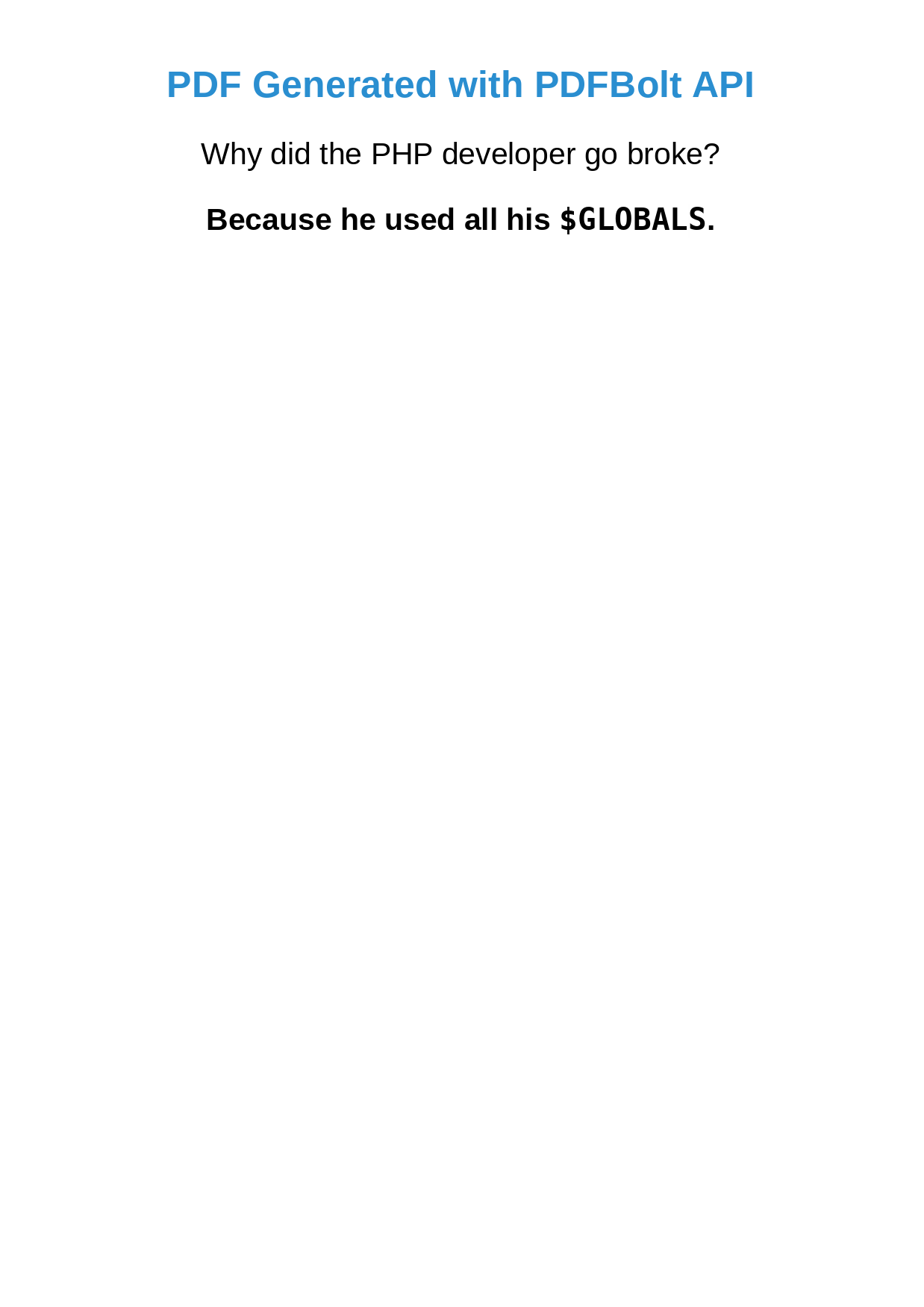
        <h1>PDF Generated with PDFBolt API</h1>
        <p>Why did the PHP developer go broke?</p>
        <p><strong>Because he used all his <code>$GLOBALS</code>.</strong></p>
    </body>
    </html>';

    // API configuration
    $apiKey = 'XXXXXXXX-XXXX-XXXX-XXXX-XXXXXXXXXXXX';
    $apiUrl = 'https://api.pdfbolt.com/v1/direct';

    // Prepare request data
    $postData = json_encode([
        'html' => base64_encode($htmlContent),
        'format' => 'A4',
        'printBackground' => true
    ]);

    // Configure cURL
    $ch = curl_init();
    curl_setopt($ch, CURLOPT_URL, $apiUrl);
    curl_setopt($ch, CURLOPT_POST, true);
    curl_setopt($ch, CURLOPT_POSTFIELDS, $postData);
    curl_setopt($ch, CURLOPT_HTTPHEADER, [
        'Content-Type: application/json',
        'API-KEY: ' . $apiKey
    ]);
    curl_setopt($ch, CURLOPT_RETURNTRANSFER, true);

    // Execute request
    $response = curl_exec($ch);
    $httpCode = curl_getinfo($ch, CURLINFO_HTTP_CODE);
    curl_close($ch);

    if ($httpCode === 200) {
        // Output PDF to browser
        header('Content-Type: application/pdf');
        header('Content-Disposition: inline; filename="pdfbolt-example.pdf"');
        echo $response;
    } else {
        echo "Error generating PDF. HTTP Code: " . $httpCode;
    }
}

generatePdfWithApi();
?>
For full API features and implementation guides: PDFBolt Documentation.
Frequently Asked Questions About PHP PDF Libraries
How to generate PDF from HTML in PHP?
- Install DomPDF:
composer require dompdf/dompdf. - Write your HTML with inline or linked CSS.
- Load it:
$dompdf->loadHtml($html). - Set paper size:
$dompdf->setPaper('A4', 'portrait'). - Render and output:
$dompdf->render()then$dompdf->stream().
For other libraries, see the code examples above. If you need modern CSS (Flexbox, Grid), use a cloud HTML to PDF API instead.
Which PHP PDF library is fastest?
FPDF – it has the smallest footprint and no HTML parsing overhead. DomPDF and mPDF are moderate because they parse HTML/CSS before rendering. TCPDF can be fast for simple Cell() calls but slows down when using its advanced features (barcodes, signatures, forms). For high-volume generation where speed matters most, FPDF or a cloud API with server-side caching will outperform the rest.
Can PHP PDF libraries handle modern CSS?
No. DomPDF covers CSS 2.1 + a few CSS3 properties. mPDF is similar. TCPDF has only basic HTML/CSS parsing. None of them support Flexbox, Grid, or JavaScript-rendered content. For modern layouts, use a headless Chrome–based service or a cloud PDF API.
Are PHP PDF libraries secure?
That depends on how you use them. Always sanitize user input before passing it to any PDF library. TCPDF had a path-traversal vulnerability that could expose files outside the intended directory – make sure you're on the latest version. DomPDF and mPDF have no known open issues when configured correctly. Cloud APIs add an extra isolation layer since PDF rendering happens off your server.
What are alternatives to DomPDF in PHP?
mPDF if you need better Unicode/RTL support. TCPDF if you need digital signatures, barcodes, or fillable forms. FPDF if you want minimal overhead and don't need HTML parsing. Snappy wraps wkhtmltopdf but the underlying binary is archived, so it's not recommended for new projects. For full modern CSS support, cloud-based HTML to PDF APIs are the strongest option.
Can I modify existing PDFs with PHP?
Not with the libraries listed here directly. You need FPDI (Free PDF Document Importer), which works alongside FPDF, TCPDF, or mPDF. FPDI imports pages from an existing PDF so you can overlay text, stamps, or watermarks on top.
Conclusion
The best PHP PDF library depends on what you're building: DomPDF for HTML to PDF conversion, TCPDF for enterprise features (signatures, barcodes, forms), mPDF for multilingual documents, and FPDF when you need minimal overhead. Avoid Snappy for new projects – wkhtmltopdf is archived. For modern CSS (Flexbox, Grid), cloud HTML to PDF APIs are the way to go.
Comparing options across languages? See our guides for Node.js, Java, C#, Ruby, and Python. For production apps that need scalable PDF output without server-side dependencies, PDFBolt is worth a look.
Stay strong – if you can survive PHP's "truthy" values, you can definitely handle any PDF library! 💪