HTML to PDF in Rails with Puppeteer-Ruby Gem

Web applications frequently need to generate high-quality PDF documents from HTML content – invoices, reports, certificates, and business documentation. Puppeteer-Ruby is a pure Ruby port of Google's Puppeteer API that gives you direct access to Chrome's rendering engine for Ruby on Rails PDF generation. This guide walks you through implementing HTML to PDF conversion using Puppeteer-Ruby, producing high-quality results with full support for modern CSS and JavaScript.
What is Puppeteer-Ruby?
Puppeteer-Ruby is a Ruby port of Google's Puppeteer API that gives you access to Chrome's headless browser capabilities for PDF generation and web automation. Unlike Grover which requires Node.js and Puppeteer dependencies, Puppeteer-Ruby is a standalone Ruby implementation that only requires Chrome/Chromium installation.
Key Advantages of Puppeteer-Ruby
When implementing Ruby HTML to PDF conversion in Rails, Puppeteer-Ruby offers practical benefits:
- Pure Ruby Implementation: Ruby port of Puppeteer API without Node.js dependencies.
- Modern Web Standards: Full CSS3, Flexbox, Grid, and JavaScript support.
- Chrome Rendering: Uses Chromium's Blink engine for high-fidelity PDF output.
- Rails Integration: Works directly with controllers, views, and ERB templates.
- PDF Customization: Flexible control over page size, margins, headers, footers, and print options.
Puppeteer-Ruby implements a subset of Puppeteer's API. Some advanced options from JavaScript Puppeteer may not be available. Check the API Coverage for current feature support.
Complete HTML to PDF Implementation: Invoice Generator
This tutorial builds an invoice generation system that converts HTML templates into professional PDF documents using Puppeteer-Ruby with ERB templates in Rails.
Step 1: System Requirements and Dependencies
Before implementation, ensure your development environment includes all necessary components:
| Component | Recommended Version | Purpose | Installation Guide |
|---|---|---|---|
| Ruby | 3.2+ | Programming language runtime | Ruby Installation |
| Rails | 7.0+ | Web application framework | Rails Setup Guide |
Installation Verification:
ruby -vrails -v- Also ensure Chrome/Chromium is installed.
Step 2: Rails Application Setup and Gem Installation
1. Create a new Rails application:
rails new puppeteer_ruby_invoice_app
cd puppeteer_ruby_invoice_app
2. Add Puppeteer-Ruby to Gemfile:
gem 'puppeteer-ruby'
3. Install Ruby dependencies:
bundle install
Step 3: Rails PDF Generation Project Structure
After setup, your Rails application structure should include:
puppeteer_ruby_invoice_app/
├── app/
│   ├── assets/
│   │   └── stylesheets/
│   │       ├── application.css
│   │       └── pdf_styles.css          # PDF-specific styles
│   ├── controllers/
│   │   ├── application_controller.rb
│   │   └── invoices_controller.rb      # Invoice PDF controller
│   ├── views/
│   │   ├── invoices/
│   │   │   └── pdf_template.html.erb   # Invoice template
│   └── routes.rb
└── Gemfile
Step 4: Professional PDF Template and Styling
Create the HTML template and CSS styles that define your invoice appearance:
1. Create PDF-specific styles – app/assets/stylesheets/pdf_styles.css:
PDF Stylesheet
/* Import fonts */
@import url('https://fonts.googleapis.com/css2?family=Inter:wght@400;500;600;700&display=swap');

/* CSS Variables for consistent theming */
:root {
    --primary-color: #0d9488;
    --text-primary: #1e293b;
    --text-secondary: #64748b;
    --border-color: #e2e8f0;
    --background-light: #f8fafc;
    --white: #ffffff;
    --success-color: #018E40;
}

* {
    margin: 0;
    padding: 0;
    box-sizing: border-box;
}

body {
    font-family: 'Inter', -apple-system, BlinkMacSystemFont, sans-serif;
    color: var(--text-primary);
    line-height: 1.7;
    font-size: 14px;
}

/* Main container */
.invoice-container {
    max-width: 800px;
    margin: 20px auto;
    padding: 0 24px;
}

/* Header section */
.invoice-header {
    display: flex;
    justify-content: space-between;
    align-items: flex-start;
    padding-bottom: 16px;
    border-bottom: 2px solid var(--primary-color);
    margin-bottom: 24px;
}

.company-branding {
    display: flex;
    align-items: center;
    gap: 12px;
}

.company-logo {
    width: 64px;
    height: 64px;
    object-fit: contain;
}

.company-info h1 {
    font-size: 24px;
    font-weight: 700;
    margin-bottom: 2px;
}

/* Invoice title */
.invoice-title-section {
    text-align: right;
}

.invoice-title {
    font-size: 32px;
    font-weight: 700;
    color: var(--white);
    background: var(--primary-color);
    display: inline-block;
    padding: 6px 14px;
    border-radius: 4px;
    margin-bottom: 8px;
}

.invoice-meta {
    font-size: 12px;
    color: var(--text-secondary);
}

.invoice-meta strong {
    color: var(--text-primary);
    font-weight: 600;
}

/* Billing information */
.billing-overview {
    margin-bottom: 24px;
    display: flex;
    justify-content: space-between;
    gap: 40px;
}

.billing-details {
    width: 48%;
}

/* Section headings */
.billing-details h3,
.payment-info h3,
.notes-terms h3 {
    font-size: 14px;
    font-weight: 600;
    color: var(--primary-color);
    margin-bottom: 8px;
    text-transform: uppercase;
}

.billing-details .name {
    font-size: 15px;
    font-weight: 600;
    margin-bottom: 4px;
}

.billing-details p {
    font-size: 12px;
    color: var(--text-secondary);
    line-height: 1.4;
    margin-bottom: 2px;
}

/* Items table styling */
.items-table {
    width: 100%;
    border-collapse: collapse;
    margin-bottom: 24px;
    font-size: 13px;
}

.items-table thead {
    background: var(--background-light);
}

.items-table th,
.items-table td {
    padding: 12px 8px;
    border-bottom: 1px solid var(--border-color);
    text-align: left;
}

.items-table th {
    font-size: 12px;
    font-weight: 600;
    color: var(--text-secondary);
    text-transform: uppercase;
}

.items-table tbody tr:last-child td {
    border-bottom: none;
}

/* Summary and payment */
.summary-payment {
    display: flex;
    justify-content: space-between;
    margin-bottom: 24px;
}

/* Payment information */
.payment-info {
    width: 48%;
    background: var(--background-light);
    padding: 16px;
    border-left: 4px solid var(--primary-color);
    border-radius: 4px;
}

.payment-info p {
    font-size: 12px;
    color: var(--text-secondary);
    margin-bottom: 7px;
}

.payment-info strong {
    color: var(--text-primary);
    font-weight: 600;
}

/* Totals summary box */
.totals-summary {
    width: 48%;
    border: 1px solid var(--border-color);
    border-radius: 4px;
}

.total-row {
    display: flex;
    justify-content: space-between;
    align-items: center;
    padding: 10px 16px;
    font-size: 13px;
    border-bottom: 1px solid var(--border-color);
}

/* Total row styles */
.total-row.subtotal {
    background: var(--background-light);
}

.total-row.discount {
    color: var(--success-color);
}

.total-row.tax {
    color: var(--text-secondary);
}

.total-row.final-total {
    background: var(--primary-color);
    color: white;
    font-weight: 700;
    font-size: 15px;
    border-bottom: none;
}

.total-label,
.total-amount {
    font-weight: 600;
}

/* Terms and conditions */
.notes-terms {
    margin-top: 24px;
    padding: 16px;
    background: var(--background-light);
    border: 1px solid var(--border-color);
    border-radius: 4px;
}

.notes-terms p {
    font-size: 12px;
    color: var(--text-secondary);
}

/* Footer section */
.invoice-footer {
    margin-top: 40px;
    padding-top: 16px;
    border-top: 1px solid var(--border-color);
    text-align: center;
    color: var(--text-secondary);
    font-size: 12px;
}

.invoice-footer strong {
    color: var(--primary-color);
}
2. Create the invoice template – app/views/invoices/pdf_template.html.erb:
Complete Professional Invoice Template
<!DOCTYPE html>
<html lang="en">
<head>
<meta charset="UTF-8">
<meta name="viewport" content="width=device-width, initial-scale=1.0">
<title>Invoice <%= invoice[:number] %></title>
<style>
<%= css_content.html_safe %>
</style>
</head>
<body>
<div class="invoice-container">
<!-- Company header -->
<header class="invoice-header no-break">
<div class="company-branding">
<% if invoice[:company][:logo_url].present? %>
<img src="<%= invoice[:company][:logo_url] %>" alt="<%= invoice[:company][:name] %> Logo" class="company-logo">
<% end %>
<div class="company-info">
<h1><%= invoice[:company][:name] %></h1>
</div>
</div>
<!-- Invoice title and dates -->
<div class="invoice-title-section">
<div class="invoice-title">INVOICE</div>
<div class="invoice-meta">
<p><strong>Number:</strong> <%= invoice[:number] %></p>
<p><strong>Date:</strong> <%= invoice[:issue_date].strftime('%B %d, %Y') %></p>
<p><strong>Due:</strong> <%= invoice[:due_date].strftime('%B %d, %Y') %></p>
</div>
</div>
</header>
<!-- Billing details -->
<div class="billing-overview">
<div class="billing-details">
<h3>Bill From</h3>
<div class="name"><%= invoice[:company][:name] %></div>
<p><%= invoice[:company][:address] %></p>
<p><%= invoice[:company][:city] %></p>
<p><%= invoice[:company][:email] %></p>
<p><%= invoice[:company][:phone] %></p>
</div>
<div class="billing-details">
<h3>Bill To</h3>
<div class="name"><%= invoice[:client][:name] %></div>
<p><%= invoice[:client][:address] %></p>
<p><%= invoice[:client][:city] %></p>
<p><%= invoice[:client][:email] %></p>
<p><%= invoice[:client][:phone] %></p>
</div>
</div>
<!-- Services/items table -->
<section class="items-section">
<table class="items-table">
<thead>
<tr>
<th style="width: 8%">No.</th>
<th style="width: 52%">Description</th>
<th style="width: 10%">Qty.</th>
<th style="width: 15%">Price</th>
<th style="width: 15%">Total</th>
</tr>
</thead>
<tbody>
<% invoice[:line_items].each_with_index do |item, index| %>
<tr>
<td><%= index + 1 %></td>
<td><%= item[:description] %></td>
<td><%= item[:quantity] %></td>
<td>$<%= sprintf('%.2f', item[:rate]) %></td>
<td>$<%= sprintf('%.2f', item[:total]) %></td>
</tr>
<% end %>
</tbody>
</table>
</section>
<!-- Payment details -->
<div class="summary-payment no-break">
<!-- Payment information -->
<div class="payment-info">
<h3>Payment Information</h3>
<p><strong>Bank:</strong> <%= invoice[:payment_info][:bank_name] %></p>
<p><strong>Account:</strong> <%= invoice[:payment_info][:account_number] %></p>
<p><strong>Routing:</strong> <%= invoice[:payment_info][:routing_number] %></p>
<p><strong>Terms:</strong> <%= invoice[:payment_info][:payment_terms] %></p>
</div>
<!-- Financial totals -->
<div class="totals-summary">
<div class="total-row subtotal">
<span class="total-label">Subtotal</span>
<span class="total-amount">$<%= sprintf('%.2f', invoice[:subtotal]) %></span>
</div>
<% if invoice[:discount_amount] && invoice[:discount_amount] > 0 %>
<div class="total-row discount">
<span class="total-label">Discount (<%= invoice[:discount_rate] %>%)</span>
<span class="total-amount">-$<%= sprintf('%.2f', invoice[:discount_amount]) %></span>
</div>
<% end %>
<div class="total-row tax">
<span class="total-label">Tax (<%= invoice[:tax_rate] %>%)</span>
<span class="total-amount">$<%= sprintf('%.2f', invoice[:tax_amount]) %></span>
</div>
<!-- Final total -->
<div class="total-row final-total">
<span class="total-label">Total</span>
<span class="total-amount">$<%= sprintf('%.2f', invoice[:total_amount]) %></span>
</div>
</div>
</div>
<!-- Terms and conditions -->
<section class="notes-terms no-break">
<h3>Terms & Conditions</h3>
<p><%= invoice[:terms] %></p>
</section>
<!-- Contact information footer -->
<footer class="invoice-footer">
<p><strong>Thank you for your business!</strong></p>
<p>Questions? Contact us at <%= invoice[:company][:email] %> or visit <%= invoice[:company][:website] %></p>
</footer>
</div>
</body>
</html>
This template showcases Puppeteer-Ruby's capabilities:
- Modern CSS Styling for responsive layouts.
- CSS Variables for consistent theming.
- Professional typography with Google Fonts integration.
- Conditional rendering using ERB logic.
- Proper HTML structure.
Step 5: Rails Controller for HTML to PDF Generation
Create the controller – app/controllers/invoices_controller.rb:
Complete Invoice Controller Implementation
class InvoicesController < ApplicationController

  def generate_pdf
    @invoice_data = build_sample_invoice
    calculate_invoice_financials

    begin
      Puppeteer.launch(headless: true) do |browser|
        page = browser.new_page

        # Read CSS file
        css_content = File.read(Rails.root.join('app/assets/stylesheets/pdf_styles.css'))

        # Render Rails template to HTML
        html_content = render_to_string(
          template: 'invoices/pdf_template',
          locals: {
            invoice: @invoice_data,
            css_content: css_content
          },
          layout: false
        )

        # Set content
        page.set_content(html_content)

        # Generate PDF with proper options
        pdf_data = page.pdf(
          format: 'A4',
          print_background: true,
          margin: {
            top: '1cm',
            right: '1cm',
            bottom: '1cm',
            left: '1cm'
          }
        )

        send_data pdf_data,
                  filename: generate_filename,
                  type: 'application/pdf',
                  disposition: 'inline'
      end
    rescue => e
      Rails.logger.error "PDF generation failed: #{e.message}"
      render plain: "Error generating PDF: #{e.message}", status: 500
    end
  end

  private

  def generate_filename
    timestamp = Time.current.strftime('%Y%m%d_%H%M%S')
    "invoice_#{@invoice_data[:number]}_#{timestamp}.pdf"
  end

  def build_sample_invoice
    {
      # Invoice metadata
      number: "INV-#{Date.current.strftime('%Y%m')}-#{rand(1000..9999)}",
      issue_date: Date.current,
      due_date: 30.days.from_now,

      # Company information
      company: {
        name: "GreenLeaf Example LLC",
        logo_url: 'https://img.pdfbolt.com/logo-leaf.png',
        address: "1234 Tree Lane, Suite 100",
        city: "Greenvale, ZZ 00000",
        phone: "(555) 123-4567",
        email: "contact@example.com",
        website: "www.greenleaf.example"
      },

      # Client information
      client: {
        name: "Green Startups Inc.",
        email: "contact@green.test",
        address: "900 Forest Glen Drive",
        city: "Naturetown, MN 55337",
        phone: "(512) 987-6543"
      },

      # Financial settings
      currency: "USD",
      tax_rate: 8.25,
      discount_rate: 10.0,

      # Service line items
      line_items: [
        {
          description: "Custom Rails Application Development",
          quantity: 8,
          rate: 175.00
        },
        {
          description: "React Frontend Implementation",
          quantity: 6,
          rate: 165.00
        },
        {
          description: "Database Design and Optimization",
          quantity: 4,
          rate: 185.00
        },
        {
          description: "API Integration and Testing",
          quantity: 3,
          rate: 155.00
        },
        {
          description: "DevOps and Deployment Setup",
          quantity: 5,
          rate: 195.00
        },
      ],

      # Payment information
      payment_info: {
        bank_name: "First Evergreen National Bank",
        account_number: "XXXX-XXXX-XXXX-0000",
        routing_number: "000000000",
        payment_terms: "Net 30"
      },

      # Additional notes
      terms: "Payment is due within 30 days of the invoice date. Late fees may apply after the due date."
    }
  end

  def calculate_invoice_financials
    # Calculate line item totals
    @invoice_data[:line_items].each do |item|
      item[:total] = (item[:quantity] * item[:rate]).round(2)
    end

    # Calculate financial summary
    @invoice_data[:subtotal] = @invoice_data[:line_items].sum { |item| item[:total] }
    @invoice_data[:discount_amount] = (@invoice_data[:subtotal] * @invoice_data[:discount_rate] / 100).round(2)
    @invoice_data[:taxable_amount] = (@invoice_data[:subtotal] - @invoice_data[:discount_amount]).round(2)
    @invoice_data[:tax_amount] = (@invoice_data[:taxable_amount] * @invoice_data[:tax_rate] / 100).round(2)
    @invoice_data[:total_amount] = (@invoice_data[:taxable_amount] + @invoice_data[:tax_amount]).round(2)
  end
end
This controller demonstrates:
- Full invoice data with business information (stored in controller for tutorial purposes).
- Inline CSS integration by reading the CSS file and injecting it into the HTML template.
- File naming with timestamps for unique PDF identification.
- Financial calculations including discounts, taxes, and totals.
- Puppeteer configuration with proper PDF options.
Step 6: Routes and Testing Configuration
1. Update routes – config/routes.rb:
Rails.application.routes.draw do
  resources :invoices, only: [] do
    collection do
      get :generate_pdf
    end
  end

  root 'invoices#generate_pdf'
end
2. Test your implementation:
Start the Rails server:
rails server -p 3000
3. Access your invoice system:
- PDF Generation:
http://localhost:3000orhttp://localhost:3000/invoices/generate_pdf.
Expected output:
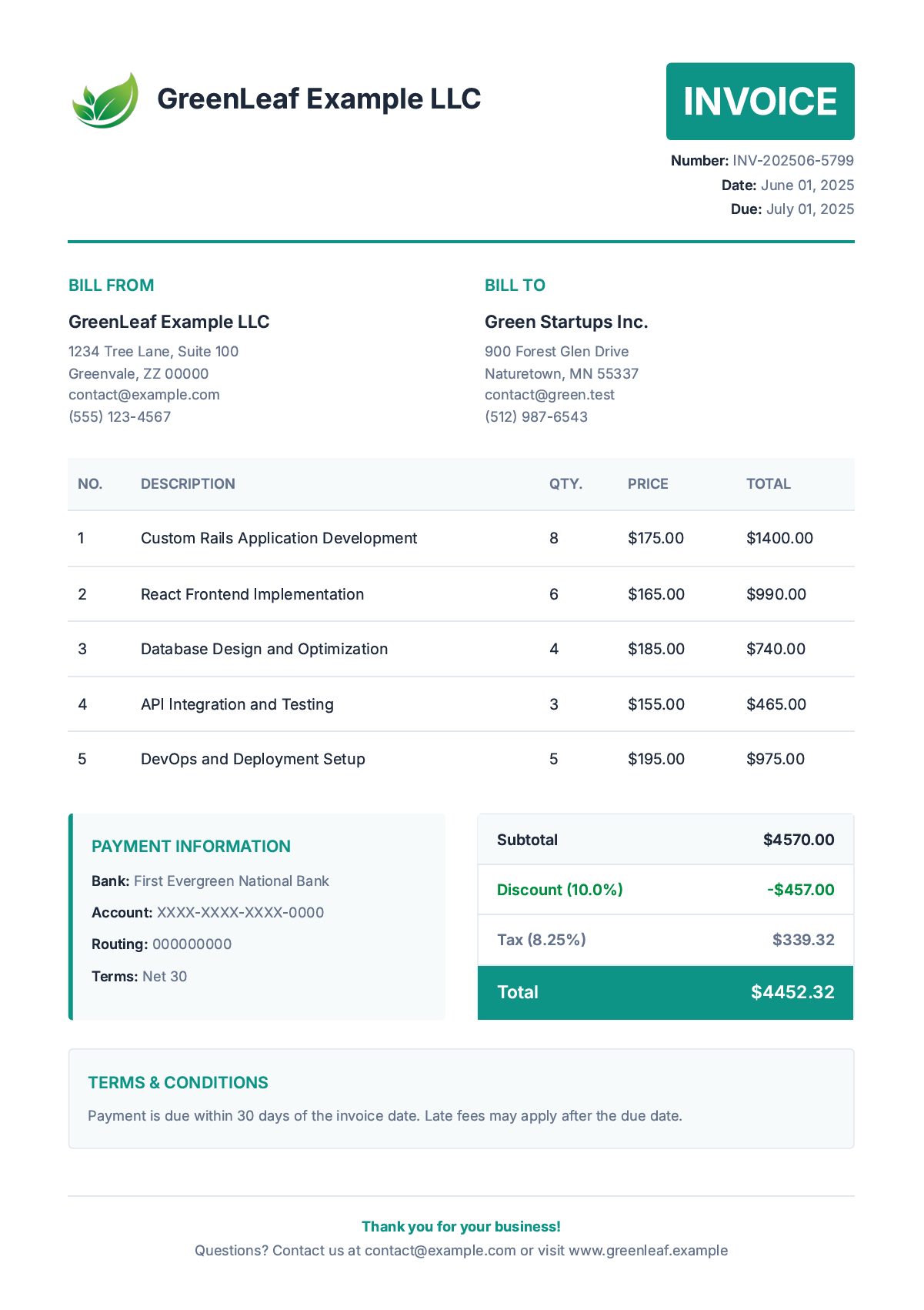
The generated PDF should demonstrate:
- Modern visual design with professional typography and color scheme.
- Structured layout with clear sections for company, client, and financial information.
- Detailed line items with service descriptions and proper calculations.
- Payment information with bank transfer details and terms.
- Terms and conditions section for legal compliance.
Puppeteer-Ruby PDF Configuration Options
Puppeteer-Ruby provides a wide range of customization options for fine-tuning PDF output.
| Option | Method | Description | Example Values |
|---|---|---|---|
| format | page.pdf() | Page dimensions | 'A4', 'A3', 'Letter', 'Legal' |
| landscape | page.pdf() | Page orientation | true, false |
| print_background | page.pdf() | Include background graphics | true, false |
| margin | page.pdf() | Page margins | { top: '1cm', right: '1cm', bottom: '1cm', left: '1cm' } |
| scale | page.pdf() | Content scaling factor | 0.1 to 2.0 |
| prefer_css_page_size | page.pdf() | Use CSS @page size | true, false |
| display_header_footer | page.pdf() | Show header/footer | true, false |
| header_template | page.pdf() | HTML template for header | '<div class="title"></div>' |
| footer_template | page.pdf() | HTML template for footer | '<div>Page <span class="pageNumber"></span></div>' |
| wait_until | page.goto() | Page load completion | 'load', 'domcontentloaded', 'networkidle0' |
Example advanced configuration:
pdf_data = page.pdf(
  format: 'Legal',              # 8.5" x 14" paper size
  landscape: false,             # Portrait orientation
  print_background: false,      # No CSS backgrounds
  margin: {                     # Page margins
    top: '1.5in',
    right: '1in',
    bottom: '1in',
    left: '1.25in'
  },
  scale: 0.9,                   # Content scaling factor
  prefer_css_page_size: false,
  display_header_footer: true,  # Enable header/footer
  header_template: '<div style="font-size: 10px; text-align: center; width: 100%; padding: 10px;"><strong>LEGAL DOCUMENT</strong></div>',
  footer_template: '<div style="font-size: 10px; text-align: center; width: 100%; padding: 5px;">Page <span class="pageNumber"></span> of <span class="totalPages"></span></div>'
)
Alternative Solutions for Rails PDF Generation
While Puppeteer-Ruby provides modern PDF generation capabilities, consider these alternatives based on your specific requirements:
Browser-based solutions:
-
Grover provides Rails integration using Node.js Puppeteer under the hood, offering similar Chrome rendering quality with easy setup but less direct control over browser configuration.
-
WickedPDF uses wkhtmltopdf for HTML to PDF conversion with basic CSS support, though wkhtmltopdf is no longer actively developed and may struggle with modern CSS features.
Programmatic solutions:
-
Prawn provides direct PDF creation through Ruby code without HTML templates, offering precise layout control and good performance for code-generated documents.
-
HexaPDF is a modern pure-Ruby PDF library with advanced features including PDF forms, digital signatures, and document manipulation capabilities.
Cloud-based solutions:
- PDF Generation APIs like PDFBolt provide Chrome rendering without infrastructure management, supporting both HTML to PDF and URL to PDF input with async processing, direct S3 uploads, and webhook notifications for production applications at scale.
For detailed implementation guides:
API-Based Alternative: Template-Driven PDF Generation
While Puppeteer-Ruby gives you full control over PDF generation, the setup requires managing Chrome/Chromium installations, handling browser processes, and maintaining rendering infrastructure. For teams that want to skip that setup, PDF generation APIs like PDFBolt offer a different approach.
- Design templates visually: Create invoice layouts in a template designer or choose from the template gallery.
- Eliminate infrastructure: No browser management, Chrome installations, or process monitoring.
- Centralize template logic: Handle styling and version control in one place.
- Simple integration: Just HTTP requests from your Ruby application.
Simple API Call in Ruby
require 'net/http'
require 'uri'
require 'json'

data_json = '''
{
  "templateId": "your-template-id",
  "templateData": {
    "client_name": "Green Startups Inc.",
    "invoice_number": "INV-2025-001",
    "total_amount": "$4,452.32",
    "line_items": [
      {
        "description": "Custom Rails Application Development",
        "unit_price": "$175.00"
      },
      {
        "description": "Database Design and Optimization",
        "unit_price": "$185.00"
      }
    ]
  }
}
'''

data = JSON.parse(data_json)

uri = URI("https://api.pdfbolt.com/v1/direct")

request = Net::HTTP::Post.new(uri)
request["API-KEY"] = "XXXXXXXX-XXXX-XXXX-XXXX-XXXXXXXXXXXX"
request["Content-Type"] = "application/json"
request.body = JSON.generate(data)

begin
  response = Net::HTTP.start(uri.hostname, uri.port, use_ssl: true) do |http|
    http.request(request)
  end

  if response.is_a?(Net::HTTPSuccess)
    File.open("invoice_pdfbolt.pdf", "wb") { |f| f.write(response.body) }
    puts "PDF generated successfully"
  else
    puts "HTTP #{response.code}"
    puts "Error Message: #{response.body}"
  end
rescue StandardError => e
  puts "Error: #{e.message}"
end
This approach works well for applications that need consistent document output without the overhead of managing browser automation infrastructure, or in containerized environments where installing Chromium dependencies can be challenging.
Puppeteer-Ruby as a Ruby on Rails PDF Generator
As a Ruby PDF generator, Puppeteer-Ruby brings headless Chrome rendering to Rails through a pure Ruby implementation of Puppeteer's API. This guide showed how to generate PDFs in Ruby from HTML using modern web standards and browser automation – something traditional PDF libraries cannot match.
Ruby HTML to PDF conversion with Puppeteer-Ruby delivers full support for CSS Grid, Flexbox, and JavaScript-driven content. For invoice generation, dynamic reports, or business documents in Rails, browser-based rendering produces consistent output across environments. For tips on getting the best results, see Optimizing HTML for PDF Output.
When your PDF workload demands managed infrastructure, PDFBolt HTML to PDF API provides equivalent Chrome rendering with async processing, webhooks, and direct S3 uploads. For a direct comparison, see PDFBolt vs Puppeteer.
PDFs? Challenge accepted. Puppeteer engaged. 🤖️