Top Ruby on Rails PDF Generation Gems Compared

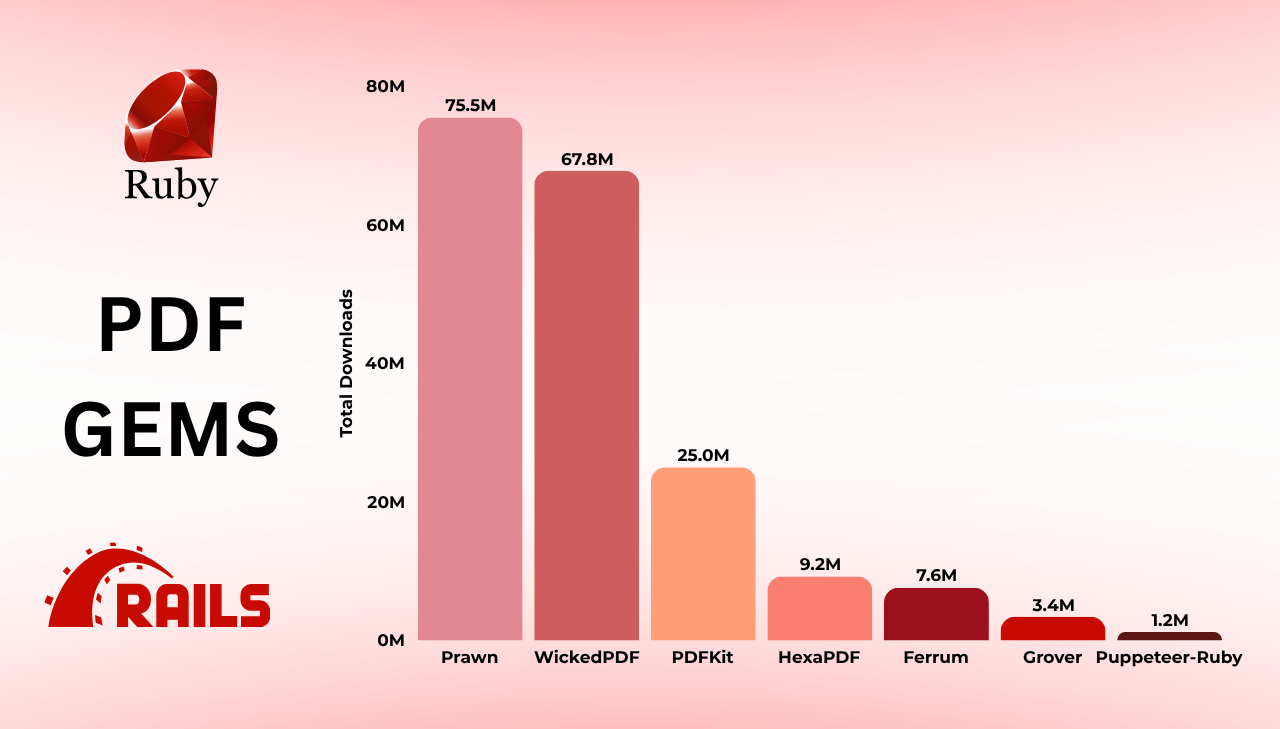
Ruby on Rails developers regularly need to generate PDFs – invoices, reports, certificates, shipping labels – and the choice of library affects both performance and long-term maintenance. The Rails ecosystem in 2025 offers many approaches, from programmatic libraries to browser-powered rendering engines. This guide compares the most popular Ruby PDF gems, backed by real download metrics and practical code examples, so you can pick the right Ruby HTML to PDF solution for your project.
PDFBolt's HTML to PDF API wraps headless Chrome behind a REST endpoint – call it with any Ruby HTTP client like Net::HTTP or Faraday in a few lines. No browser binaries to install on Heroku/Docker, no font setup on your server, no version drift. 100 free conversions per month, no credit card required.
Ruby PDF Gem Download Statistics and Rankings 2025
Download numbers show which PDF generation gems Rails developers actually use in production. The data below comes from BestGems.org and GitHub, collected in June 2025.
Ruby PDF Gem Rankings: BestGems.org Download Statistics
The following table presents statistics from BestGems.org, which tracks download metrics and popularity rankings across the entire Ruby gems ecosystem:
| Gem | BestGems Ranking | Total Downloads | Daily Downloads | First Release | Primary Purpose |
|---|---|---|---|---|---|
| Prawn | 🥇 635 | 75,530,840 | 87,665 | 2008 | PDF generation |
| WickedPDF | 🥇 708 | 67,753,243 | 46,724 | 2011 | HTML to PDF |
| PDFKit | 🥈 1,415 | 24,952,429 | 14,595 | 2010 | HTML to PDF |
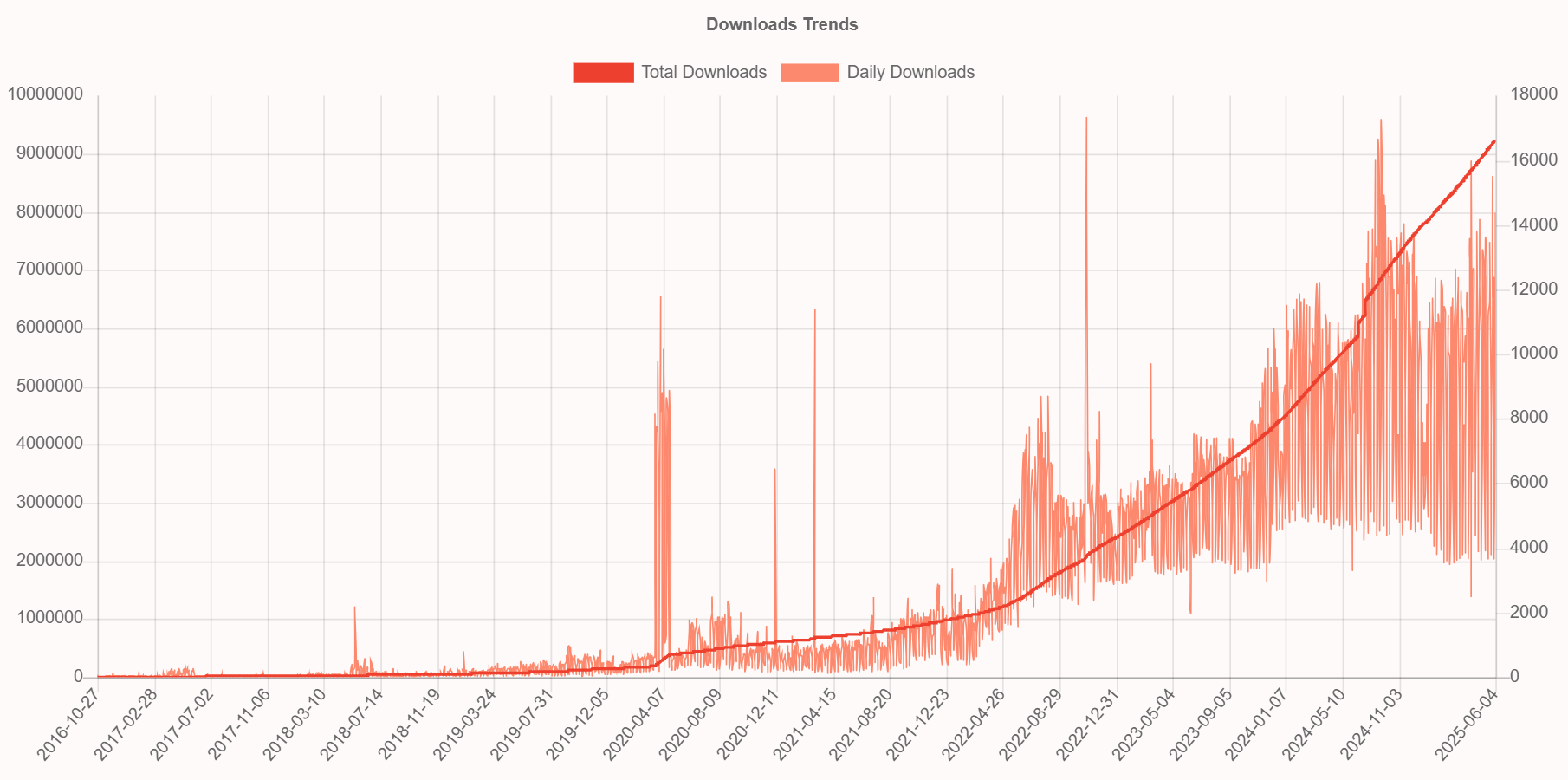
| HexaPDF | 🥈 2,134 | 9,234,015 | 11,359 | 2016 | PDF generation and manipulation |
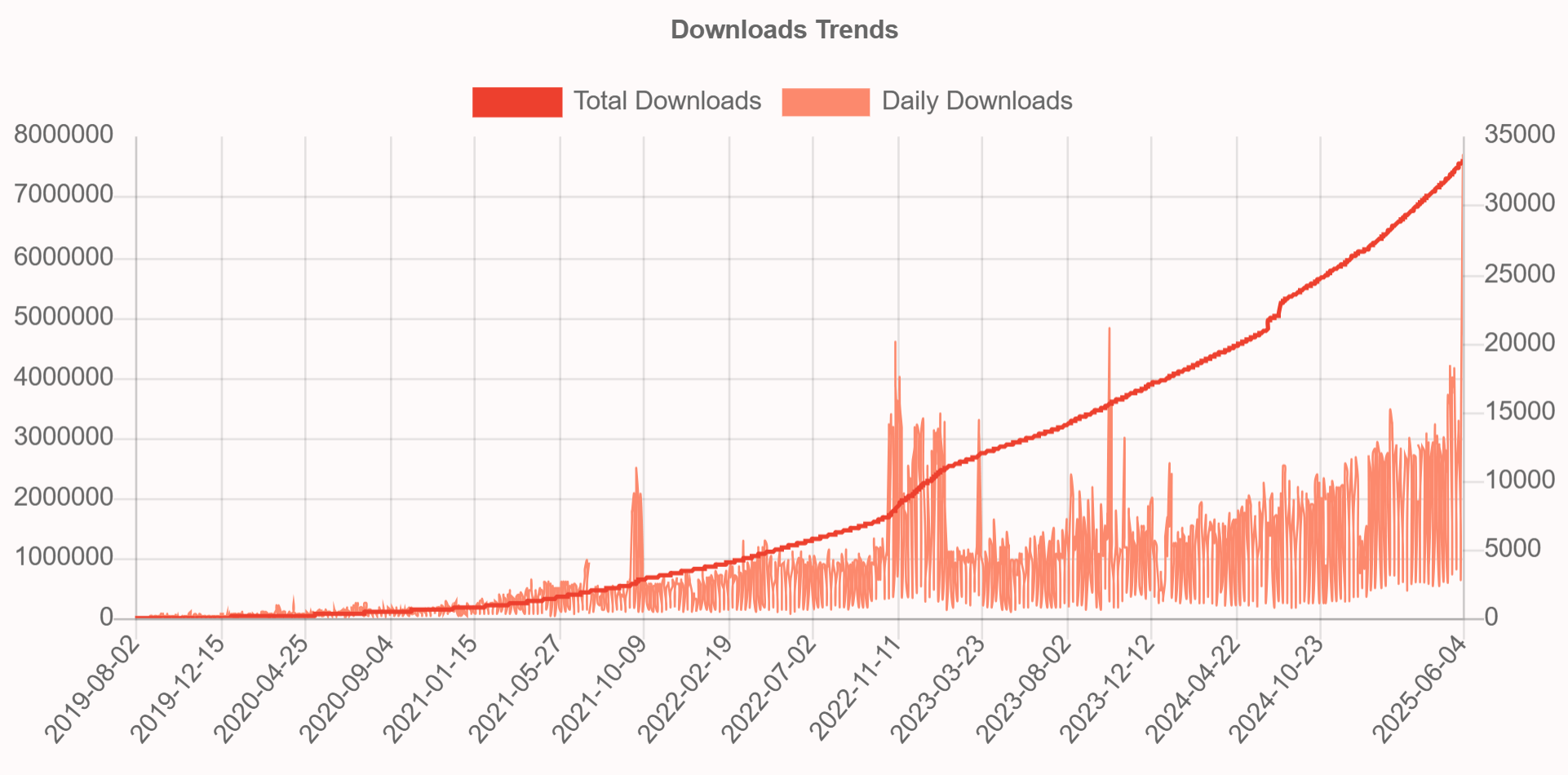
| Ferrum | 🥈 2,362 | 7,587,600 | 33,532 | 2019 | Browser automation |
| Grover | 🥉 3,363 | 3,386,451 | 4,657 | 2018 | HTML to PDF |
| Puppeteer-Ruby | 🥉 5,169 | 1,176,372 | 1,724 | 2020 | Browser automation |
All download statistics and GitHub metrics presented in this article reflect data from June 2025.
Ruby on Rails PDF Gems: Total Downloads Comparison
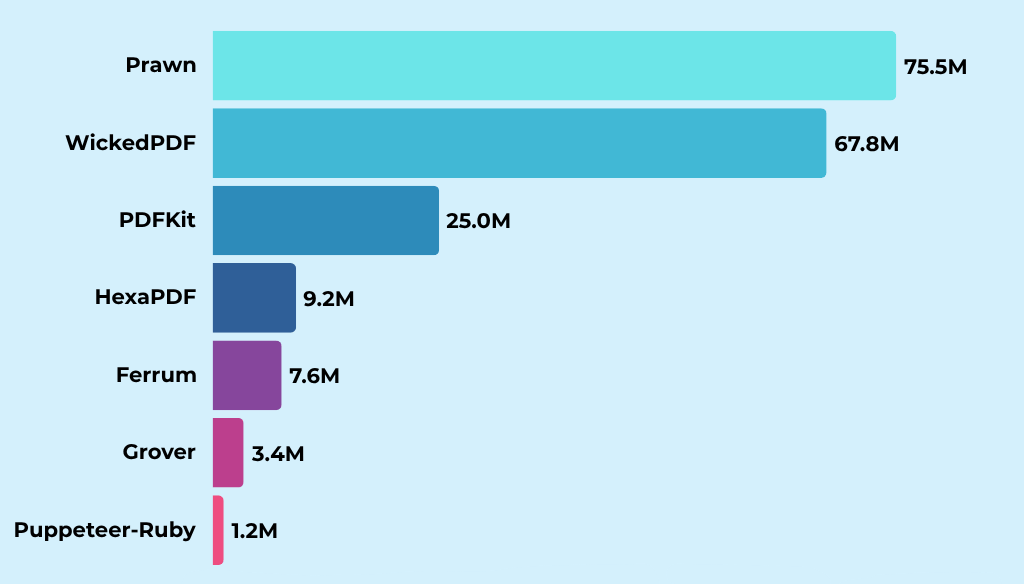
The chart shows the download gap between mature libraries like Prawn and WickedPDF and newer solutions in the Rails PDF ecosystem.
Ruby on Rails PDF Libraries: Daily Downloads Activity
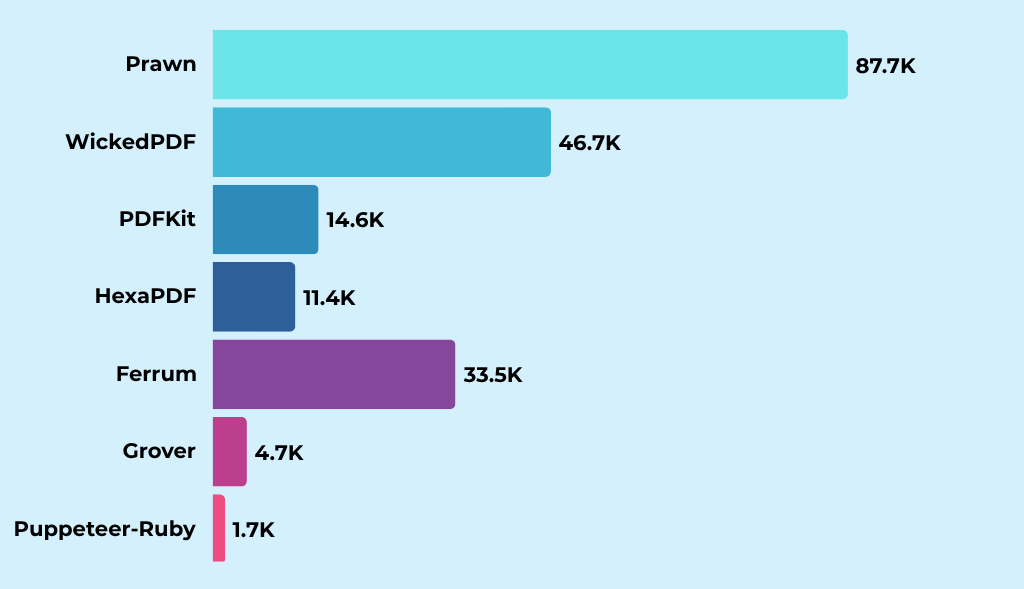
Daily activity patterns reveal different adoption trends. Prawn maintains consistent leadership, while Ferrum shows stronger daily download momentum than libraries with higher total downloads, indicating growing developer adoption of modern browser automation tools. Ferrum's high daily downloads may primarily reflect its use in browser automation and testing, with PDF generation being one of many capabilities.
Ruby PDF Gems: GitHub Stars and Community Engagement
GitHub stars, watchers, and forks show community involvement and project activity beyond download numbers.
| Gem | GitHub Stars | Watchers | Forks |
|---|---|---|---|
| Prawn | 4.7k ⭐ | 95 | 698 |
| WickedPDF | 3.6k ⭐ | 52 | 651 |
| PDFKit | 2.9k ⭐ | 31 | 427 |
| Ferrum | 1.9k ⭐ | 25 | 147 |
| HexaPDF | 1.3k ⭐ | 18 | 73 |
| Grover | 1.0k ⭐ | 5 | 115 |
| Puppeteer-Ruby | 309 ⭐ | 9 | 43 |
Prawn leads GitHub engagement just as it leads downloads, while WickedPDF and PDFKit maintain active communities built over a decade of use.
Best Ruby on Rails PDF Generation Libraries: Complete 2025 Guide
Below is each library with a code example, feature overview, and setup instructions.
Prawn
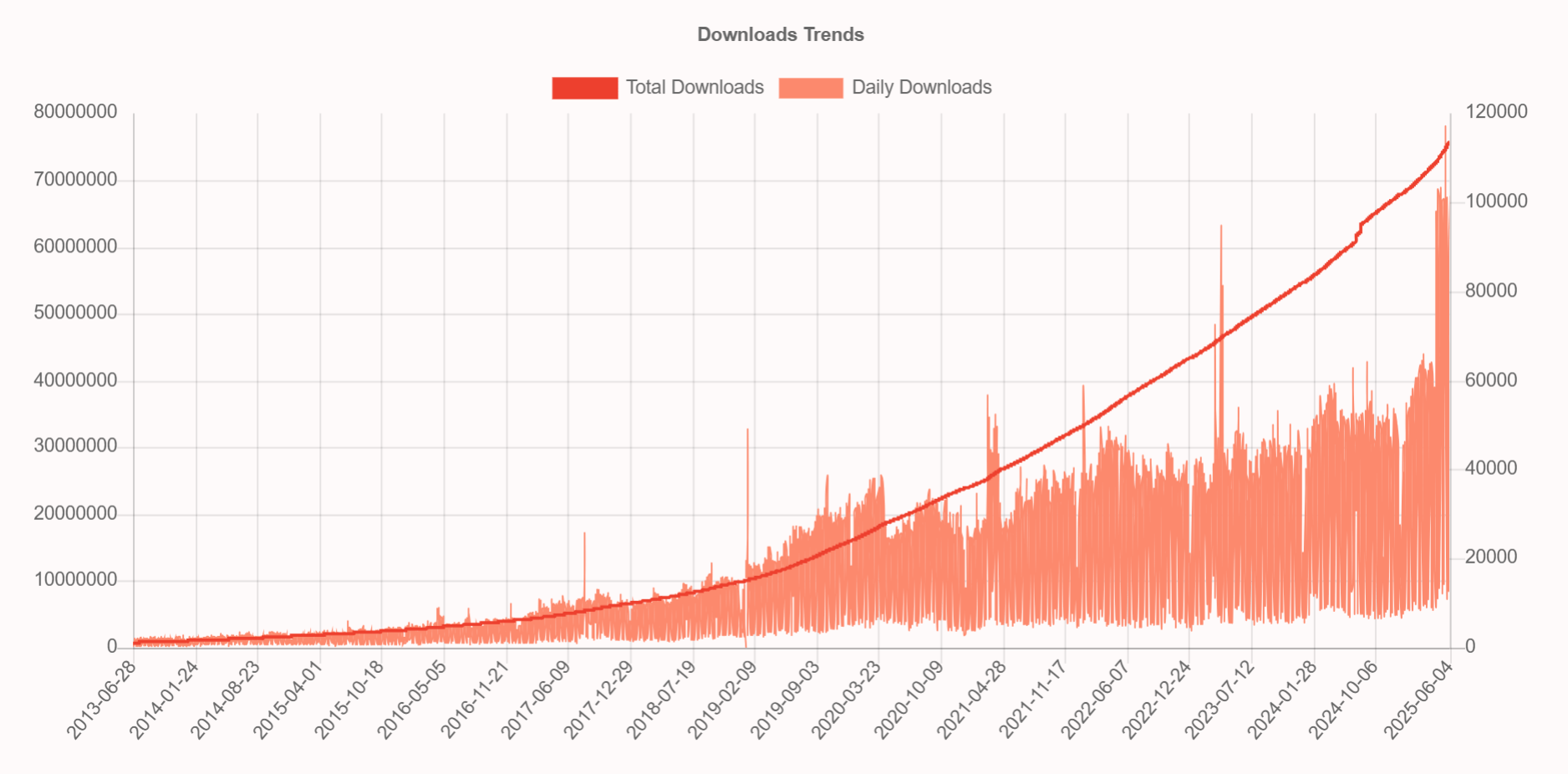
Prawn is the most downloaded Ruby gem for programmatic PDF generation. This pure Ruby library gives you direct control over document layout, typography, and design through an API that feels natural to Ruby developers.
➡️ Key Features:
- Pure Ruby implementation with no external binary dependencies.
- Programmatic document creation with full layout control.
- Rich text formatting and advanced typography support.
- Vector graphics and custom drawing capabilities.
- Multi-page document support with automatic pagination.
➡️ Key Constraints:
- No HTML to PDF conversion – designed for code-based document construction.
- Manual layout management required for complex document structures.
➡️ Installation:
gem install prawn
➡️ Basic Document Creation Example:
- Code
- PDF Preview
class DocumentsController < ApplicationController
  def generate_pdf

    # Create a new PDF document
    pdf = Prawn::Document.new

    # Add title
    pdf.fill_color "2563eb"
    pdf.text "PDF Generated with Prawn", size: 28, style: :bold, align: :center
    pdf.fill_color "000000"
    pdf.move_down 20

    # Add some content
    pdf.text "Why did the Ruby developer break up with Python?", size: 16, align: :center
    pdf.move_down 15
    pdf.text "Because they couldn't handle the whitespace in their relationship!",
             size: 16, style: :bold, align: :center

    # Generate and send PDF to browser for viewing
    send_data pdf.render,
              filename: "prawn-example.pdf",
              type: "application/pdf",
              disposition: "inline"
  end
end

Explore advanced Prawn techniques in our detailed guide: Ruby on Rails PDF Generation with Prawn: Complete Tutorial.
WickedPDF
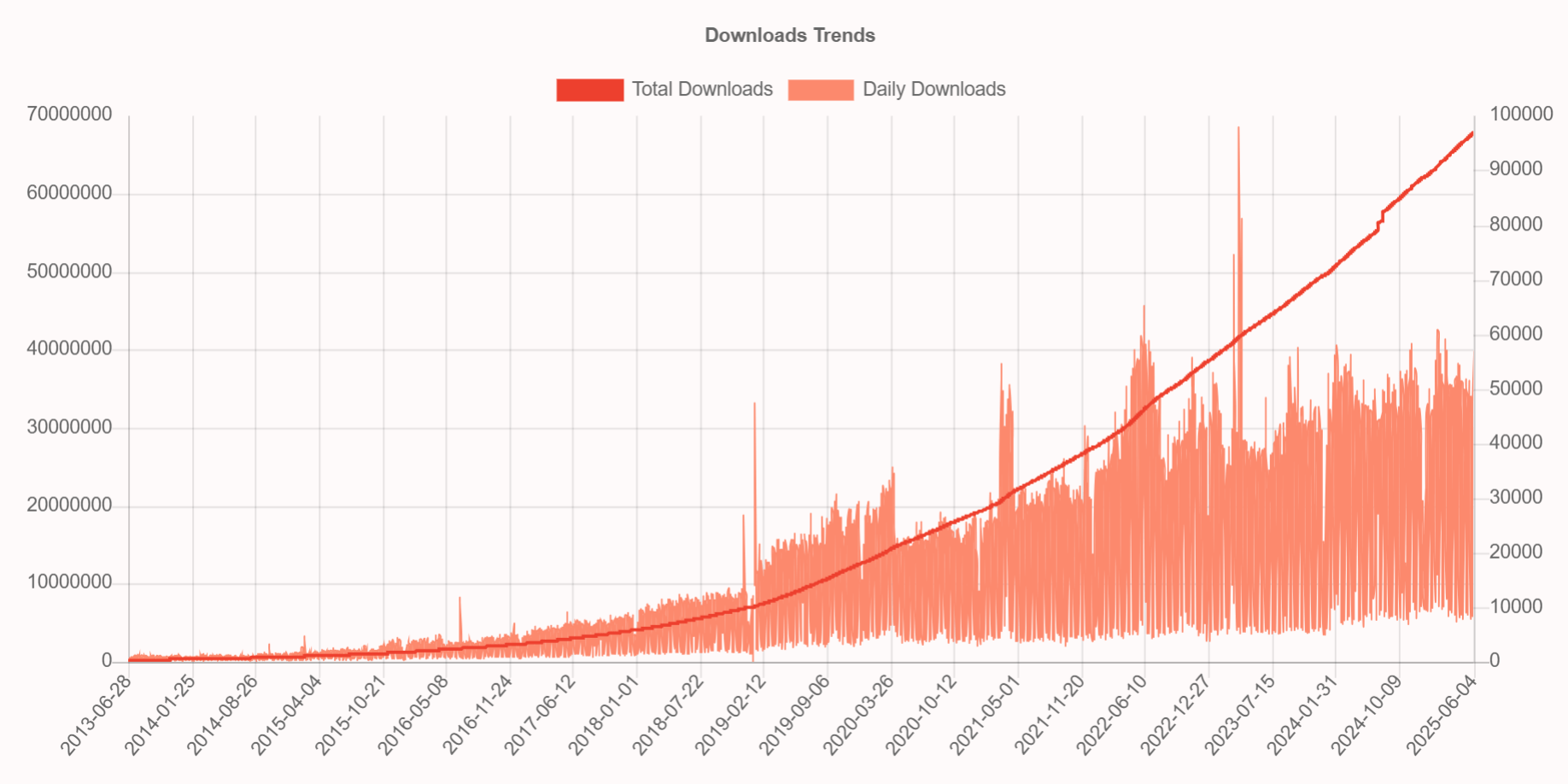
WickedPDF is Rails' most popular HTML to PDF converter, tightly integrated with ERB templates and Rails conventions. Built as a wrapper around wkhtmltopdf, it lets developers reuse existing HTML/CSS skills for PDF generation.
➡️ Key Features:
- Native Rails integration with familiar MVC patterns.
- HTML/CSS to PDF conversion.
- ERB template support with Rails helpers.
- Asset pipeline compatibility for stylesheets and images.
- Flexible configuration options for page layout and margins.
- Header and footer support with dynamic content.
➡️ Key Constraints:
- wkhtmltopdf dependency (archived project, but still functional).
- Limited modern CSS support due to older WebKit engine.
- Limited JavaScript support due to older WebKit engine.
➡️ Installation:
gem 'wicked_pdf'
WickedPDF requires the wkhtmltopdf binary to be installed on your system. You can either:
- Install via gem:
gem 'wkhtmltopdf-binary'(includes binary). - Download from: wkhtmltopdf.org.
➡️ HTML to PDF Conversion Example:
- Code
- PDF Preview
class DocumentsController < ApplicationController
  def generate_pdf
    # Define HTML content with embedded CSS
    html_content = %{
      <!DOCTYPE html>
      <html>
        <head>
          <style>
            body { font-family: Arial, sans-serif; text-align: center; }
            h1 { color: #d32f2f; }
             p { font-size: 26px; margin: 25px 0; }
          </style>
        </head>
        <body>
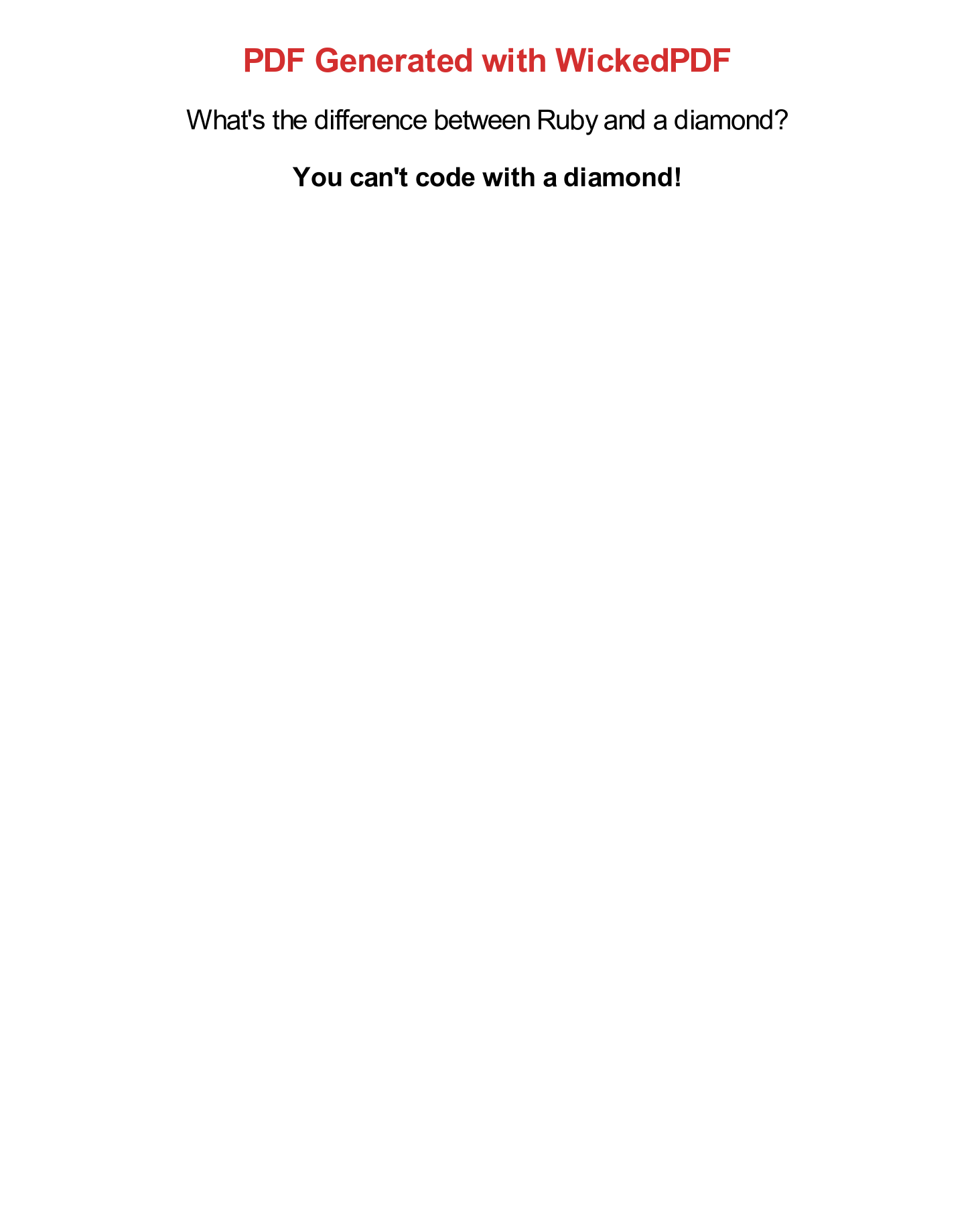
          <h1>PDF Generated with WickedPDF</h1>
          <p>What's the difference between Ruby and a diamond?</p>
          <p><strong>You can't code with a diamond!</strong></p>
        </body>
      </html>
    }

    # Convert HTML to PDF
    pdf = WickedPdf.new.pdf_from_string(html_content)

    # Send PDF to browser for viewing
    send_data pdf,
              filename: "wickedpdf-example.pdf",
              type: "application/pdf",
              disposition: "inline"
  end
end
Master WickedPDF implementation with our detailed tutorial: Ruby on Rails: Convert HTML to PDF with WickedPDF.
PDFKit
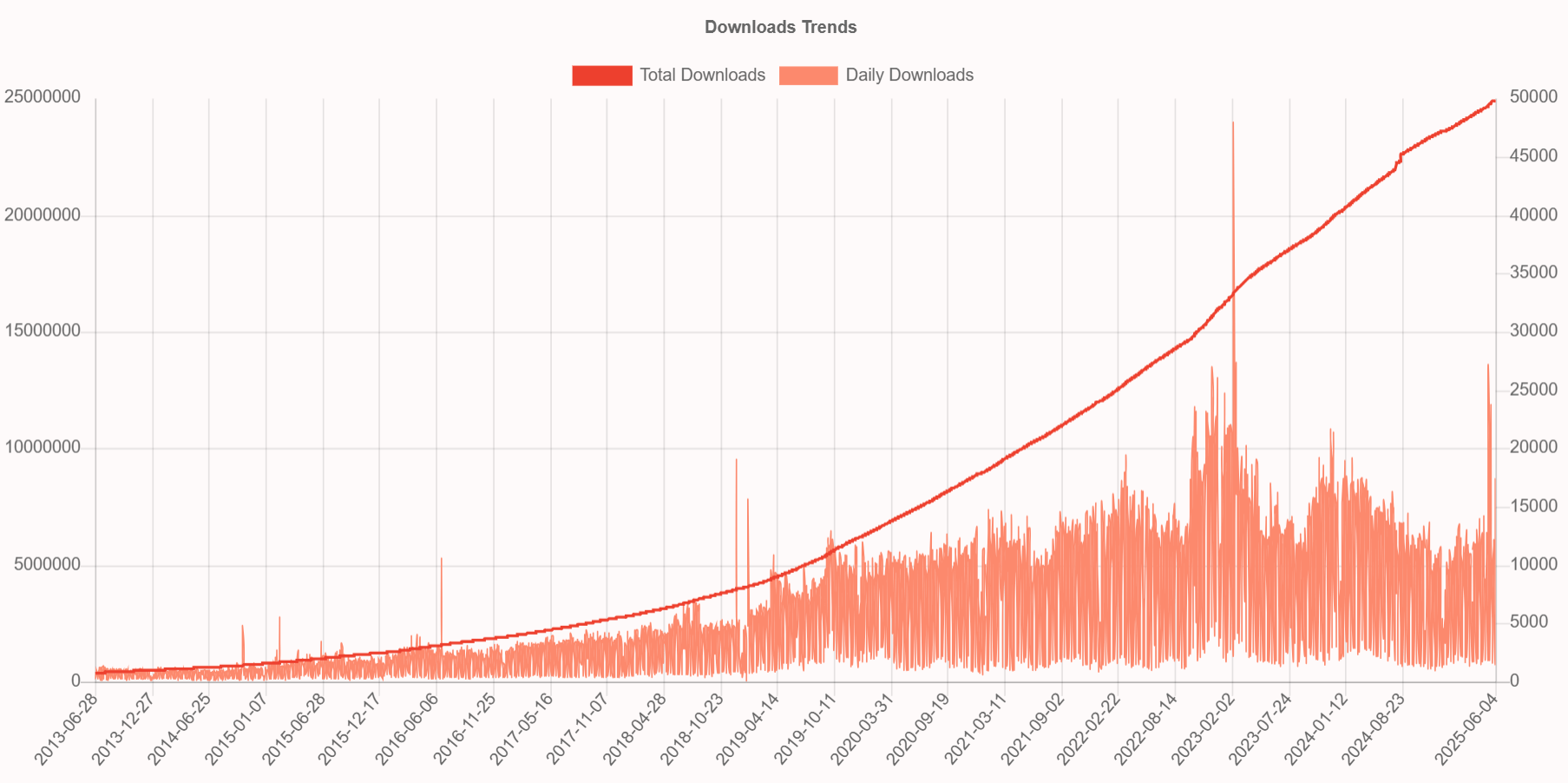
PDFKit is another HTML to PDF converter that wraps the wkhtmltopdf binary. Similar to WickedPDF but with a different API approach, PDFKit handles HTML to PDF conversion with a wide range of configuration options.
➡️ Key Features:
- Clean API accepting HTML strings, URLs, or file paths.
- Access to all wkhtmltopdf options.
- Qt WebKit rendering engine.
- Configurable headers and footers.
- Image and asset embedding support.
➡️ Key Constraints:
- Deprecated wkhtmltopdf dependency (archived).
- Limited modern CSS support.
- Requires separate installation and management of the wkhtmltopdf binary.
➡️ Installation:
gem 'pdfkit'
PDFKit requires wkhtmltopdf binary to be installed on your system (same dependency as WickedPDF). You can either:
- Install via gem:
gem 'wkhtmltopdf-binary'(easiest option). - Download manually from: wkhtmltopdf.org and configure the binary path in
config/initializers/pdfkit.rb.
➡️ HTML to PDF Conversion Example:
- Code
- PDF Preview
class DocumentsController < ApplicationController

  def generate_pdf
    # Define HTML content
    html_content = %{
      <!DOCTYPE html>
      <html>
        <head>
          <style>
            body { font-family: Arial, sans-serif; text-align: center; }
            h1 { color: #936e2d; }
            p { font-size: 26px; margin: 25px 0; }
          </style>
        </head>
        <body>
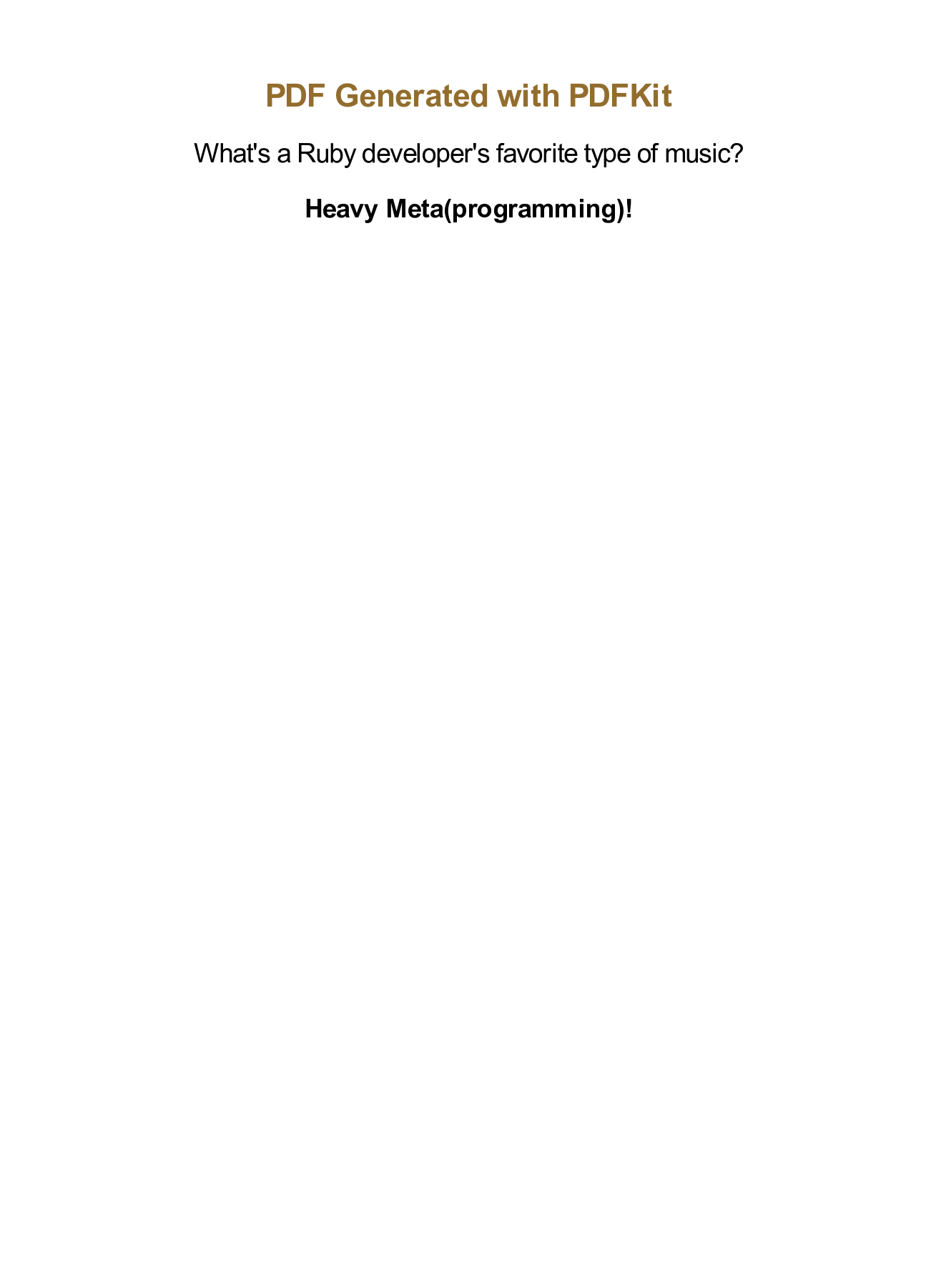
          <h1>PDF Generated with PDFKit</h1>
          <p>What's a Ruby developer's favorite type of music?</p>
          <p><strong>Heavy Meta(programming)!</strong></p>
        </body>
      </html>
    }

    # Create PDF
    kit = PDFKit.new(html_content, page_size: 'A4')
    pdf = kit.to_pdf

    # Send PDF to browser
    send_data pdf,
              filename: "pdfkit-example.pdf",
              type: "application/pdf",
              disposition: "inline"
  end
end
Master PDFKit implementation with detailed configuration options and troubleshooting guide: PDFKit Official Documentation.
HexaPDF
HexaPDF is a pure Ruby PDF library that covers both document creation and manipulation. Unlike libraries focused solely on generation, HexaPDF supports the full PDF lifecycle – editing, merging, encryption, and optimization.
➡️ Key Features:
- Pure Ruby implementation with full PDF standard support.
- Document manipulation capabilities (edit, merge, split existing PDFs).
- Advanced security features including encryption and digital signatures.
- PDF optimization for file size reduction.
- Form handling with AcroForm support.
➡️ Key Constraints:
- Dual licensing model (AGPL for open source, commercial license required for proprietary use).
- No HTML to PDF conversion – focused on programmatic PDF creation.
- Less extensive ecosystem compared to Prawn.
➡️ Installation:
gem 'hexapdf'
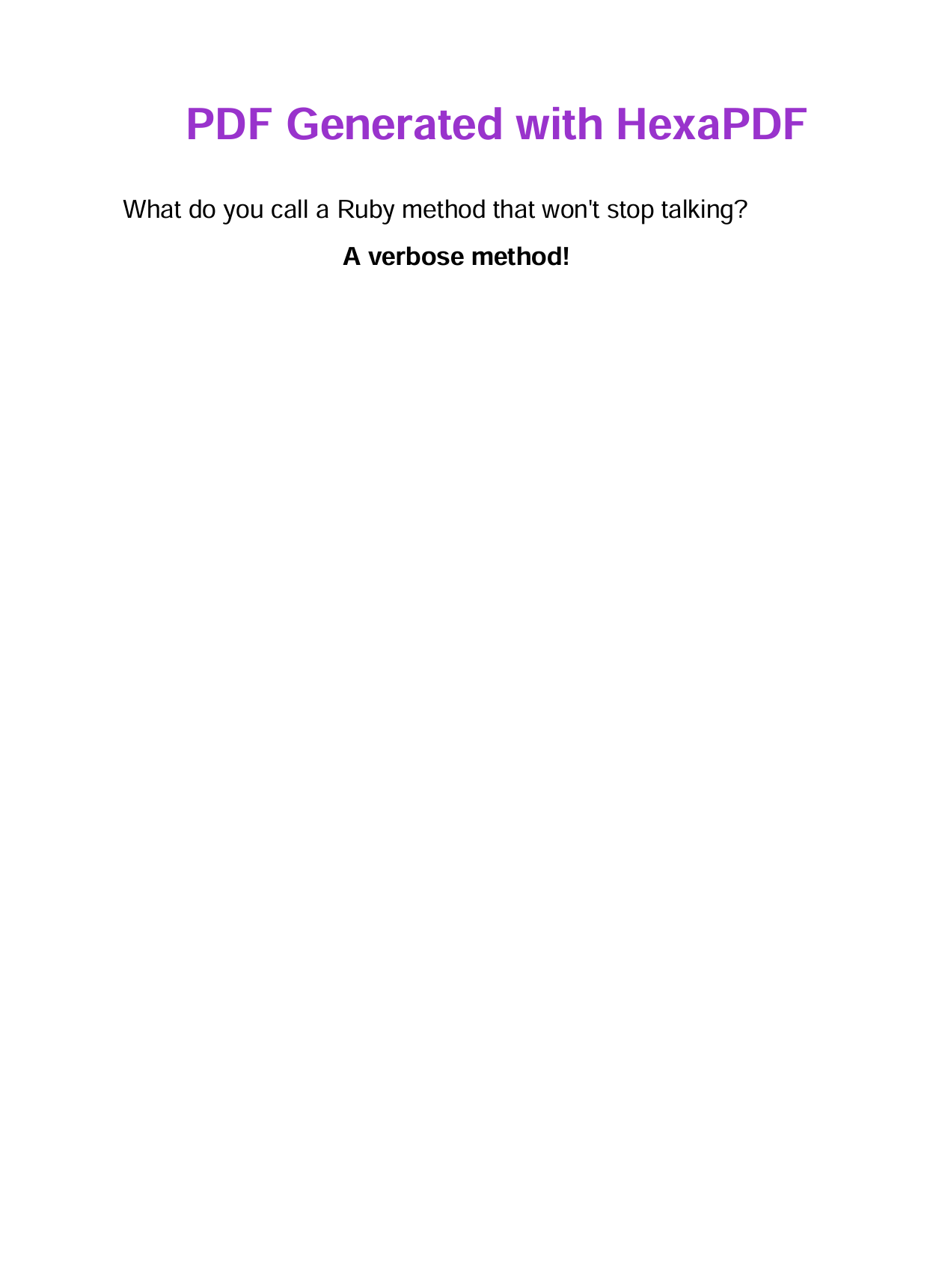
➡️ Document Creation Example:
- Code
- PDF Preview
class DocumentsController < ApplicationController
  def generate_pdf

    # Create a new PDF document
    doc = HexaPDF::Document.new
    page = doc.pages.add
    canvas = page.canvas

    # Add title
    canvas.font('Helvetica', size: 28, variant: :bold)
    canvas.fill_color(0.6, 0.2, 0.8)
    canvas.text("PDF Generated with HexaPDF", at: [120, 750])

    # Add content
    canvas.font('Helvetica', size: 16)
    canvas.fill_color(0, 0, 0)
    canvas.text("What do you call a Ruby method that won't stop talking?", at: [80, 700])

    canvas.font('Helvetica', size: 16, variant: :bold)
    canvas.text("A verbose method!", at: [220, 670])

    # Generate and send PDF to browser for viewing
    send_data doc.write_to_string,
              filename: "hexapdf-example.pdf",
              type: "application/pdf",
              disposition: "inline"
  end
end
Discover HexaPDF's full potential: HexaPDF Ruby Tutorial: PDF Generation for Rails.
Ferrum and FerrumPDF
Ferrum is primarily a pure Ruby browser automation tool with direct access to Chrome DevTools Protocol and no Node.js dependencies. Built for web scraping, testing, and browser automation, Ferrum can also generate PDFs as part of its broad browser control capabilities.
➡️ Key Features:
- Pure Ruby Chrome automation without Node.js dependencies.
- Chrome DevTools Protocol access for advanced browser control.
- Modern HTML5, CSS3, and JavaScript support through Chrome engine.
- Multi-purpose tool: web scraping, testing, and PDF generation.
- Screenshot and PDF capabilities as part of browser automation.
➡️ Key Constraints:
- Primary purpose is browser automation, not dedicated PDF generation.
- Chrome binary management and configuration required.
- Limited PDF-specific features compared to dedicated solutions.
For dedicated PDF generation in Rails, consider FerrumPDF – a Rails-optimized wrapper around Ferrum focused on PDF generation with convenient helper methods and better Rails integration.
➡️ Installation FerrumPDF:
# For Rails-optimized PDF generation
gem 'ferrum_pdf'
Both gems require Chrome to be installed on your system.
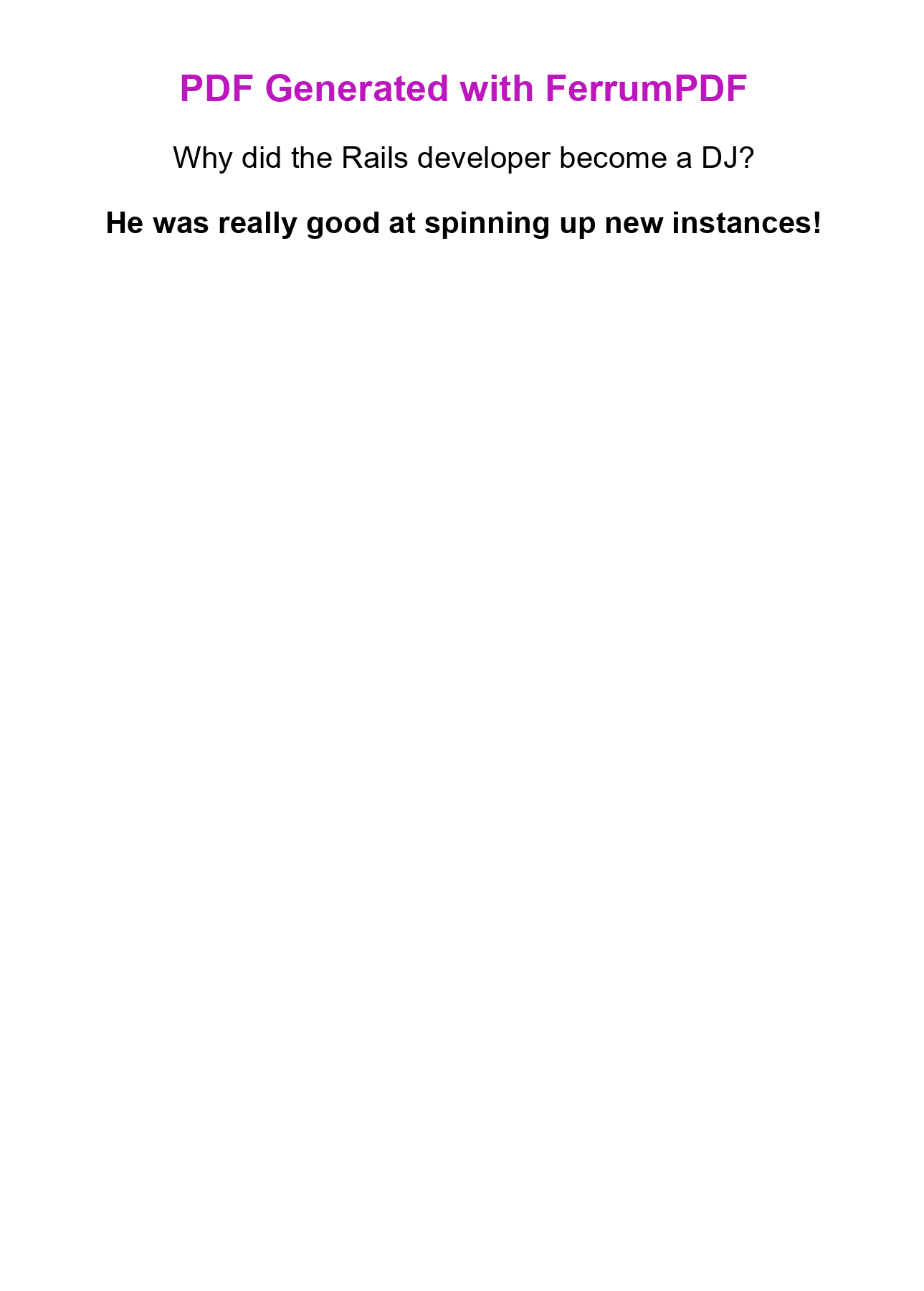
➡️ HTML to PDF Generation with FerrumPDF:
- Code
- PDF Preview
class DocumentsController < ApplicationController

  def generate_pdf
    html_content = %{
      <!DOCTYPE html>
      <html>
        <head>
          <style>
            body { font-family: Arial, sans-serif; text-align: center; }
            h1 { color: #bc18bc; }
            p { font-size: 26px; margin: 25px 0; }
          </style>
        </head>
        <body>
          <h1>PDF Generated with FerrumPDF</h1>
          <p>Why did the Rails developer become a DJ?</p>
          <p><strong>He was really good at spinning up new instances!</strong></p>
        </body>
      </html>
    }

    pdf_data = FerrumPdf.render_pdf(
      html: html_content,
      pdf_options: {
        format: 'A4',
        print_background: true
      }
    )

    send_data pdf_data,
              filename: "ferrum_pdf_example.pdf",
              type: "application/pdf",
              disposition: "inline"
  end
end
FerrumPDF combines Chrome rendering with Rails conventions. Recent adoption shows developers are moving from Grover to FerrumPDF to eliminate Node.js dependencies. Check out the FerrumPDF documentation for advanced features.
Grover
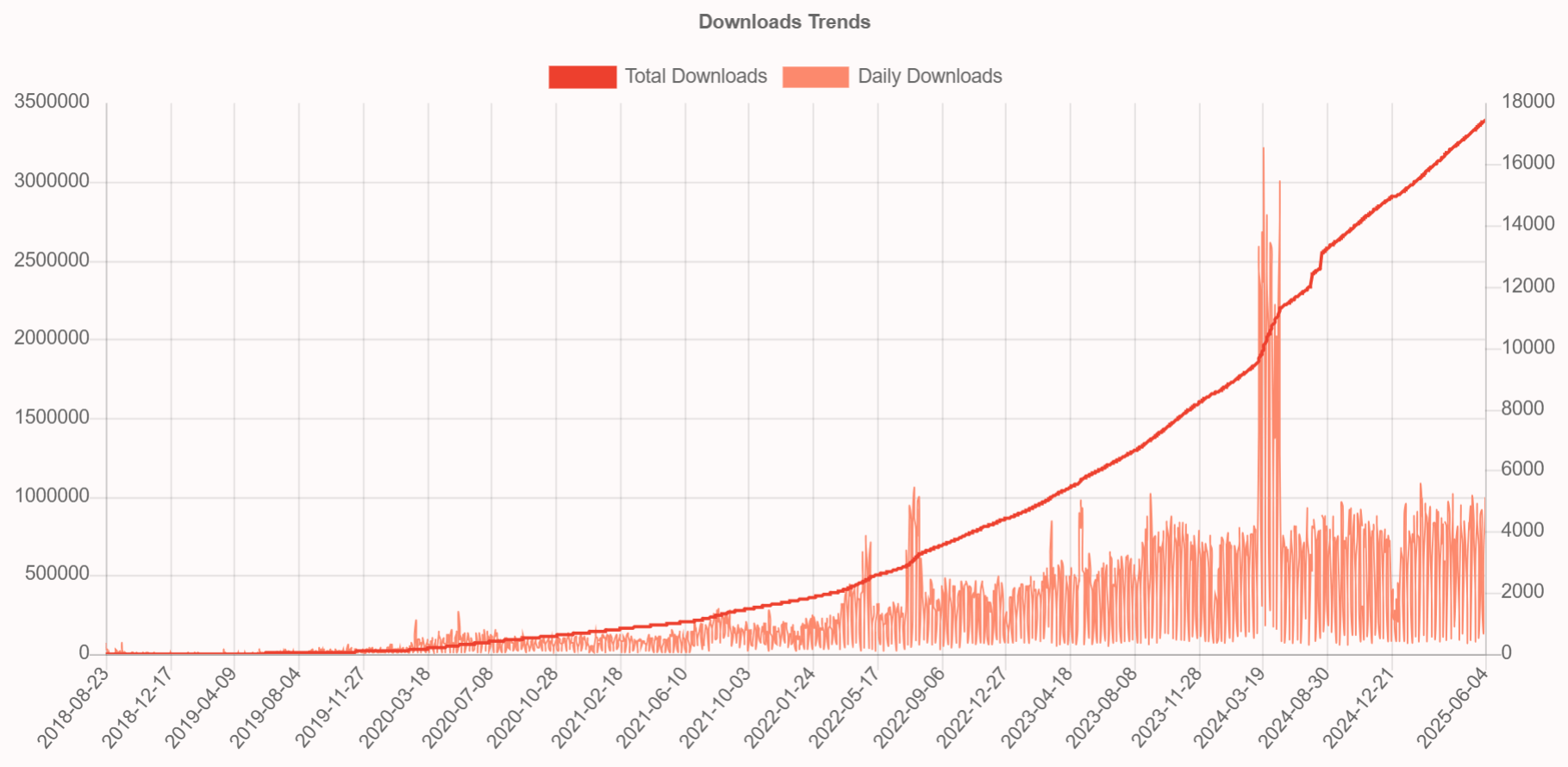
Grover converts HTML to PDF using Google Chrome's rendering engine through Puppeteer. Because it runs a real browser, Grover accurately renders contemporary CSS features including Flexbox, Grid, and JavaScript-driven content.
➡️ Key Features:
- Chrome-based rendering for high-fidelity PDF output.
- Modern CSS support including Flexbox and Grid.
- JavaScript execution for dynamic content rendering.
- Flexible configuration options for page formatting.
- High compatibility with modern web standards.
➡️ Key Constraints:
- Node.js and Puppeteer dependencies increase infrastructure complexity.
- Higher resource consumption compared to lightweight alternatives.
- Browser binary management required for deployment.
➡️ Installation:
gem 'grover'
Grover requires Node.js and Puppeteer to be installed on your system:
- Install Node.js from: nodejs.org
- Install Puppeteer:
npm install puppeteer
➡️ HTML to PDF Conversion Example:
- Code
- PDF Preview
class DocumentsController < ApplicationController
  def generate_pdf
    # Define HTML content with embedded CSS
    html_content = %{
      <!DOCTYPE html>
      <html>
        <head>
          <style>
            body { font-family: Arial, sans-serif; text-align: center; padding: 40px 0; }
            h1 { color: #057c37; }
            p { font-size: 26px; margin: 25px 0; }
          </style>
        </head>
        <body>
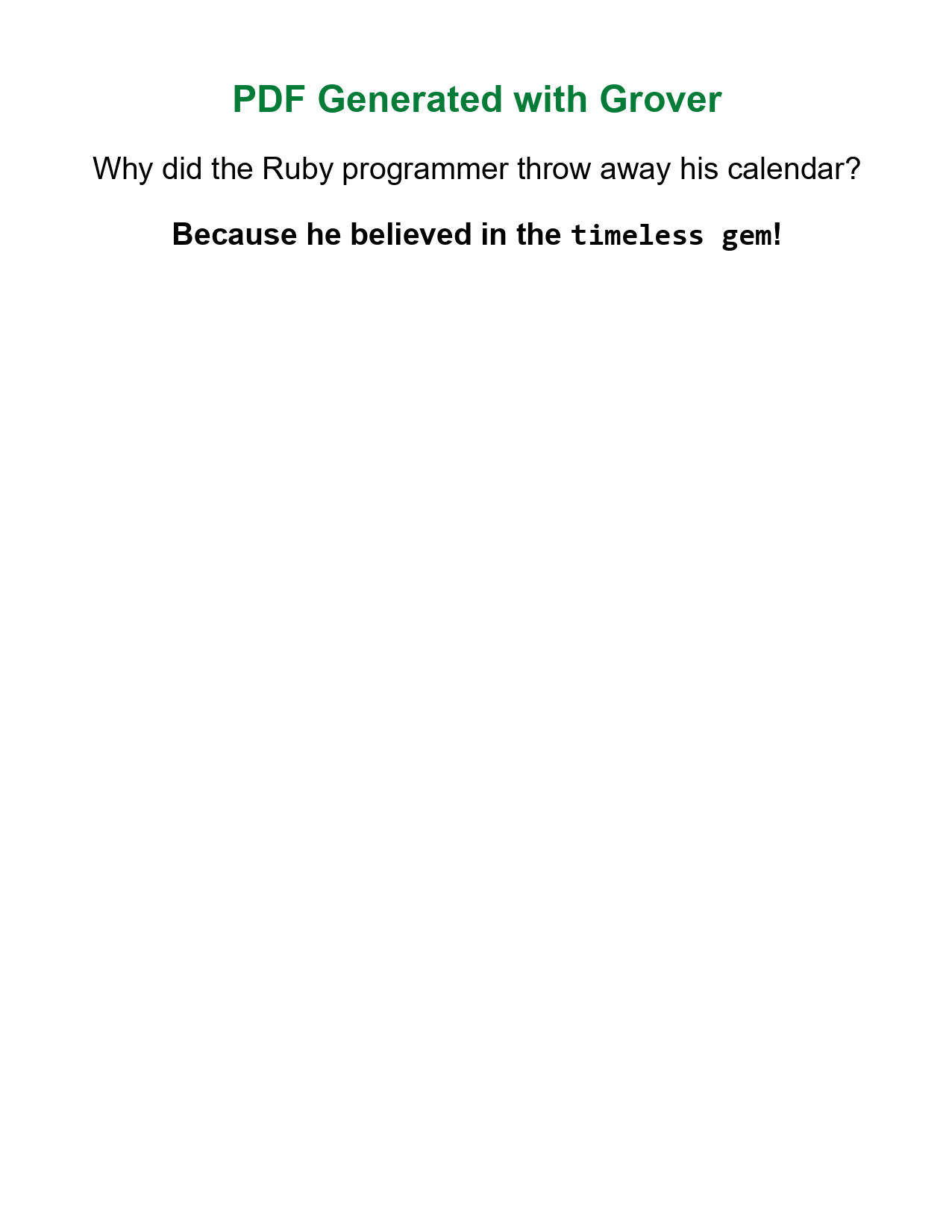
          <h1>PDF Generated with Grover</h1>
          <p>Why did the Ruby programmer throw away his calendar?</p>
          <p><strong>Because he believed in the <code>timeless gem</code>!</strong></p>
        </body>
      </html>
    }

    # Convert HTML to PDF using Chrome engine
    pdf = Grover.new(html_content).to_pdf

    # Send PDF to browser for viewing
    send_data pdf,
              filename: "grover-example.pdf",
              type: "application/pdf",
              disposition: "inline"
  end
end
Complete Grover implementation guide: HTML to PDF in Rails: Complete Guide with Grover Gem.
Puppeteer-Ruby
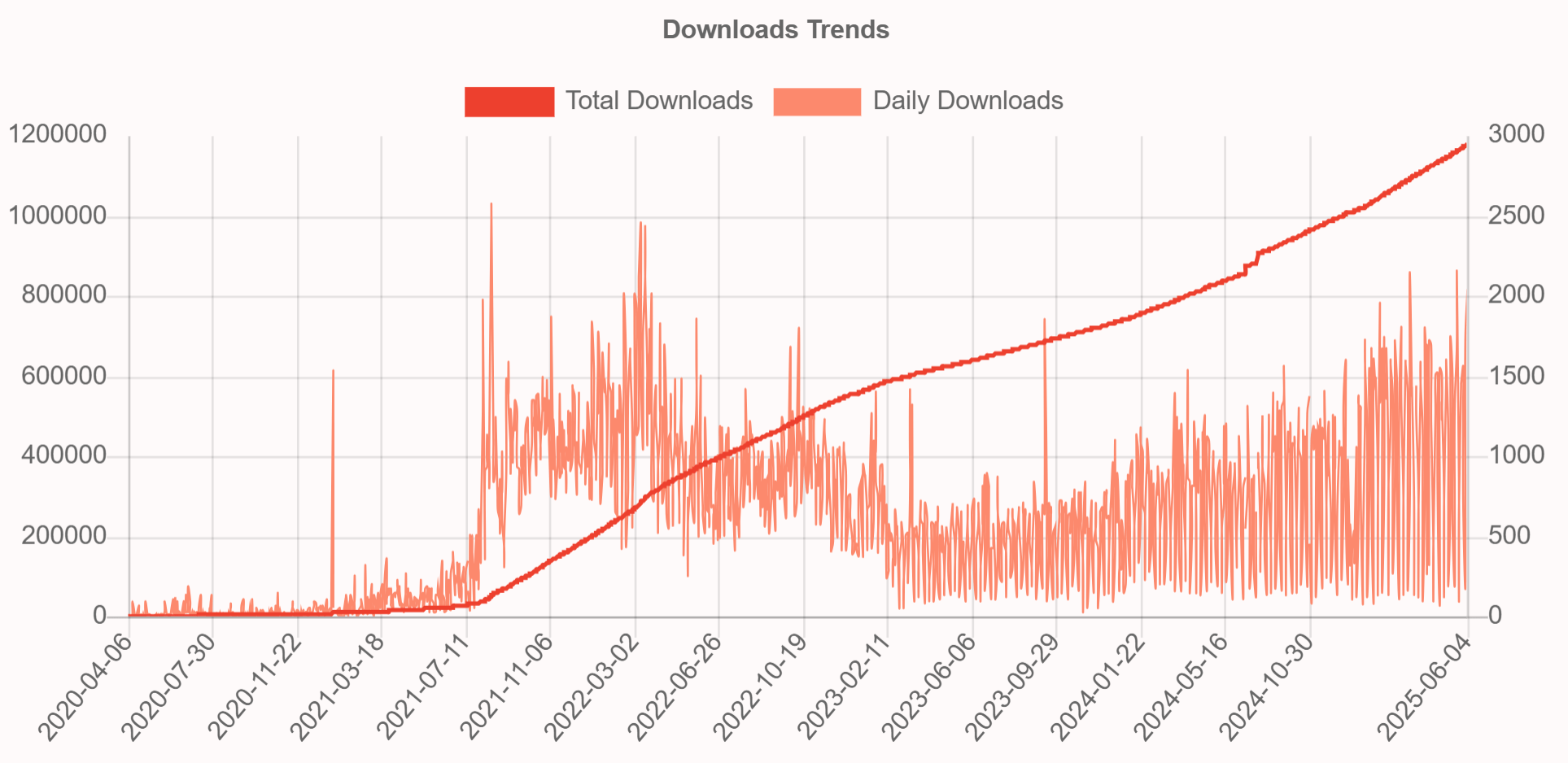
Puppeteer-Ruby is a Ruby port of Google's Puppeteer API with direct access to Chrome's rendering capabilities. It gives developers browser automation control while maintaining Ruby's familiar syntax and conventions.
➡️ Key Features:
- Pure Ruby implementation for Chrome automation.
- Modern CSS3, Flexbox, Grid, and JavaScript support.
- Chrome rendering engine for high-quality PDFs.
- Compatible with Rails applications and workflows.
- Configurable PDF formats, margins, headers and more.
➡️ Key Constraints:
- Complex setup compared to simpler alternatives.
- Higher resource consumption due to full browser automation.
- Covers only a subset of the full Puppeteer API.
➡️ Installation:
gem 'puppeteer-ruby'
Ensure Chrome/Chromium is installed.
➡️ HTML to PDF Conversion Example:
- Code
- PDF Preview
class DocumentsController < ApplicationController
  def generate_pdf
    # Define HTML content with embedded CSS
    html_content = %{
      <!DOCTYPE html>
      <html>
        <head>
          <style>
            body { font-family: Arial, sans-serif; text-align: center; padding: 40px 0; }
            h1 { color: #f56e01; }
            p { font-size: 26px; margin: 25px 0; }
          </style>
        </head>
        <body>
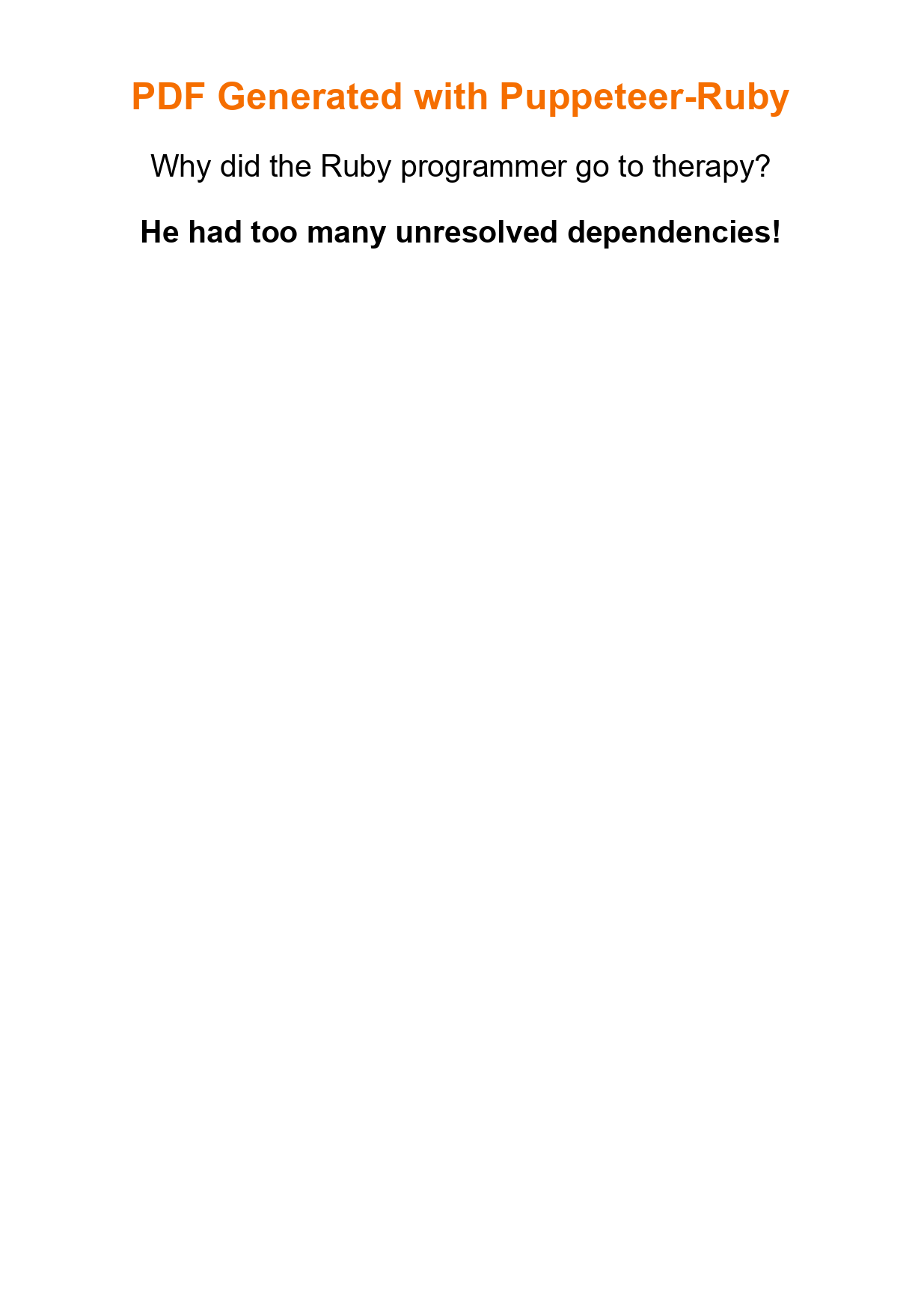
          <h1>PDF Generated with Puppeteer-Ruby</h1>
          <p>Why did the Ruby programmer go to therapy?</p>
          <p><strong>He had too many unresolved dependencies!</strong></p>
        </body>
      </html>
    }

    # Generate PDF using Puppeteer-Ruby
    pdf_data = Puppeteer.launch(headless: true) do |browser|
      page = browser.new_page
      page.set_content(html_content)
      page.pdf(format: 'A4', print_background: true)
    end

    # Send PDF to browser for viewing
    send_data pdf_data,
              filename: "puppeteer-ruby-example.pdf",
              type: "application/pdf",
              disposition: "inline"
  end
end
Advanced Puppeteer-Ruby implementation: HTML to PDF in Rails with Puppeteer-Ruby.
Ruby on Rails PDF Libraries Comparison: Features and Performance
This side-by-side comparison covers the most popular Ruby PDF generation gems, so you can match each library's strengths to your Rails project.
| Feature | Prawn | WickedPDF | PDFKit | HexaPDF | Grover | Puppeteer-Ruby | FerrumPDF |
|---|---|---|---|---|---|---|---|
| HTML to PDF | No | Yes | Yes | No | Yes | Yes | Yes |
| Modern CSS | N/A | Basic (CSS2) | Basic (CSS2) | N/A | Full | Full | Full |
| JavaScript | No | Limited | Limited | No | Full | Full | Full |
| Dependencies | None | wkhtmltopdf | wkhtmltopdf | geom2d cmdparse | Node.js + Puppeteer | Chrome/ Chromium | Chrome/ Chromium |
| Approach | Programmatic | HTML conversion | HTML conversion | Programmatic | Browser- based | Browser- based | Browser- based |
| Performance | High | Moderate | Moderate | High | Moderate | Moderate | Moderate |
| Memory Usage | Low | Low | Low | Low | High | High | Moderate |
| License | Ruby/ GPLv2/GPLv3 | MIT | MIT | AGPL/ Commercial | MIT | Apache 2.0 | MIT |
| Rails Integration | Good | Excellent | Good | Good | Excellent | Good | Excellent |
| PDF Manipulation | Basic | No | No | Advanced | No | No | No |
- MIT/Apache 2.0: Free for commercial use, no restrictions.
- Ruby/GPLv2/GPLv3 (Prawn): Triple-licensed – you may choose between Matz's Ruby License, GPLv2, or GPLv3. Copyleft applies when using GPL variants.
- AGPL/Commercial (HexaPDF): Free with open-source requirement, or paid license for commercial use.
How to Choose the Best PDF Gem for Ruby on Rails Projects
The best Ruby PDF gem depends on your project requirements and technical constraints. Use this guide to match common Rails scenarios with the right library.
| Use Case | Recommended Libraries | Reasoning |
|---|---|---|
| Programmatic PDFs | • Prawn • HexaPDF | Full control, code-based generation, complex layouts from scratch. |
| Modern HTML to PDF | • Grover • FerrumPDF • Puppeteer-Ruby | Full CSS3, JavaScript, modern web standards support. |
| Basic HTML to PDF | • WickedPDF • PDFKit | Simple templates, basic CSS only. Note: wkhtmltopdf archived in 2023. |
| High-Volume Production | • Prawn • HexaPDF | Superior performance, minimal dependencies, efficient resource usage. |
| PDF Manipulation | • HexaPDF | Merge, split, encrypt, optimize existing PDFs, form handling. |
| Enterprise/Compliance | • HexaPDF | Digital signatures, encryption, PDF/A standards, regulatory requirements. |
Ruby on Rails PDF Library Selection: Key Decision Factors
-
HTML vs Programmatic approach: Do you need HTML template conversion or code-based document construction?
-
Modern CSS requirements: Do your designs need Flexbox, Grid, or other modern CSS features?
-
JavaScript dependency: Do your PDFs need dynamic content or interactive elements?
-
Infrastructure preferences: Do you prefer managed services over self-hosted dependencies?
-
Performance and scalability: Do you need auto-scaling for traffic spikes or high-volume generation?
-
Licensing/pricing: Are you limited to open source solutions or can you use commercial options?
-
Team focus: Would you rather focus on core business logic than managing PDF infrastructure?
-
Speed of integration: Do you prioritize fast implementation and ease of use?
-
Long-term maintenance: Do you want guaranteed support and automatic updates without managing infrastructure yourself?
HTML to PDF API Solutions for Ruby on Rails Applications
For teams that want to skip managing browser binaries and gem dependencies, cloud-based HTML to PDF API services like PDFBolt offer a practical alternative to self-hosted Ruby libraries.
If multiple decision factors above pointed toward managed solutions, API-based PDF generation removes the infrastructure overhead entirely.
Benefits of API-Based PDF Generation
Cloud-based HTML to PDF API services like PDFBolt offer several practical advantages:
Infrastructure Simplification:
- No browser binary installation or maintenance.
- Eliminate Node.js, wkhtmltopdf, or Chrome dependency management.
- Zero server provisioning for PDF workloads.
Modern Web Standards:
- Latest Chrome rendering engine with full CSS3, Flexbox, and Grid support.
- JavaScript execution for dynamic content generation.
- Complete web font and modern typography support. See optimizing HTML for PDF output for best practices.
Enterprise Reliability:
- Automatic scaling for traffic spikes and high-volume generation.
- Guaranteed rendering consistency across all environments.
- Privacy-focused processing with no sensitive data retention or logging.
Developer Experience:
- Simple HTTP API integration with any Ruby application.
- Async processing and webhook notifications for large documents.
- Direct cloud storage integration with your S3 bucket.
- Easy team collaboration with logs and usage analytics.
Ruby on Rails HTML to PDF API Integration Example
Integrating PDFBolt HTML to PDF API into your Rails application replaces local PDF dependencies with a single API call. The code below converts HTML content to PDF using the /v1/direct endpoint.
➡️ Installation:
# HTTP client for API requests
gem 'faraday'
➡️ HTML to PDF API Conversion Example:
- Code
- PDF Preview
class DocumentsController < ApplicationController
  def generate_pdf
    # Define HTML content with embedded CSS
    html_content = %{
      <!DOCTYPE html>
      <html>
        <head>
          <style>
            body { font-family: Arial, sans-serif; text-align: center; padding: 40px 0; }
            h1 { color: #008be8; }
            p { font-size: 26px; margin: 25px 0; }
          </style>
        </head>
        <body>
          <h1>PDF Generated with PDFBolt API</h1>
          <p>How do you know when a Rails developer is feeling sad?</p>
          <p><strong>They start writing pessimistic migrations!</strong></p>
        </body>
      </html>
    }

    begin
      # Make API request to PDFBolt service
      response = Faraday.post('https://api.pdfbolt.com/v1/direct') do |req|
        req.headers['Content-Type'] = 'application/json'
        req.headers['API-KEY'] = 'XXXXXXXX-XXXX-XXXX-XXXX-XXXXXXXXXXXX'
        req.body = {
          html: Base64.strict_encode64(html_content), # Encode HTML content
          format: 'A4',
          printBackground: true
        }.to_json
      end

      if response.success?
        # Send PDF to browser for viewing
        send_data response.body,
                  filename: "pdfbolt-example.pdf",
                  type: "application/pdf",
                  disposition: "inline"
      else
        render plain: "PDF generation failed. Status: #{response.status}, Body: #{response.body}", status: 500
      end
    rescue => e
      render plain: "PDF generation error: #{e.message}", status: 500
    end
  end
end

Explore advanced PDF generation capabilities: PDFBolt HTML to PDF API Documentation.
Choosing a Ruby PDF Gem: Final Thoughts
Prawn remains the most downloaded gem for programmatic PDF creation in Ruby, while WickedPDF and PDFKit are still widely used for Ruby HTML to PDF conversion despite their archived wkhtmltopdf dependency.
Browser-based solutions – Grover, Puppeteer-Ruby, and FerrumPDF – give you full CSS3 and JavaScript support through Chrome, making them a better fit for modern web layouts. HexaPDF covers PDF manipulation tasks like merging, encryption, and digital signatures.
If you prefer not to manage browser binaries or gem dependencies at all, cloud-based APIs like PDFBolt HTML to PDF API handle rendering and scaling for you. You can also explore PDF templates to separate layout design from your Ruby code.
Pick the gem that matches your use case, and you will spend less time debugging PDF output and more time building features.
If generating PDFs feels harder than explaining metaprogramming, you’ve picked the wrong gem! 💎